Android ContentProviders are one of the main ways applications share data and functionality with other applications on a device.
Most Android developers are introduced to ContentProviders as a database-sharing mechanism. An application exposes a content:// URI, another application calls query(), and a Cursor containing rows comes back. That description is technically correct, but it leaves out most of the interesting attack surface.
A ContentProvider can return files, accept writes, perform custom RPC-style operations, issue temporary permissions, expose different security rules for different URI paths, and even return live Binder objects. All of that code runs inside the provider application’s process and with the provider application’s permissions.
This means that a vulnerable provider can allow an attacker to:
- Read or modify private application data
- Invoke undocumented privileged operations
- Escape an intended file-sharing directory
- Retain access to content after the original sharing flow has ended
- Make a privileged application access another provider on the attacker’s behalf
- Attack an application that trusts filenames and metadata returned by a malicious provider
- Obtain a Binder or file descriptor that exposes an entirely different IPC surface
Why ContentProvider vulnerabilities matter
These are not theoretical weaknesses. ContentProvider vulnerabilities have been found in Android itself and in applications with hundreds of millions or billions of installations. They have been used to steal cookies, read and overwrite private files, tamper with application downloads, bypass storage permissions and execute attacker-controlled native code.
| Class | Example | Demonstrated impact |
|---|---|---|
| Missing caller authorization | Samsung SemClipboardProvider, CVE-2021-25337, before SMR March 2021 | Provided arbitrary file read/write with system_server privileges. Project Zero confirmed it was used in an in-the-wild commercial-surveillance exploit chain to plant a second-stage ELF and support later privilege escalation. |
| Missing write-permission check | Android MediaProvider, CVE-2025-48578, Android 16 QPR2 | Bypassed the permission normally required to modify external-storage media. This allowed a local application to perform MediaProvider write operations with elevated authority. |
| Exposed provider | Samsung Notes, CVE-2021-25367, before 4.2.00.22; found by Ken Gannon during Tokyo Pwn2Own 2020 research | Allowed applications without storage permissions to read files from external storage through Samsung Notes. The demonstrated exploit downloaded a 1,932,151-byte image that the attacker could not access directly. |
| Path-specific authorization bypass | AOSP DownloadProvider, CVE-2018-9468, Android 5.1–9 | Allowed an unprivileged application to enumerate, read and modify downloads belonging to Gmail, Chrome, Google Play and other applications. Download tampering could prevent Google Play from installing applications or updates. |
| Improper URI grant | Samsung Flow, CVE-2022-28775, before 4.8.06.5; used by Ken Gannon during Austin Pwn2Own 2021 research | Granted attacker access to Samsung Flow’s non-exported provider without storage permission. The demonstrated exploit retrieved a photograph from DCIM/Camera and copied it into the attacker application’s private directory. |
| Overbroad provider root | Firefox for Android, CVE-2020-15647, 68.9.0 | Allowed a remote webpage to make Firefox read private local files through an overbroad root-path. The demonstrated exploit extracted Firefox profile information and cookies belonging to other origins. |
| Provider path traversal | Google TV PosterSharingContentProvider, 4.39.2590.678247678.4-release; found by Ken Gannon | Allowed another application to escape the intended poster-image directory and read files using Google TV’s privileges. This exposed system files and private SharedPreferences containing registration metadata and internal identifiers. |
| Malicious provider / Dirty Stream | Xiaomi File Manager, V1-210567; fixed in V1-210593 | Allowed a malicious provider to write attacker-controlled files into Xiaomi File Manager’s private storage. Microsoft used the primitive to replace SharedPreferences state, plant a native library, execute code and expose stored SMB and FTP credentials. |
The impact depends on which capability the provider accidentally delegates, but the common failure is the same: attacker-controlled input crosses an application boundary and is processed with authority the attacker does not have.
The interesting part is not simply finding android:exported="true". ContentProviders have several overlapping access-control systems, and developers frequently protect one operation or URI path while accidentally leaving another capability reachable.
Let’s take a look at how they work, how these protections interact, and how to exploit the mistakes that appear in real Android applications.
How do ContentProviders work!?
A ContentProvider is an Android component identified by an authority. A client accesses it through a URI using the content scheme:
content://com.application.yayProviderYay/users/42
This URI has three important parts:
content://<authority>/<path>/<record>
The authority identifies the provider. The remaining path is interpreted by the provider itself.
A provider is declared in the Android manifest:
<provider
    android:name=".YayProviderYay"
    android:authorities="com.application.yayProviderYay"
    android:exported="true" />
The implementation can expose the familiar database-style methods:
public class YayProviderYay extends ContentProvider {

    @Override
    public Cursor query(
            Uri uri,
            String[] projection,
            String selection,
            String[] selectionArgs,
            String sortOrder) {

        return database.query(
                "users",
                projection,
                selection,
                selectionArgs,
                null,
                null,
                sortOrder
        );
    }

    @Override
    public Uri insert(Uri uri, ContentValues values) {
        // Insert a record
        return null;
    }

    @Override
    public int update(Uri uri, ContentValues values,
                      String selection, String[] selectionArgs) {
        // Update records
        return 0;
    }

    @Override
    public int delete(Uri uri, String selection,
                      String[] selectionArgs) {
        // Delete records
        return 0;
    }
}
Another application talks to the provider through ContentResolver:
Uri yayUriYay = Uri.parse(
        "content://com.application.yayProviderYay/users/42"
);

Cursor cursor = getContentResolver().query(
        yayUriYay,
        null,
        null,
        null,
        null
);
The call crosses a Binder IPC boundary. The query() implementation executes in the provider application’s process, not the attacker’s process.
That trust boundary is the foundation of every vulnerability in this article.
ContentProvider access control is a maze
ContentProviders do not have one access-control switch. They have several layers that can overlap or override one another:
android:exporteddecides whether applications with a different UID can normally reach the provider.android:permissionapplies one provider-wide permission to both reads and writes.android:readPermissionandandroid:writePermissioncan apply different provider-wide permissions and take precedence overandroid:permission.<path-permission>can apply different read and write permissions to particular URI paths and takes precedence over broader provider permissions.android:grantUriPermissionsand<grant-uri-permission>allow temporary URI access to bypass the normal provider permission requirement.- Provider code can perform additional authorization using the verified calling package, calling UID, signatures, accounts, user IDs, or application-specific state.
- Some operations have special behavior that does not map neatly to read-versus-write permissions.
This is what makes provider auditing interesting. A manifest may look protected while a particular path, method, or temporary grant creates another route through the provider.
The Android documentation describes the permission model as becoming progressively more fine-grained: provider-wide permissions, separate read/write permissions, path permissions, and temporary URI permissions. More specific rules take precedence over broader ones.
From an attacker’s perspective, the right question is not:
Does this provider have a permission?
The right questions are:
Which operation am I calling, which URI am I using, which permission applies to that exact operation, and can I reach it through a temporary grant or custom method instead?
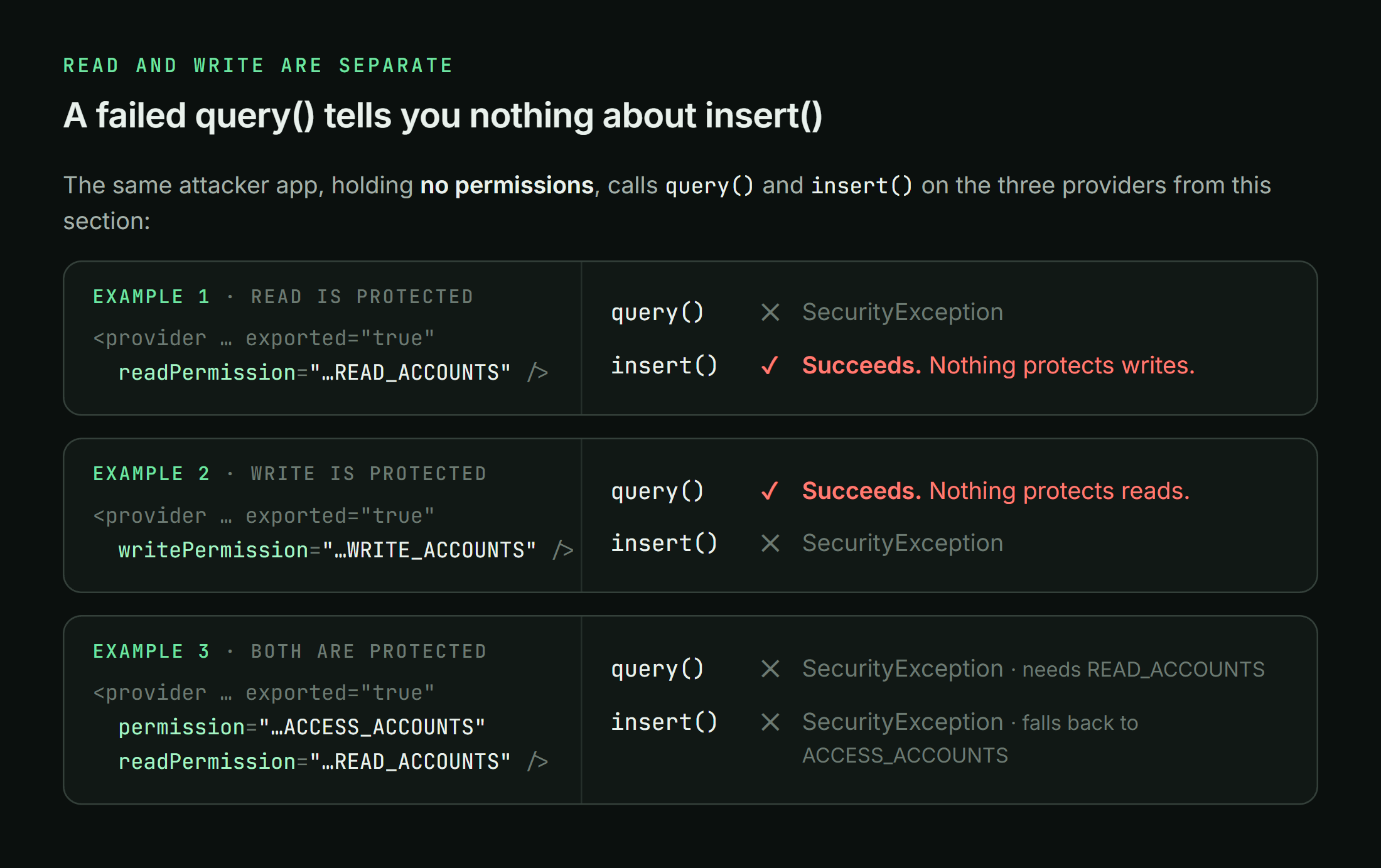
Read and write permissions are separate
Yes, Android still treats provider reads and writes as separate capabilities.
android:readPermission controls read operations such as query(). android:writePermission controls modifying operations such as insert(), update(), and delete().
This means a caller that cannot read from a provider may still be allowed to write to it.
Consider this manifest entry:
<provider
    android:name=".AccountProvider"
    android:authorities="com.victim.accounts"
    android:exported="true"
    android:readPermission="com.victim.permission.READ_ACCOUNTS" />
The provider requires READ_ACCOUNTS for reads, but it defines no writePermission and no provider-wide permission. A caller without READ_ACCOUNTS should be blocked from querying the provider, but the manifest has not placed an equivalent permission requirement on writes.
An attacker can test the write side independently:
ContentValues values = new ContentValues();
values.put("display_name", "yayattackerentryyay");
values.put("enabled", 1);

Uri inserted = getContentResolver().insert(
        Uri.parse("content://com.victim.accounts/accounts"),
        values
);
The reverse mistake is also possible:
<provider
    android:name=".AccountProvider"
    android:authorities="com.victim.accounts"
    android:exported="true"
    android:writePermission="com.victim.permission.WRITE_ACCOUNTS" />
Here, writes require WRITE_ACCOUNTS, but no read permission has been defined. Unless another access-control layer applies, other applications may still be able to query the provider.
There is one important fallback rule. If the provider also defines android:permission, that provider-wide permission applies wherever a more specific readPermission or writePermission has not replaced it:
<provider
    android:name=".AccountProvider"
    android:authorities="com.victim.accounts"
    android:exported="true"
    android:permission="com.victim.permission.ACCESS_ACCOUNTS"
    android:readPermission="com.victim.permission.READ_ACCOUNTS" />
In this example, reads use READ_ACCOUNTS, while writes fall back to the provider-wide ACCESS_ACCOUNTS permission. The absence of a specific writePermission does not make writes public because android:permission still covers them.
So during an assessment, test the two directions separately. A failed query() does not prove that insert(), update(), or delete() will also fail, and a protected write path does not prove that reads are protected.
The safe ContentProvider
If a provider is only used inside one application, the safest option is to keep it private:
<provider
    android:name=".InternalProvider"
    android:authorities="com.application.yayInternalYay"
    android:exported="false" />
If another application legitimately needs permanent access, use an appropriately protected permission. For applications signed by the same developer, that usually means a signature permission:
<permission
    android:name="com.application.yayPermissionYay.ACCESS_PROVIDER"
    android:protectionLevel="signature" />

<provider
    android:name=".SharedProvider"
    android:authorities="com.application.yaySharedYay"
    android:exported="true"
    android:readPermission="com.application.yayPermissionYay.ACCESS_PROVIDER"
    android:writePermission="com.application.yayPermissionYay.ACCESS_PROVIDER" />
When only one specific item needs to be shared, the application can keep the provider non-exported and issue a temporary URI grant to the intended recipient. This is how FileProvider is intended to work:
<provider
    android:name="androidx.core.content.FileProvider"
    android:authorities="com.application.yayFiledYay"
    android:exported="false"
    android:grantUriPermissions="true">

    <meta-data
        android:name="android.support.FILE_PROVIDER_PATHS"
        android:resource="@xml/file_paths" />
</provider>
Then the application shares only a narrow content URI:
Intent shareIntent = new Intent(Intent.ACTION_SEND);
shareIntent.setData(fileUri);
shareIntent.addFlags(Intent.FLAG_GRANT_READ_URI_PERMISSION);
shareIntent.setPackage("com.trusted.viewer");
startActivity(shareIntent);
The recipient receives access to that URI rather than permanent access to the entire provider.
This is the safe design we can compare the vulnerable examples against.
The obvious provider exposure
Let’s briefly cover the easy version.
The target application exports a provider without requiring any permission:
<provider
    android:name=".AccountProvider"
    android:authorities="com.victim.account"
    android:exported="true" />
The provider returns private records from query():
@Override
public Cursor query(Uri uri, String[] projection,
                    String selection, String[] selectionArgs,
                    String sortOrder) {

    return database.query(
            "accounts",
            projection,
            selection,
            selectionArgs,
            null,
            null,
            sortOrder
    );
}
An attacker can query it directly:
Cursor cursor = getContentResolver().query(
        Uri.parse("content://com.victim.account/accounts"),
        null,
        null,
        null,
        null
);

while (cursor != null && cursor.moveToNext()) {
    String username = cursor.getString(
            cursor.getColumnIndexOrThrow("username")
    );

    String token = cursor.getString(
            cursor.getColumnIndexOrThrow("token")
    );

    Log.d("YAY", username + " : " + token);
}
This vulnerability is real, but it is also the least interesting provider mistake. It teaches us that an exported component needs authorization, but it does not teach us much about ContentProviders themselves.
The more useful bugs appear when the provider looks protected or when the dangerous operation is hiding somewhere other than query().
The really dangerous method: call()
ContentProviders are often used as private RPC servers.
The call() method lets developers expose arbitrary provider-defined methods that do not fit the normal table model:
@Override
public Bundle call(String method, String arg, Bundle extras) {
    if (method.equals("set_debug_mode")) {
        boolean enabled = extras.getBoolean("enabled");
        settings.setDebugMode(enabled);
    }

    if (method.equals("get_backup_info")) {
        Bundle result = new Bundle();
        result.putBoolean("backup_exists", backupExists());
        result.putLong("backup_size", getBackupSize());
        return result;
    }

    return Bundle.EMPTY;
}
The Android framework cannot determine whether a custom method is performing a read, a write, or something completely unrelated to provider data. The official ContentProvider.call() documentation explicitly warns that the framework performs no read-versus-write permission check here beyond the caller’s basic ability to access the provider. The implementation must authorize custom calls itself.
An attacker invokes the custom method through ContentResolver.call():
Uri provider = Uri.parse("content://com.victim.settings");

Bundle arguments = new Bundle();
arguments.putBoolean("enabled", true);

getContentResolver().call(
        provider,
        "set_debug_mode",
        null,
        arguments
);
Or from ADB during an authorized test:
adb shell content call \
  --uri content://com.victim.settings \
  --method set_debug_mode \
  --extra enabled:b:true
This creates an important audit rule:
Never stop after reviewing
query(),insert(),update(), anddelete(). Search every ContentProvider for an overriddencall()method and enumerate every method string it accepts.
One provider can expose dozens of undocumented commands through a single exported component.
The permission exists…but what does it actually protect?
Now let’s look at a provider that appears to require a permission:
<permission
    android:name="com.victim.permission.MANAGE_BACKUPS"
    android:protectionLevel="normal" />

<provider
    android:name=".BackupProvider"
    android:authorities="com.victim.backups"
    android:exported="true"
    android:permission="com.victim.permission.MANAGE_BACKUPS" />
At first glance, this looks protected. Unfortunately, a normal permission is granted automatically to any application that requests it:
<uses-permission
    android:name="com.victim.permission.MANAGE_BACKUPS" />
The permission is functioning exactly as Android designed it. The security assumption behind it is wrong.
There is an even stranger variation: the provider requires a custom permission name, but no installed package has actually defined that permission. Under affected installation conditions, an attacker application may be able to define the missing permission itself and request it:
<permission
    android:name="com.victim.permission.MANAGE_BACKUPS"
    android:protectionLevel="normal" />

<uses-permission
    android:name="com.victim.permission.MANAGE_BACKUPS" />
The provider still appears permission-protected in the manifest, but the attacker now owns the permission definition used by the gate.
This is much more interesting than simply checking whether android:permission is empty. During an assessment, resolve the permission owner and protection level on the actual device:
adb shell dumpsys package permissions
adb shell dumpsys package com.victim.application
You want to know:
- Which package defines the permission?
- What is its protection level?
- Does the attacker application receive it?
- Was the permission already defined when the attacker application was installed?
- Is the provider also performing a caller or signature check inside its methods?
The presence of a permission string is not proof of authorization.
The getType() trap
getType() looks harmless. Its documented purpose is to return the MIME type associated with a content URI:
@Override
public String getType(Uri uri) {
    return "vnd.android.cursor.item/vnd.yayAccountYay";
}
However, applications sometimes use URI paths as commands and place real logic inside getType():
@Override
public String getType(Uri uri) {
    String command = uri.getLastPathSegment();

    if ("isSetupComplete".equals(command)) {
        preferences.edit()
                .putBoolean("setup_checked", true)
                .apply();

        return Boolean.toString(isSetupComplete());
    }

    return null;
}
This method is no longer describing a MIME type. It is acting as an RPC endpoint and performing a persistent state change.
That is especially dangerous because getType() has unusual access semantics. Android’s documentation notes that, by default, applications can call it even when the provider has read/write permissions or is not exported. Android 14 added getTypeAnonymous() so a provider can separate public type information from protected type information, but older and custom implementations still need careful review.
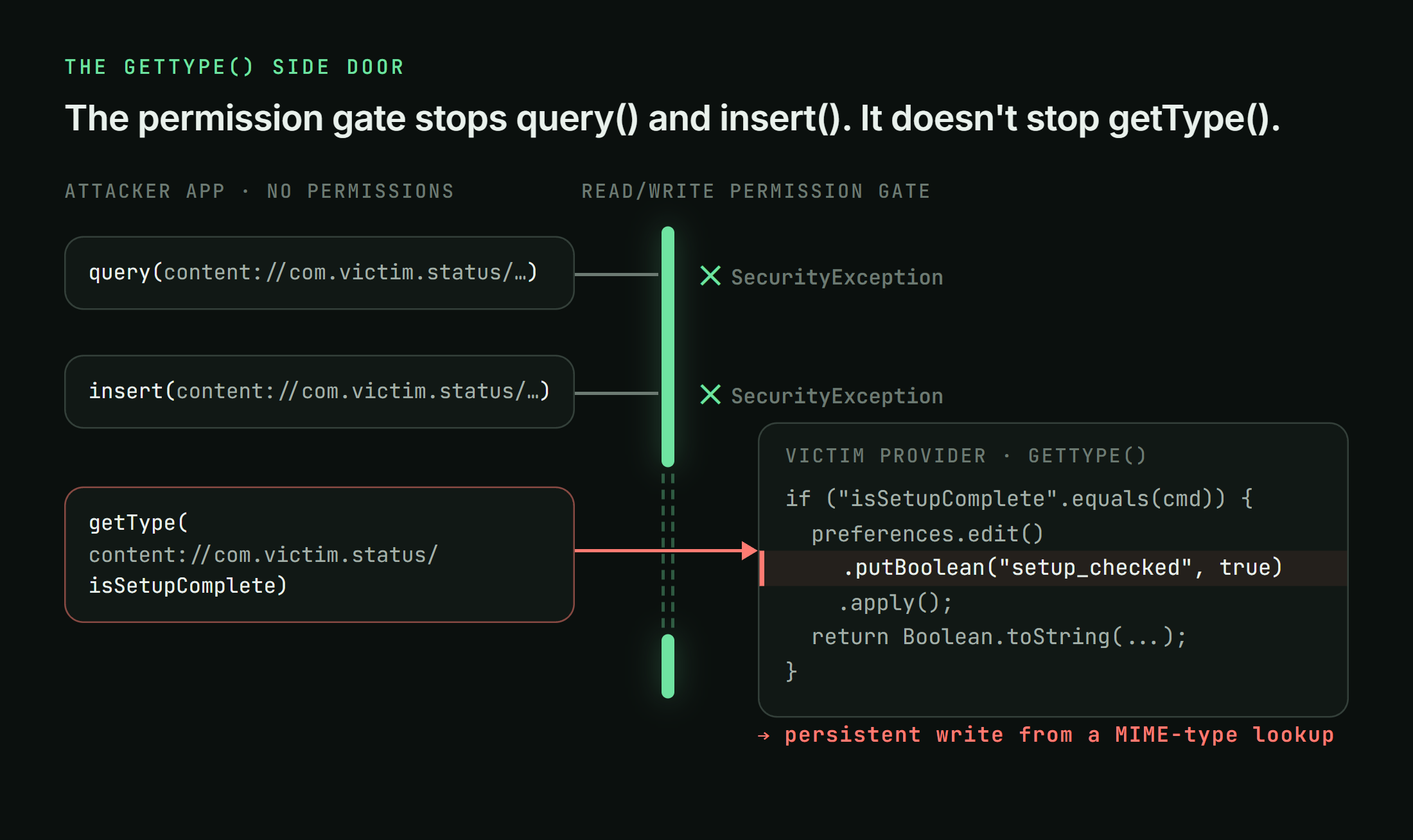
An attacker can reach the example above using ordinary application code:
String result = getContentResolver().getType(
        Uri.parse(
            "content://com.victim.status/isSetupComplete"
        )
);
Or from ADB:
adb shell content gettype \
  --uri content://com.victim.status/isSetupComplete
During one of our assessments, we found a provider where two getType() paths performed a persistent SharedPreferences write. The attacker could not choose the written value, so it was not an arbitrary-write primitive, but a nominally read-only MIME-type request still mutated application state.
That is exactly the kind of provider behavior a basic exported-component checklist will miss.
Path permissions: protected here, exposed over there
Providers can assign permissions to particular URI paths:
<provider
    android:name=".RecordsProvider"
    android:authorities="com.victim.records"
    android:exported="true"
    android:readPermission="com.victim.permission.READ_PUBLIC">

    <path-permission
        android:pathPrefix="/private"
        android:readPermission="com.victim.permission.READ_PRIVATE" />
</provider>
This allows the provider to expose different datasets through one authority. It also creates room for mistakes involving:
android:pathversusandroid:pathPrefix- Android’s simple-glob
android:pathPatternsyntax - Encoded and decoded path forms
- Trailing slashes and alternate URI shapes
- Read permissions that do not match the corresponding write permissions
- New provider routes added later without a matching path rule
The interesting test is not whether one protected path rejects the attacker. Enumerate every path handled by the provider’s UriMatcher and test which permission applies to each operation.
For example, a provider might protect /private/records while separately handling /private, /private/, or /records/private in code. The manifest and the provider’s routing logic must describe the same namespace. If they disagree, the weaker interpretation wins for the attacker.
Temporary URI grants
A provider can remain non-exported while still sharing particular content URIs:
intent.setData(secretUri);
intent.addFlags(Intent.FLAG_GRANT_READ_URI_PERMISSION);
This temporarily allows the recipient to access secretUri without holding the provider’s normal permission.
URI grants are not a workaround or a hack. They are a core part of Android’s provider security model. Problems appear when the application grants the wrong URI, grants it to the wrong recipient, or grants a much larger URI subtree than intended.
Things to look for include:
- An implicit Intent carrying a sensitive URI grant
- Attacker control over the package or component receiving the grant
FLAG_GRANT_WRITE_URI_PERMISSIONwhen only read access is requiredFLAG_GRANT_PREFIX_URI_PERMISSION, which can extend access below a URI prefix- Persistable grants that survive longer than the developer expects
- Sensitive URIs copied into
ClipData, nested Intents, PendingIntents, or result Bundles - A provider configured to allow grants for a broader path range than intended
A provider declared with android:exported="false" is not necessarily unreachable. A valid URI grant intentionally creates an exception to the normal provider boundary.
When auditing a URI grant, record four things:
- The exact URI being granted
- The read, write, prefix, and persistable flags
- The package or component that ultimately receives it
- How and when the grant is revoked
FileProvider configurations
FileProvider converts files into temporary content:// URIs. Its security depends heavily on the configured roots.
A narrow configuration might expose only an image and document directory:
<paths xmlns:android="http://schemas.android.com/apk/res/android">
    <files-path name="images" path="images/" />
    <files-path name="documents" path="documents/" />
</paths>
A dangerous configuration exposes far more:
<paths xmlns:android="http://schemas.android.com/apk/res/android">
    <root-path name="device_root" path="." />
</paths>
root-path maps to the filesystem root. Broad values such as . can make sensitive files addressable through the provider. Google’s Android security guidance explicitly recommends avoiding root-path and sharing only narrow directory ranges.
There is an important distinction here: a broad path configuration does not always mean every application can immediately read every file. The attacker still needs a usable content URI and sufficient provider or URI-grant access.
The broad configuration creates the dangerous capability. Another flaw—such as attacker control over which URI is returned or granted—often makes that capability exploitable.
Path traversal in custom file providers
Applications also implement their own file-serving providers. Consider this openFile() implementation:
@Override
public ParcelFileDescriptor openFile(Uri uri, String mode)
        throws FileNotFoundException {

    String requestedPath = uri.getQueryParameter("path");
    File target = new File(getContext().getFilesDir(), requestedPath);

    return ParcelFileDescriptor.open(
            target,
            ParcelFileDescriptor.MODE_READ_ONLY
    );
}
An attacker supplies:
content://com.victim.files/open?path=../../shared_prefs/session.xml
The provider joins the attacker path to its intended base directory, but never checks where the result resolves. The ../ segments escape the intended directory.
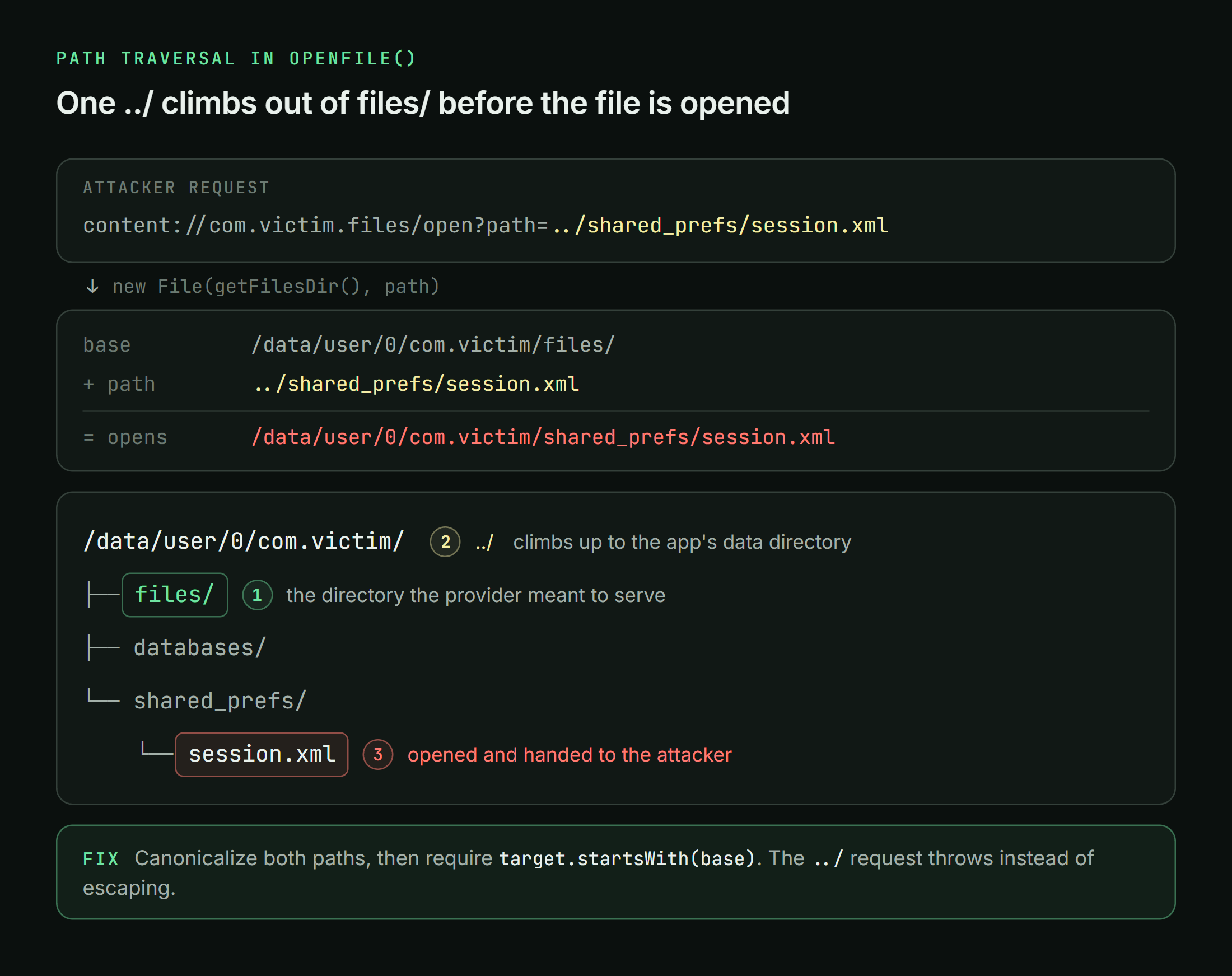
The correct defense is canonical containment, not simply removing one suspicious substring:
File base = getContext().getFilesDir().getCanonicalFile();
File target = new File(base, requestedPath).getCanonicalFile();

if (!target.toPath().startsWith(base.toPath())) {
    throw new SecurityException("Path escaped provider root");
}
The same rule applies when the provider accepts filenames through call(), query parameters, path segments, or returned cursor columns.
When the attacker owns the provider
So far, the target application has owned the vulnerable provider. The trust direction can also be reversed.
Imagine an application that accepts a document from any installed file picker. It queries the returned provider for _display_name and uses that value as a local filename:
Cursor cursor = getContentResolver().query(
        attackerUri,
        new String[]{OpenableColumns.DISPLAY_NAME},
        null,
        null,
        null
);

cursor.moveToFirst();
String displayName = cursor.getString(0);

File output = new File(getFilesDir(), displayName);

try (InputStream input = getContentResolver().openInputStream(attackerUri);
     OutputStream result = new FileOutputStream(output)) {
    input.transferTo(result);
}
A malicious provider returns this display name:
../shared_prefs/config.xml
The victim application then writes attacker-controlled content outside the intended import directory. This pattern is often called a malicious-provider or dirty-stream attack.
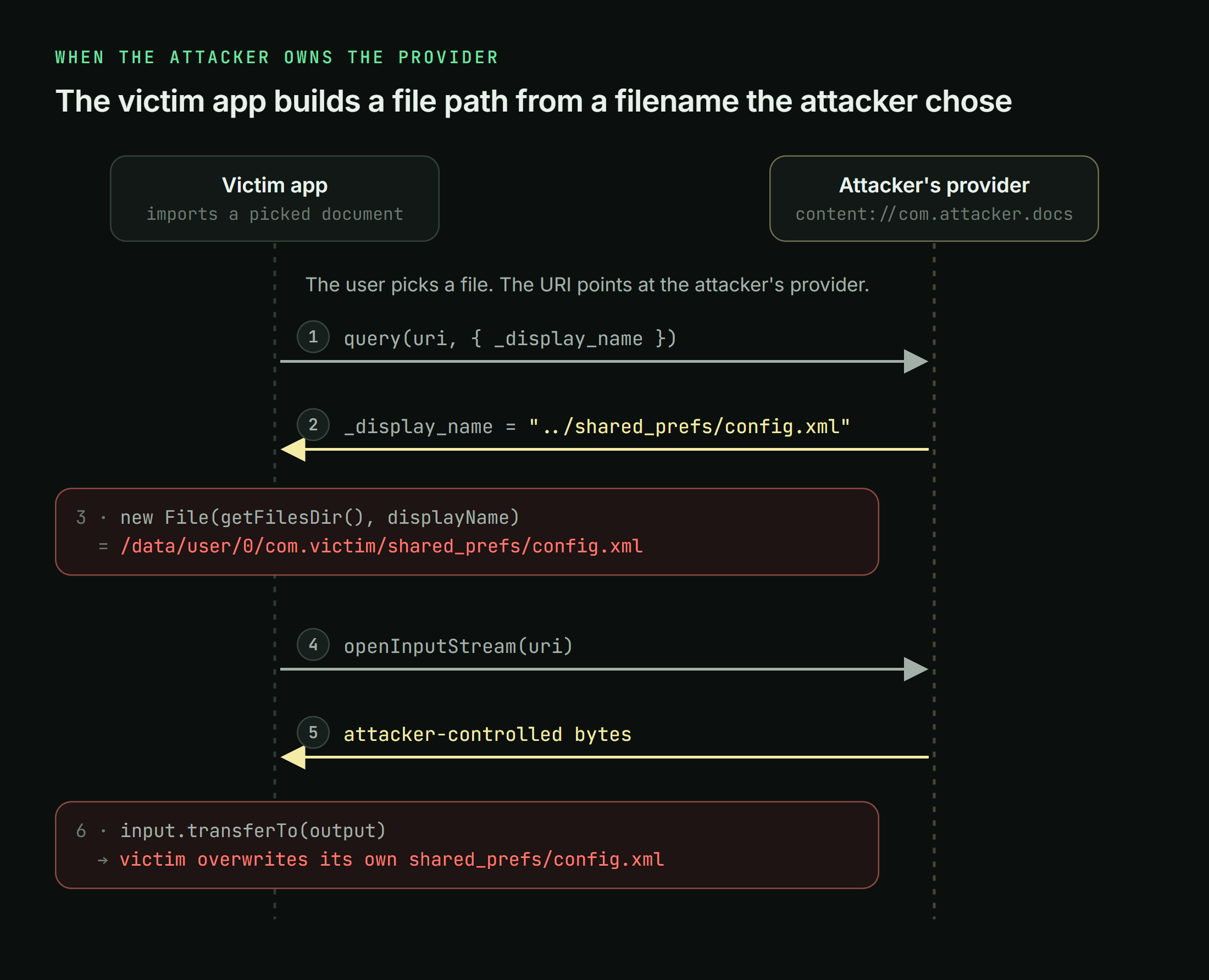
The victim must treat provider-returned metadata as untrusted. Generate a new local filename where possible. If the original filename must be preserved, remove path separators and verify the canonical destination remains inside the intended directory. Android documents this class of issue as improperly trusting a ContentProvider-provided filename.
This is another provider-specific lesson: the provider is not always the trusted side of the IPC boundary.
Returning capabilities instead of rows
The strangest providers do not return database records at all.
A Cursor can carry a Bundle of extras. That Bundle can contain an IBinder:
@Override
public Cursor query(Uri uri, String[] projection,
                    String selection, String[] selectionArgs,
                    String sortOrder) {

    MatrixCursor cursor = new MatrixCursor(
            new String[]{"status"}
    );

    Bundle extras = new Bundle();
    extras.putBinder("service", privilegedServiceBinder);
    cursor.setExtras(extras);

    return cursor;
}
The attacker extracts it:
Cursor cursor = getContentResolver().query(
        Uri.parse("content://com.victim.bus/binder"),
        null,
        null,
        new String[]{"service"},
        null
);

IBinder binder = cursor.getExtras().getBinder("service");
At this point, the provider has handed the attacker a live capability to another IPC interface. Securing the provider’s database methods is irrelevant if the returned Binder exposes privileged operations without performing its own caller checks.
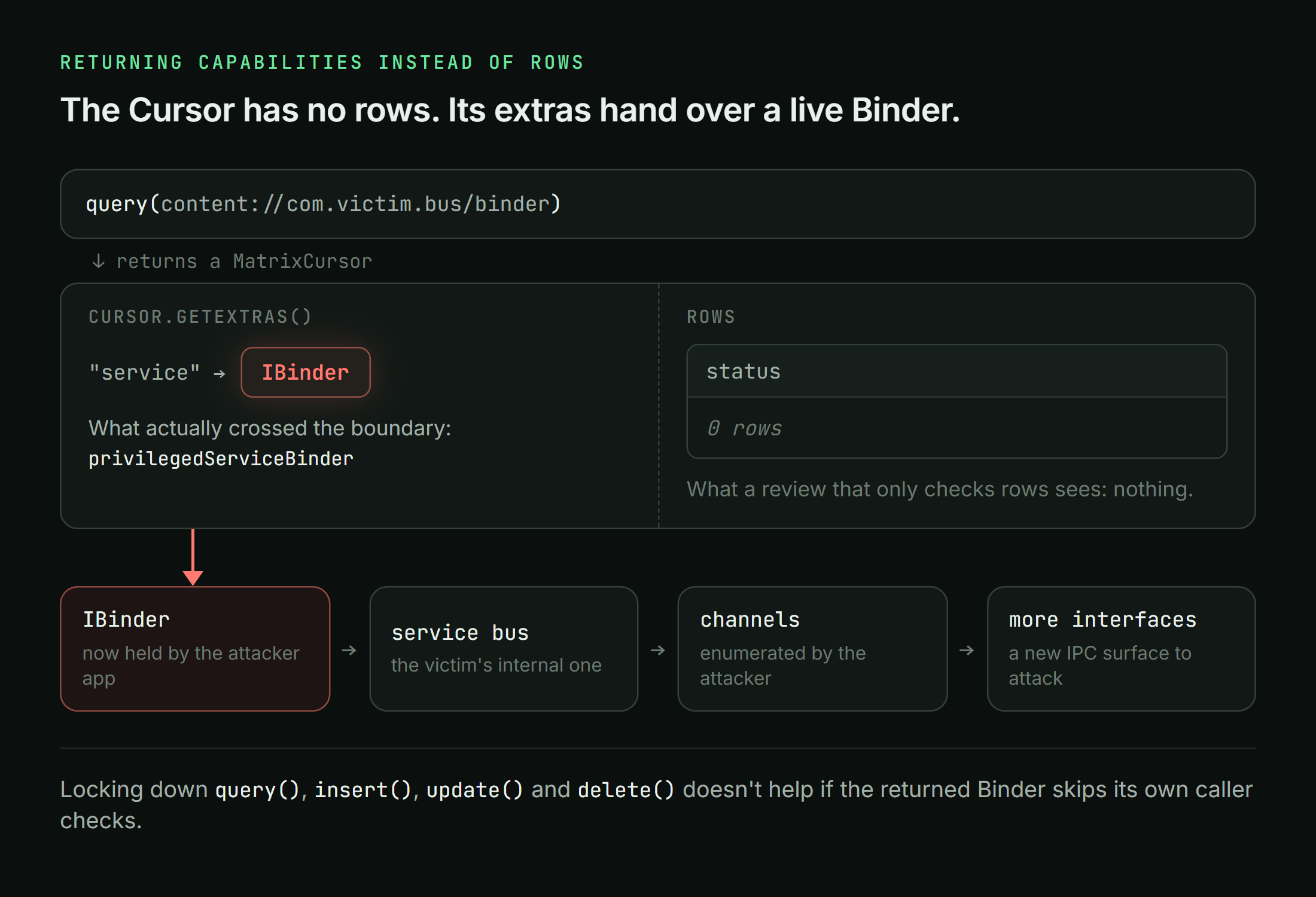
We encountered this pattern in an OEM system service where an exported provider returned the Binder for an internal service bus. From that Binder, a client could enumerate service channels and obtain additional interfaces. The provider query was only the first step into a much larger attack surface.
This is why ContentProvider auditing cannot stop at rows and files. Inspect Cursor extras, returned Bundles, ParcelFileDescriptors, PendingIntents, ResultReceivers, callbacks, and Binders. Any of them can transfer authority across the application boundary.
Caller identity checks
When provider operations require custom authorization, use identity supplied and verified by the Binder framework.
ContentProvider.getCallingPackage() returns a package verified to belong to the calling UID. Binder.getCallingUid() provides the UID directly. By contrast, a package name supplied inside the URI, arg, or extras is ordinary attacker-controlled data.
This check is vulnerable:
String claimedPackage = extras.getString("package_name");

if (claimedPackage.equals("com.trusted.client")) {
    performPrivilegedOperation();
}
The attacker simply claims to be the trusted package.
A better design uses a signature permission in the manifest. If custom logic is necessary, derive identity from the IPC caller and verify it before clearing Binder identity or performing privileged work:
String caller = getCallingPackage();

if (caller == null ||
        getContext().getPackageManager().checkSignatures(
                getContext().getPackageName(),
                caller
        ) != PackageManager.SIGNATURE_MATCH) {

    throw new SecurityException("Unauthorized provider caller");
}
Be especially careful with getCallingPackageUnchecked(): as its name suggests, it does not verify that the returned package belongs to the calling UID.
Also perform authorization before calling Binder.clearCallingIdentity() or ContentProvider.clearCallingIdentity(). Clearing identity is sometimes necessary so a provider can perform internal work as itself, but doing it before authorization destroys the caller context that should have been checked.
Want to know more?
Djini.ai accelerates mobile pentesting process by removing reverse-engineering overhead and surfacing dangerous primitives early, so security teams, pentesters, and researchers can focus on impact instead of boilerplate analysis.
With iOS jailbroken and Android rooted devices, plus bundled premium courses and certifications from Mobile Hacking Lab, it provides a complete end-to-end mobile security workflow.
If your team wants to move faster and go deeper, schedule a demo and see it in action.
Book a meeting: https://calendly.com/d/cryq-nqv-8gf/book-a-demo
Check out the subscription: https://djini.ai/pricing/