

Very interesting bug chain, especially the escalation process by using AppLink as a bridge between the browser and the app…

Blog

Djini AI
SAST: A Free AI Scanner for Mobile App Source Code
Today we are releasing Djini AI SAST, a
new scanner that finds security bugs in mobile
Today we are releasing Djini AI SAST, a new scanner that finds security bugs in mobile app source code.
Here is the simple version. You point it at your code and it reads through the code, finds the weak spots, and tells you the exact line to fix. It works on Android and iOS. There is no app file to build, no emulator to boot, and no phone to plug in. Most scans finish in under a minute.
You can run it in two places.
While you build. Ask your AI coding agent to scan the repo, or start a scan yourself from the dashboard. You see the results before you even commit.
In your pipeline. Add it to GitHub Actions and every pull request gets scanned. If the code has a serious bug, the build stops before it ships.
Everything shows up in one dashboard: what the bug is, how bad it is, the exact file and line, and how to fix it. You can also bring your own AI model, so every scan runs on the provider you pick and control.
And it is free to start. Every account gets 10 source code scans a month. New users also get one full black box scan with live testing on real devices.
The rest of this post is a practical walkthrough with real commands and real output. By the end you will have scans running in GitHub Actions, blocking a merge when the code is not safe to ship.
What it actually does
Point it at source and it runs a MASVS swarm parallel analysis passes across the eight categories of the OWASP Mobile Application Security Verification Standard:
- MASVS-STORAGE
- Credentials in SharedPreferences, world-readable files, keychain misuse
- MASVS-CRYPTO
- Weak ciphers, hardcoded keys, bad IVs
- MASVS-AUTH
- Client-side auth gates, spoofable session state
- MASVS-NETWORK
- TLS validation bypass, cleartext traffic
- MASVS-PLATFORM
- Exported components, intent redirection, WebView misconfiguration
- MASVS-CODE
- Injection, vulnerable dependencies, unsafe deserialisation
- MASVS-RESILIENCE
- Missing root/debugger detection, no anti-tampering
- MASVS-PRIVACY
- Over-broad permissions, PII leakage
Plus a cross-cutting attack-chain pass that looks for vulnerabilities which only matter in combination with exported components and internal functions that process attacker controlled input.
Every finding carries a MASVS category, a MASWE identifier, a severity, an exact file:line, the offending code snippet, and concrete remediation. Output is JSON or SARIF 2.1.0, which GitHub Code Scanning ingests natively.
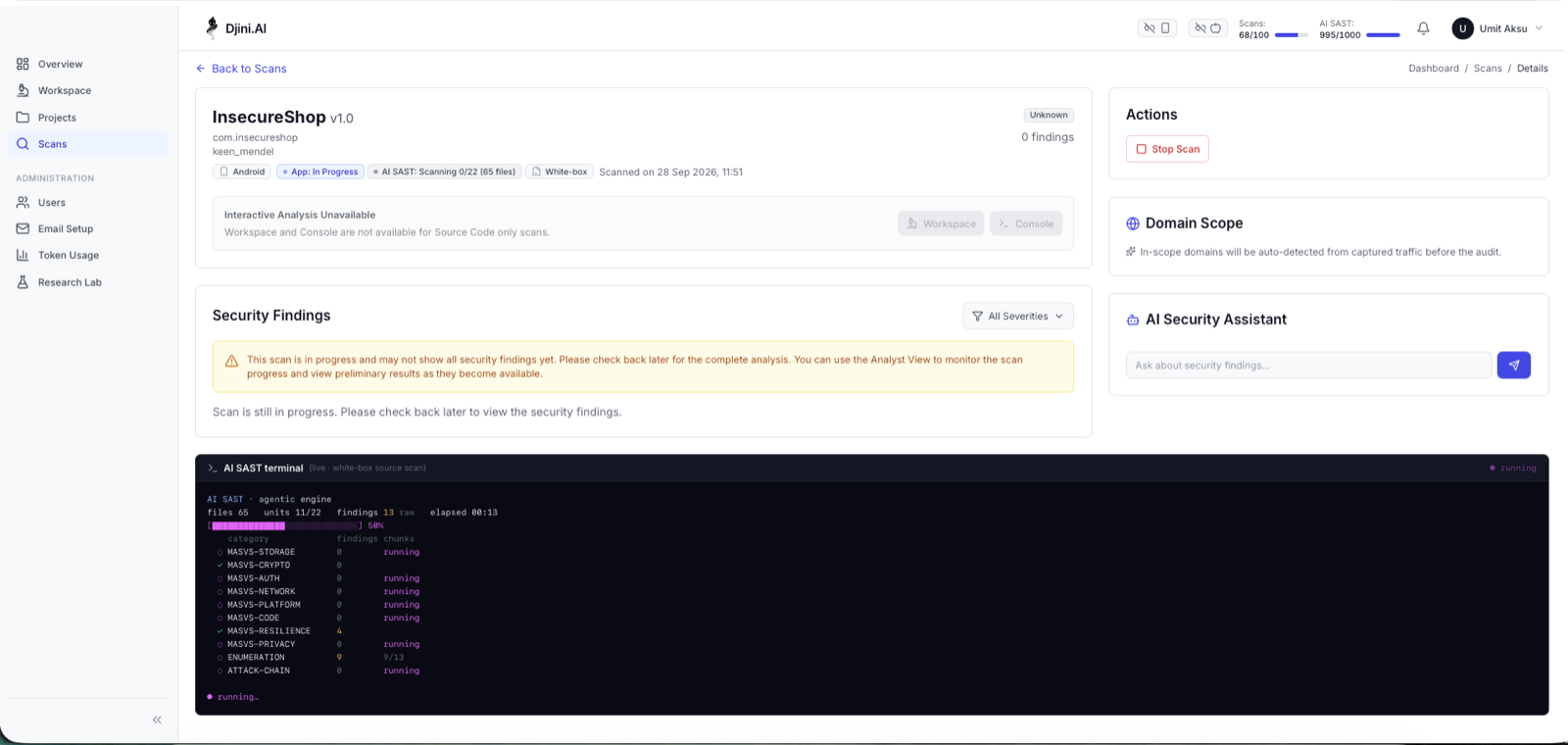
Swarm is literal; you can watch the categories run:
Step 1
Setup, once
Get your API key
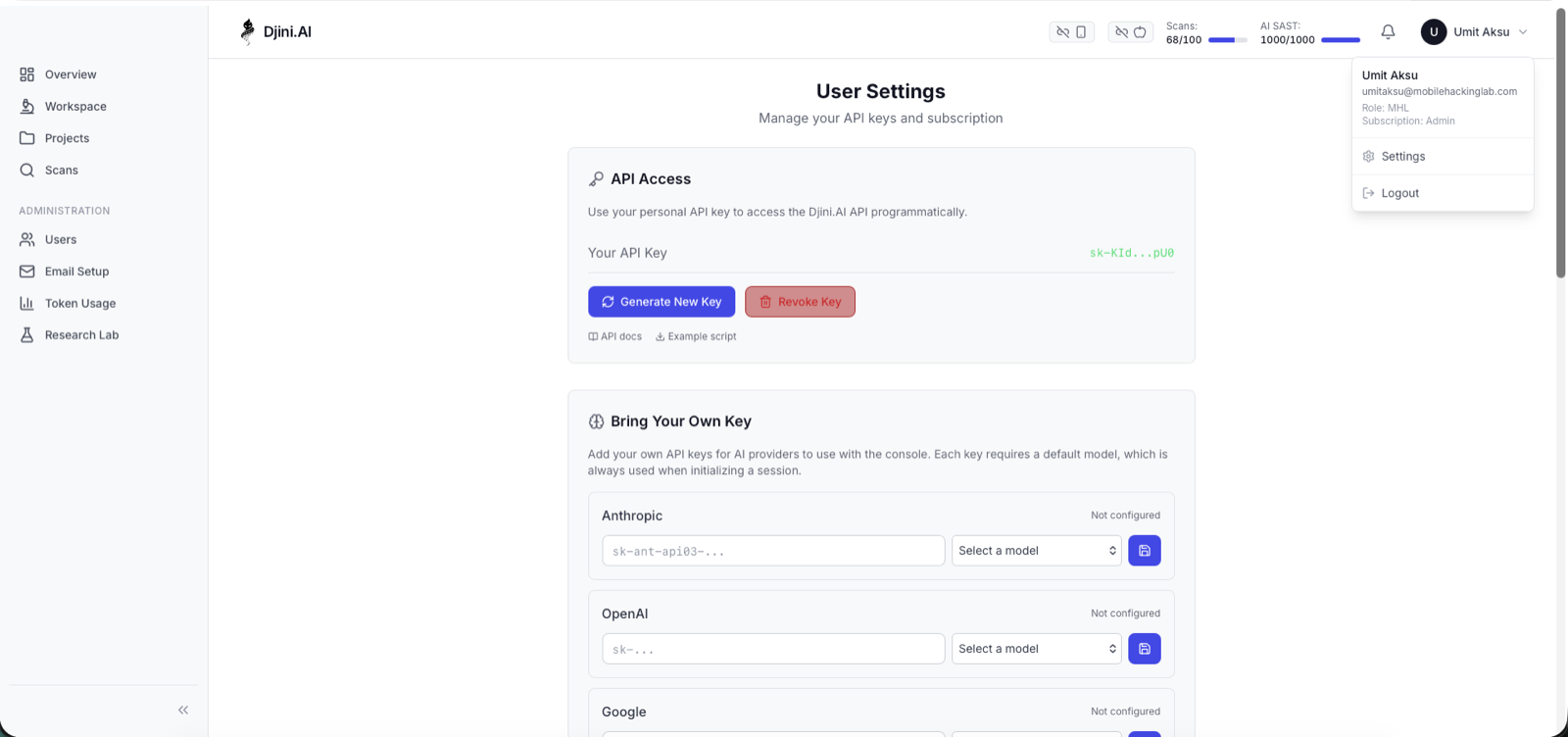
In the Djini console: avatar menu -> Settings -> API Access -> Generate New Key. Copy the sk-* value.
# point your shell at the instance and key
export DJINI_CONSOLE_URL="https://app.djini.ai"
export DJINI_API_KEY="sk-your-key-here"
Configure your model (BYOK required)
The AI source scan is bring-your-own-key. It runs on your OpenAI-compatible model, not a Djini-hosted one; your source code is analysed by a model you control and pay for directly.
This is a one-time account setting, and it must be done in the UI. Go to Settings -> Bring Your Own Key -> OpenAI Compatible -> the third card down, not the “OpenRouter” card above it. The source scan specifically requires the openai_compatible provider.
Enter the base URL and key, click refresh to pull the live model list from your provider, pick your model, then hit save. The card flips from Not configured to configured.
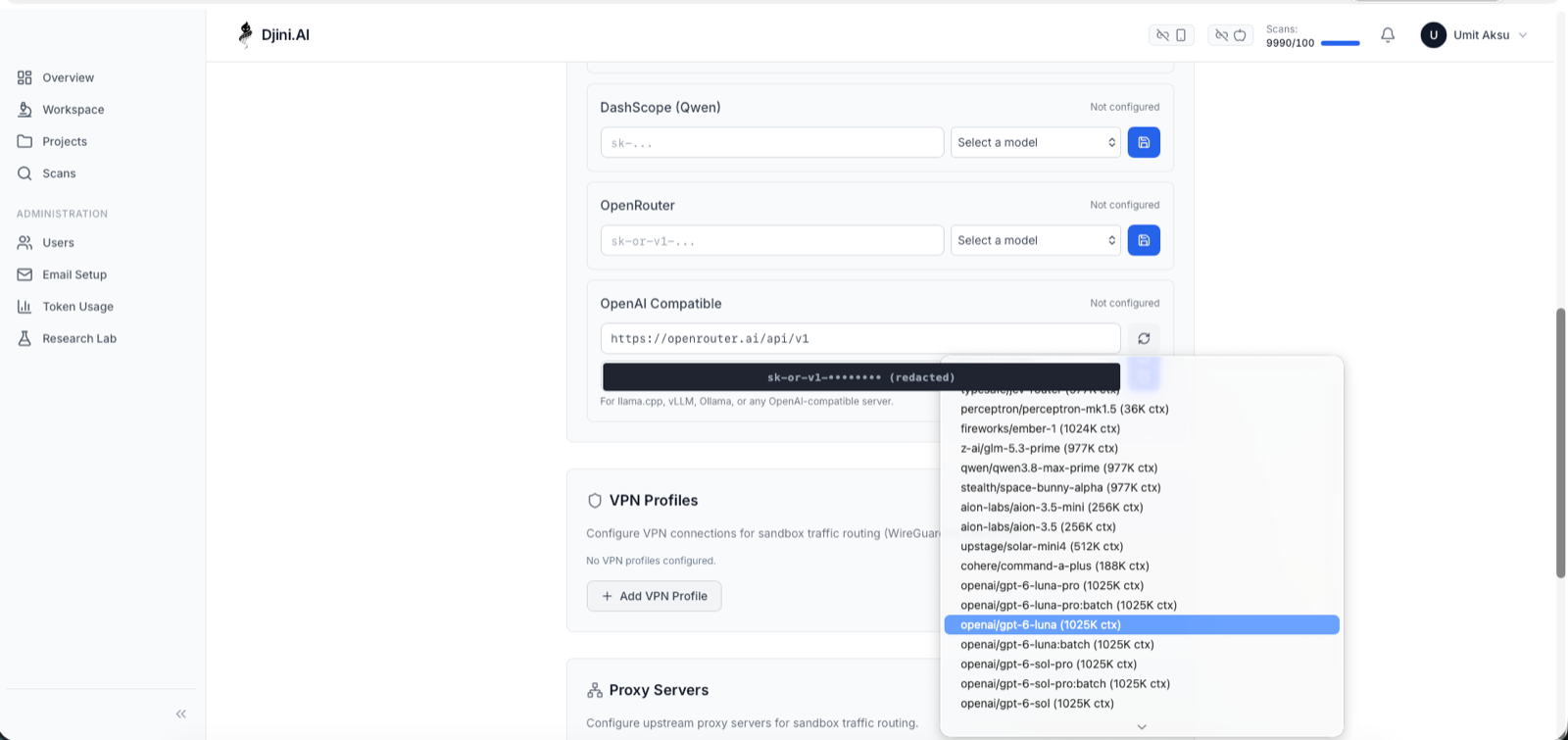
Any OpenAI-compatible endpoint works: OpenRouter, Azure OpenAI, Together, or a local llama.cpp / vLLM / Ollama server (use any non-empty string as the key for keyless local servers).
Skip this step and your first scan fails loudly rather than mysteriously:
{
  "code": "byok_required",
  "error": "An OpenAI-compatible model is required for the AI source scan.",
  "success": false
}
Step 2
Your first scan, in four calls
We’ll scan InsecureShop, a deliberately vulnerable Kotlin Android app used widely for training. Because its flaws are documented, you can check the scanner’s work.
There are two ways in, and they hit the same engine. If you’d rather click than curl, start from the console Overview -> Source Code only (AI SAST):
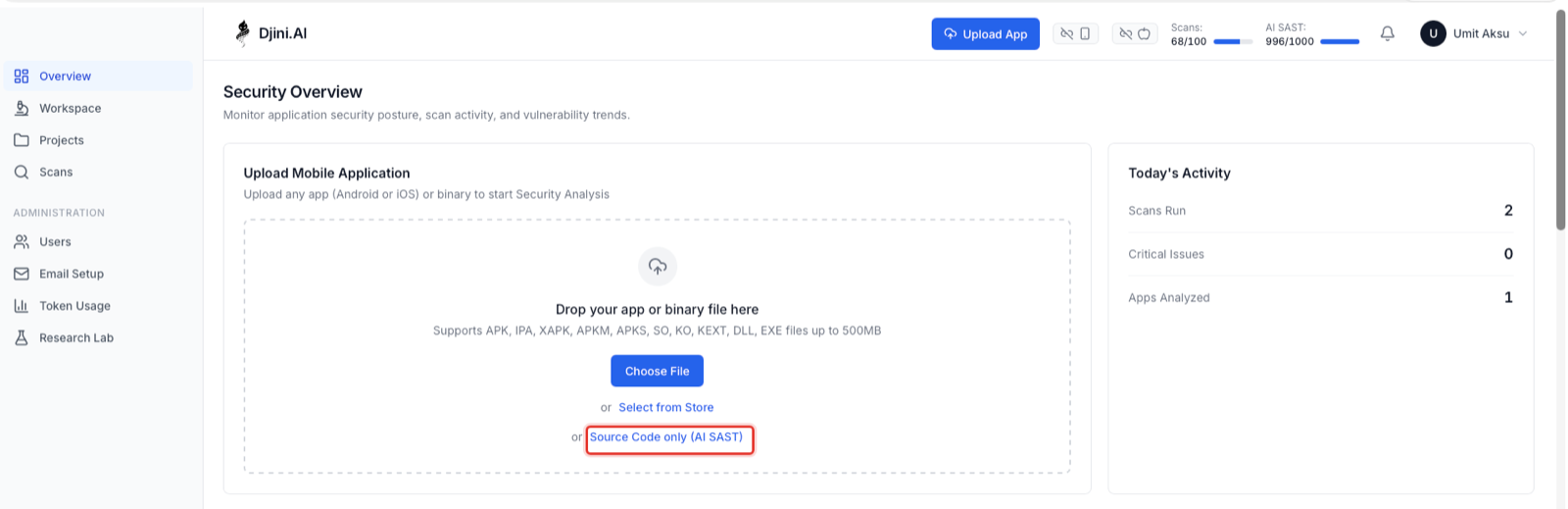
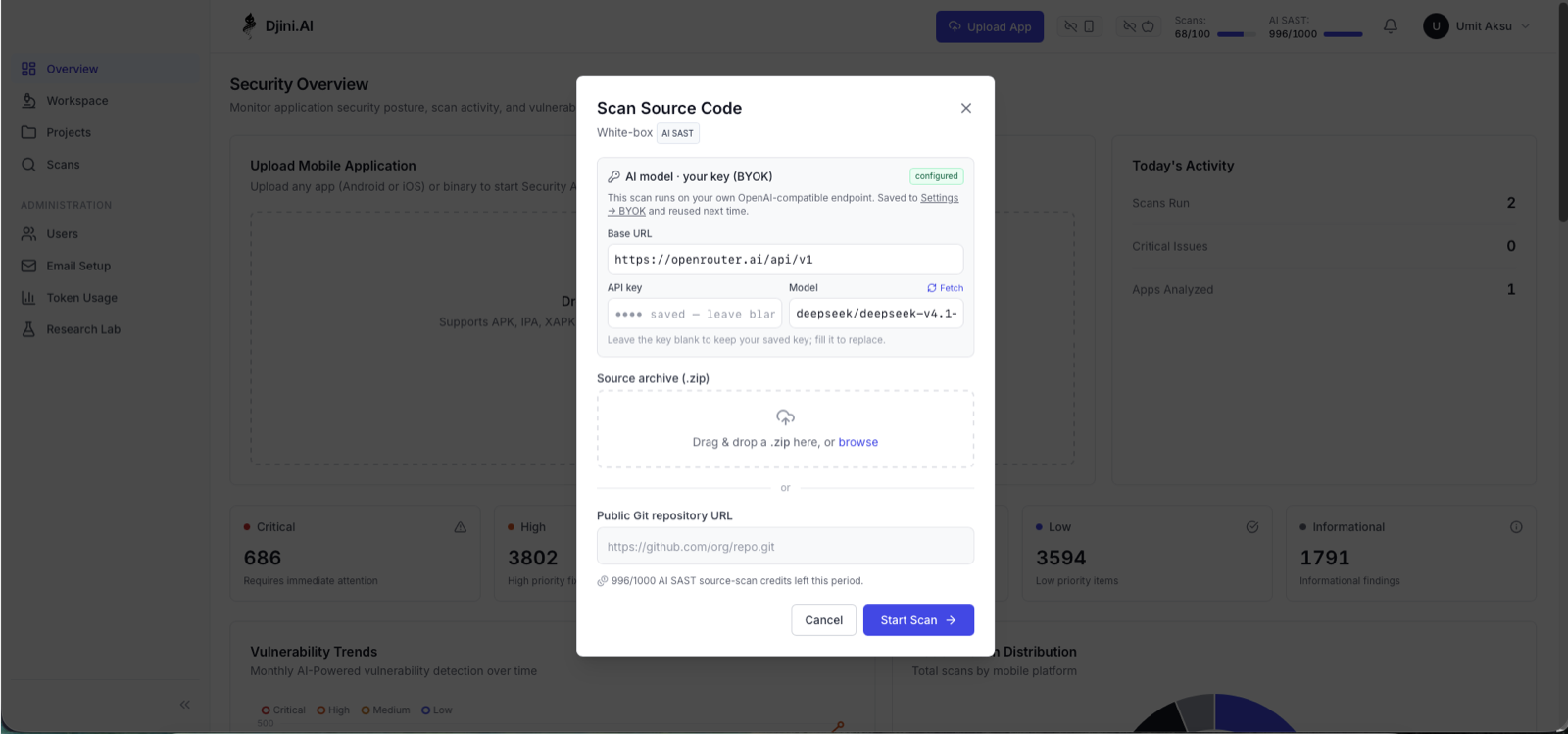
That dialog is the whole product surface for source scanning a zip or a git URL, the model you brought, and a credit count. Everything below is the same thing over HTTP, which is what you’ll actually wire into CI.
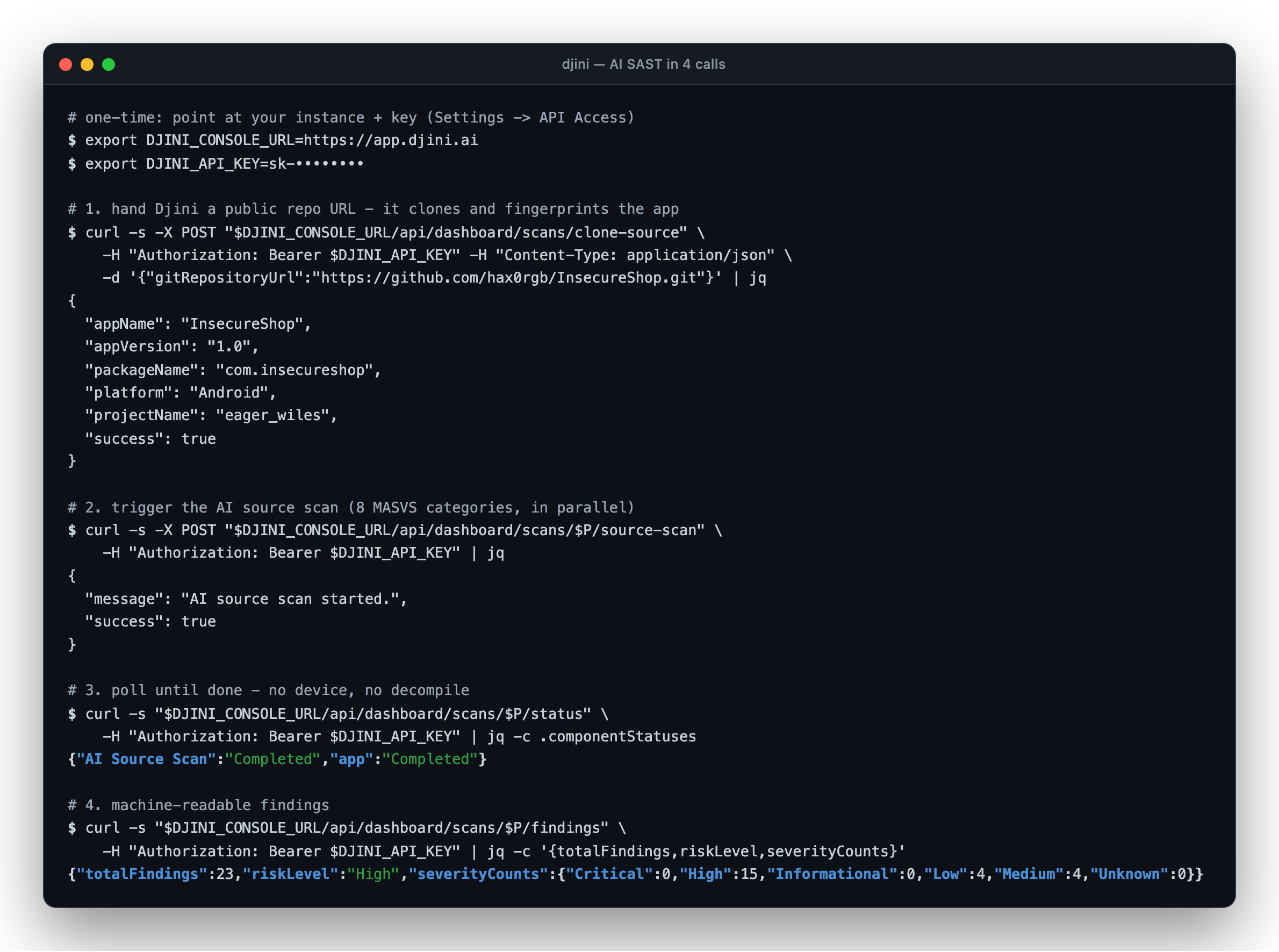
1. Hand Djini the repo. It clones, then fingerprints platform, package and version from the source:
curl -s -X POST "$DJINI_CONSOLE_URL/api/dashboard/scans/clone-source" \
  -H "Authorization: Bearer $DJINI_API_KEY" \
  -H "Content-Type: application/json" \
  -d '{"gitRepositoryUrl":"https://github.com/hax0rgb/InsecureShop.git"}'
{
  "appName": "InsecureShop",
  "appVersion": "1.0",
  "packageName": "com.insecureshop",
  "platform": "Android",
  "projectName": "eager_wiles",
  "success": true
}
Note projectName is the handle for every subsequent call.
2. Start the scan:
P=eager_wiles
curl -s -X POST "$DJINI_CONSOLE_URL/api/dashboard/scans/$P/source-scan" \
  -H "Authorization: Bearer $DJINI_API_KEY"
# {"message": "AI source scan started.", "success": true}
3. Poll for progress and watch the swarm work through its units:
curl -s "$DJINI_CONSOLE_URL/api/dashboard/scans/$P/status” \
  -H "Authorization: Bearer $DJINI_API_KEY"
{"AI Source Scan":"Scanning 4/22 (65 files)","app":"In Progress"}
{"AI Source Scan":"Scanning 19/22 (65 files)","app":"In Progress"}
{"AI Source Scan":"Completed","app":"Completed"}
4. Collect findings:
curl -s "$DJINI_CONSOLE_URL/api/dashboard/scans/$P/findings" \
  -H "Authorization: Bearer $DJINI_API_KEY" | jq -c '{totalFindings,riskLevel,severityCounts}'
{"totalFindings":22,"riskLevel":"Critical",
 "severityCounts":{"Critical":2,"High":11,"Medium":6,"Low":3,"Informational":0}}
65 files. 22 analysis units. 23 findings. About 40 seconds. No build, no emulator, no decompiler.
Step 3
Reading the results
In the console, you will see the severity chip, a plain-English impact summary, and the attack chain spelled out, before you expand anything:
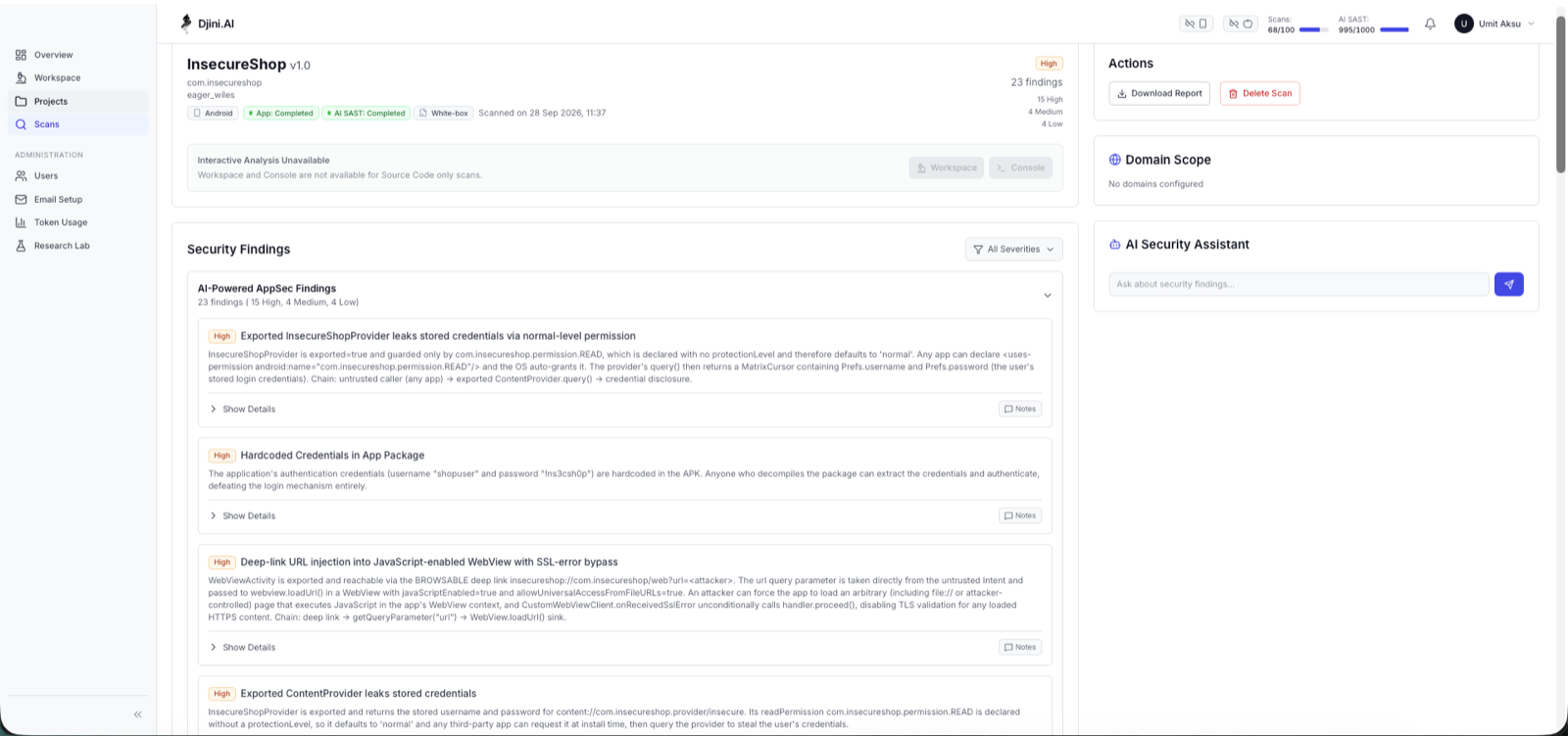
Note the first card. It doesn’t just say “exported ContentProvider”, it says the permission guarding it is com.insecureshop.permission.READ, declared with no protectionLevel, therefore normal, therefore auto-granted to any app that asks for it. That’s the difference between a finding you can action and a finding you have to go research.
The same data, pulled from the SARIF report:
| Severity | MASVS / MASWE | Location | Finding |
|---|---|---|---|
| High | AUTH · 0018 | provider_paths.xml:3 | FileProvider exposes root/external storage (over-broad sharing) |
| High | AUTH · 0018 | InsecureShopProvider.kt:25 | Exported ContentProvider leaks stored credentials without permission |
| High | CRYPTO · 0009 | AndroidManifest.xml:10 | Exported InsecureShopProvider leaks stored credentials via normal-level permission |
| High | CRYPTO · 0009 | AndroidManifest.xml:57 | Deep-link URL injection into JavaScript-enabled WebView with SSL-error bypass |
| High | PLATFORM · 0036 | AndroidManifest.xml:82 | Exported ContentProvider leaks stored credentials |
| High | PLATFORM · 0032 | AboutUsActivity.kt:32 | Credentials broadcast unprotected via implicit broadcast |
| High | PLATFORM · 0032 | ChooserActivity.kt:22 | Exported ChooserActivity copies attacker-supplied URI to external storage (arbitrary file read / path traversal) |
| High | PLATFORM · 0032 | WebView2Activity.kt:21 | Intent Redirection via Parcelable extra in WebView2Activity |
| High | PLATFORM · 0029 | WebViewActivity.kt:31 | Insecure deep link handling in WebViewActivity |
| High | PLATFORM · 0032 | AboutUsActivity.kt:19 | Dynamic broadcast receiver redirects attacker URL into WebView |
| High | PLATFORM · 0034 | PrivateActivity.kt:24 | WebView loads untrusted URL with universal file access enabled |
| High | PLATFORM · 0031 | LoginActivity.kt:55 | Loading and executing code from another app’s package context |
| High | PRIVACY · 0077 | LoginActivity.kt:39 | Credentials Logged to Logcat |
| High | STORAGE · 0004 | Util.kt:12 | Hardcoded Credentials in App Package |
| High | STORAGE · 0001 | Prefs.kt:32 | Credentials Stored Unencrypted in SharedPreferences |
| Medium | AUTH · 0018 | ProductListActivity.kt:21 | Client-side-only authentication gate via SharedPreferences username |
| Medium | CODE · 0044 | build.gradle:44 | Outdated Gson dependency with known deserialization vulnerability |
| Medium | PLATFORM · 0032 | ResultActivity.kt:9 | Intent Redirection via ResultActivity Echoing Received Intent |
| Medium | RESILIENCE · 0059 | build.gradle:23 | Release build not obfuscated (minifyEnabled false) |
| Low | CODE · 0042 | build.gradle:6 | Outdated targetSdkVersion (29) |
| Low | PRIVACY · 0066 | LoginActivity.kt:28 | Unnecessary runtime request for external storage permissions |
| Low | RESILIENCE · 0064 | InsecureShopApp.kt:1 | No debugger detection implemented |
| Low | STORAGE · 0004 | strings.xml:26 | Hardcoded AWS Cognito Identity Pool ID in App Package |
These are the findings and severities from one specific run. Re-scan the same commit and you’ll get the same vulnerabilities, but the severity column can shift by a notch; see the gating note in Step 05 before you wire a threshold to it.
Don't take the model's word for it, check!
This matters more than any feature list, so let’s verify three findings against the actual source.
Hardcoded credentials, Util.kt:12:
private fun getUserCreds(): HashMap<String,String> {
    val userCreds = HashMap<String, String>()
    userCreds["shopuser"] = "!ns3csh0p"     // line 12
    return userCreds
}
TLS validation bypass, CustomWebViewClient.kt:10:
override fun onReceivedSslError(view: WebView?, handler: SslErrorHandler?, error: SslError?) {
    handler?.proceed()      // accepts any certificate, including an attacker's
}
Vulnerable dependency, build.gradle:44: com.google.code.gson:gson:2.8.6 – CVE-2022-25647 affects everything below 2.8.9. Correct.
Three for three, with exact line numbers. The evidence snippet in each finding is lifted verbatim from your code, so triage doesn’t begin with where is this?
It chains, rather than listing
The TLS bypass above is the clearest illustration. It isn’t reported as an isolated “SSL handler”, it’s reported as one link in Deep-link URL injection into JavaScript-enabled WebView with SSL-error bypass, and the finding carries the whole path as an ordered trace:
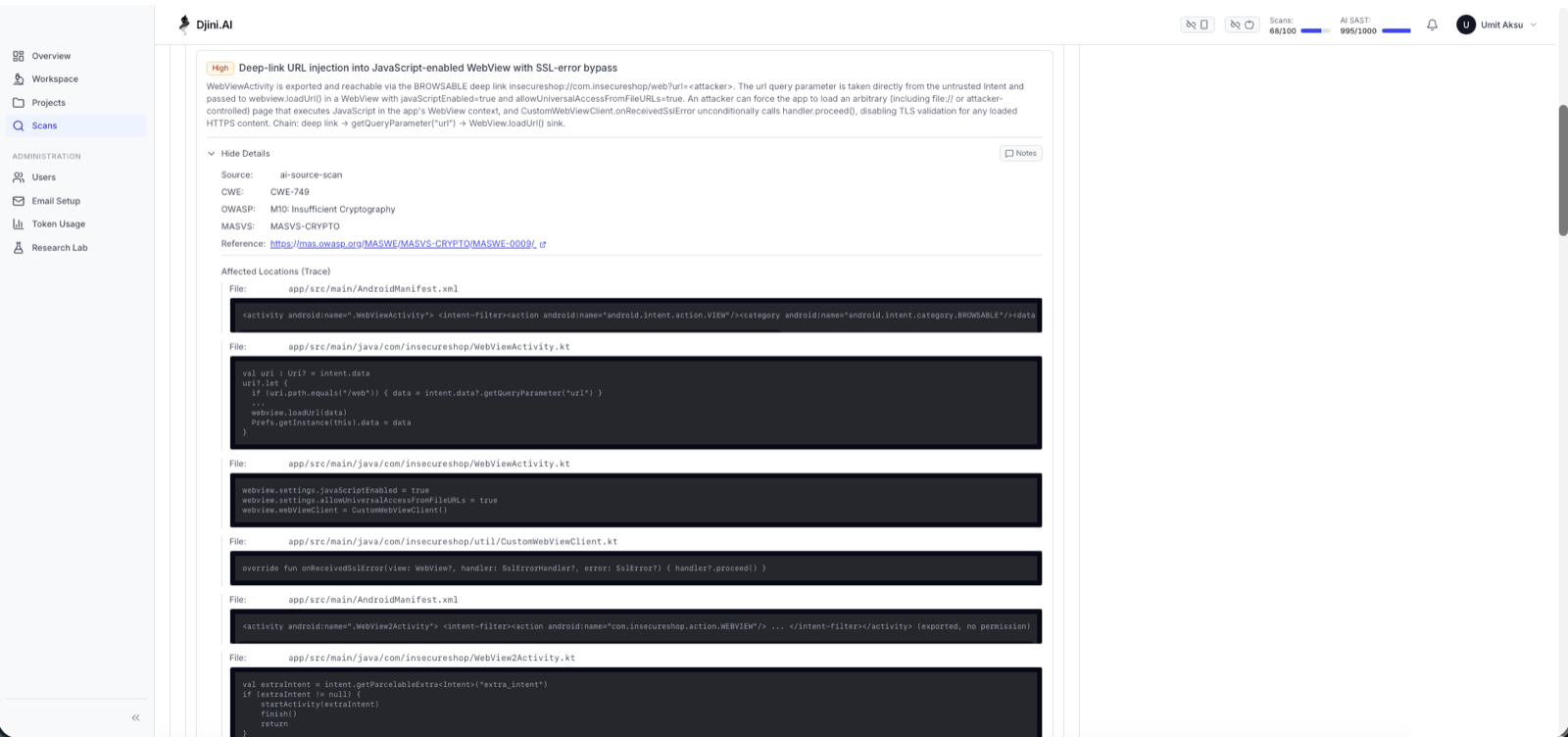
Read the trace top to bottom and you get the exploit: AndroidManifest.xml declares WebViewActivity as BROWSABLE -> WebViewActivity.kt pulls getQueryParameter(“url”) straight from the intent into webview.loadUrl() -> the WebView has javaScriptEnabled and allowUniversalAccessFromFileURLs set to true -> and CustomWebViewClient.kt calls handler?.proceed(), so TLS won’t stop the attacker’s page loading either.
Each of those four is individually arguable. Together they’re a remote compromise of the app’s WebView context, reachable from a link. That composition is the thing a per-file linter structurally cannot see, and it’s why each finding ships a Chain: line alongside the CWE, OWASP and MASWE references.
Step 4
iOS, and a bug that proves the point
Same engine, no IPA involved; point it at Objective-C or Swift and it works identically. We ran it against Linkliar, one of Mobile Hacking Lab’s own iOS lab apps: 13 findings – 1 Critical, 6 High, 4 Medium, 2 Low.
The Critical is worth walking through, because it’s the kind of bug people assume AI SAST can’t find.
ViewController.m:441 — Stack-based buffer overflow in parseHTTPHeaders: · MASWE-0029
- (void)parseHTTPHeaders:(NSHTTPURLResponse *)response { struct { char headerName[32]; int (*validateFunc)(const char*, const char*); // function pointer, right after the buffer char headerValue[256]; } responseHeaders[100]; ... responseHeaders[headerCount].validateFunc = headerValidator; int i = 0; while (nameData[i] != '\0') { // no bounds check responseHeaders[headerCount].headerName[i] = nameData[i]; i++; } ... strncpy(responseHeaders[headerCount].headerValue, valueData, sizeof(responseHeaders[headerCount].headerValue) - 1); // ↠this one IS bounded int valid = responseHeaders[headerCount].validateFunc( // ↠and now we call it responseHeaders[headerCount].headerName, responseHeaders[headerCount].headerValue);
headerName is 32 bytes. The while loop copies a server-controlled HTTP header name until it hits a NUL with no bounds check at all. Send a header name longer than 32 bytes and the overflow runs straight into validateFunc, the function pointer stored immediately after the buffer. Two lines later, that pointer is called.
A hostile HTTP server gets arbitrary code execution in the app.
Three things make this a genuinely hard find:
• It requires reasoning about struct memory layout that headerName and validateFunc are adjacent, so the overflow lands on the pointer.
• It requires noticing the corrupted pointer is invoked, not merely overwritten. An overflow into dead data is a crash; an overflow into a called function pointer is RCE.
• strncpy two lines below is correctly bounded. The model had to distinguish the safe copy from the unsafe one inside the same block, rather than flagging the whole function.
No regex finds this. A traditional rule for unbounded while copy would drown you in false positives without the layout reasoning that makes this one Critical.
The rest of the iOS findings trace a coherent attack chain rather than a list of isolated issues — an unauthenticated URL-scheme deep link (SceneDelegate.m:81) that silently enables debug mode (ViewController.m:524), which then exfiltrates a secret over cleartext HTTP (ViewController.m:565) to an attacker-controlled URL, on an app that has App Transport Security globally disabled (Info.plist:25).
Scanning a private repo
clone-source only accepts public HTTPS URLs. Linkliar lives in a private repo, so we used the other path zip the tree and upload it:
curl -s -X POST "$DJINI_CONSOLE_URL/api/dashboard/scans/upload-source" \
  -H "Authorization: Bearer $DJINI_API_KEY" \
  -F "file=@./my-app-source.zip"
#  {"appName":"Linkliar","platform":"Ios","projectName":"...","success":true}
This is also exactly what the CI runner does, which is why private repos work in the pipeline below.
⏱ A timing note, honestly
The iOS scan took about 9 minutes, against 40 seconds for the larger Android project. Source scans are usually quick, but they’re LLM-bound — duration varies with the model you bring, provider load, and how much cross-file reasoning your code demands. Size your CI –timeout accordingly rather than assuming 40 seconds.
Step 5
Wire it into CI/CD
A scan you run by hand is a scan you eventually stop running. Here’s the same thing as a merge gate.
Djini publishes a runnable example: djini-pipeline-example has two workflows (Android and iOS), a shared scan runner, and bundled lab apps so it runs before you’ve wired up your own build.
Repo configuration
First, copy the scan runner into your own repo; the workflow below expects it at that exact path:
# from the root of your repo
mkdir -p .github/scripts
curl -sL https://raw.githubusercontent.com/mobilehackinglab/djini-pipeline-example/main/.github/scripts/djini-scan.sh \
  -o .github/scripts/djini-scan.sh
chmod +x .github/scripts/djini-scan.sh
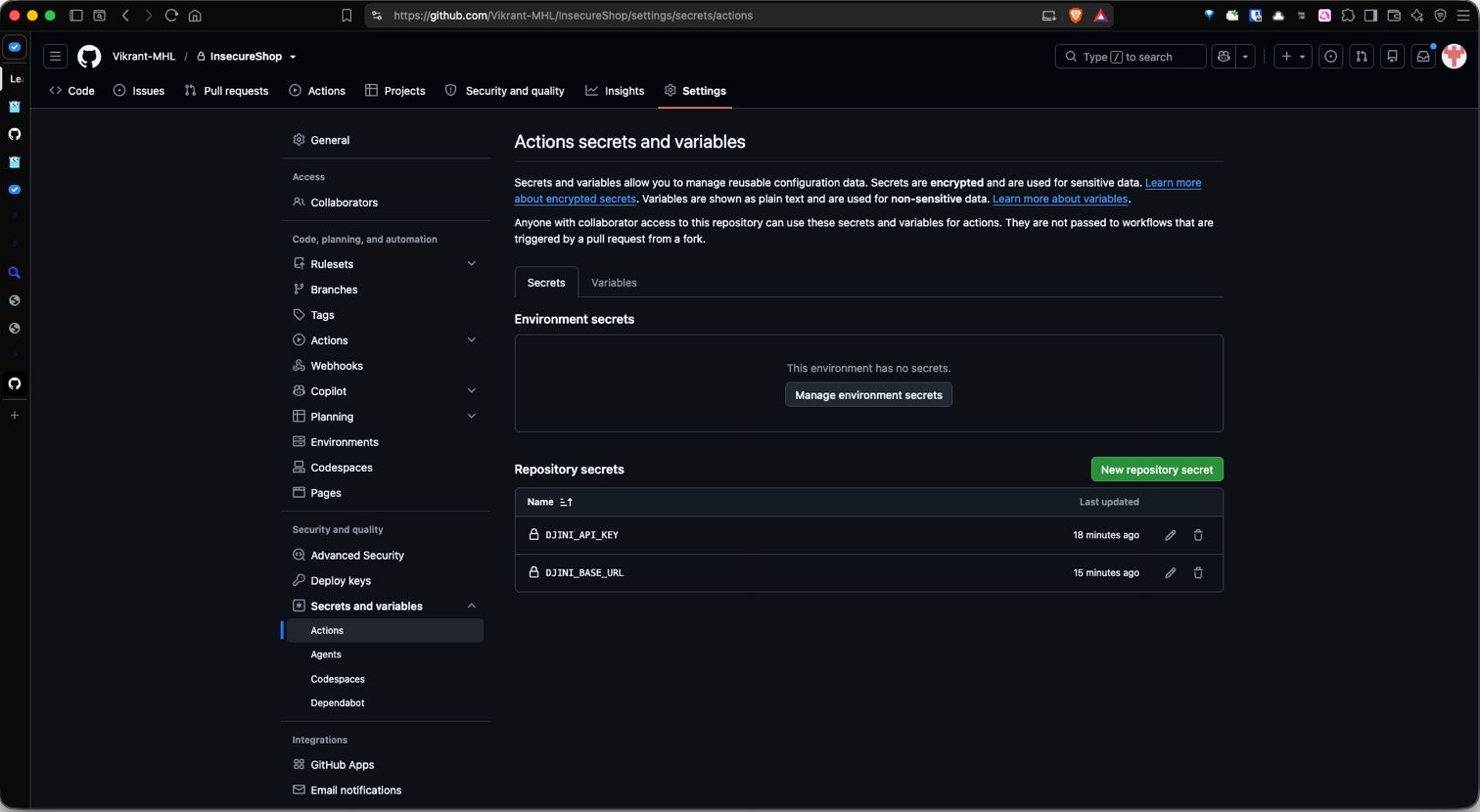
Then add your credentials Settings -> Secrets and variables -> Actions, or from the CLI:
gh secret   set DJINI_API_KEY  --body 'sk-...'          # Secret
gh variable set DJINI_BASE_URL --body 'https://app.djini.ai'  # Variable
That’s all CI needs. Your BYOK model is stored on your Djini account from Step 01, so the pipeline never handles it. The runner needs only curl, jq and zip — all present on ubuntu-latest except jq, which the workflow installs.
Secret or variable?
DJINI_API_KEY must be a secret — it’s a credential. DJINI_BASE_URL works as either. Stored as a secret (above) GitHub masks it everywhere, so your logs read Uploading source to *** …; stored as a variable it stays readable, which is easier when a run misbehaves and you want to confirm which instance it hit. Neither is wrong — pick masked or debuggable.
The workflow
name: Djini.AI Security Scan (Android)

on:
  pull_request:
  push:
    branches: [main]

jobs:
  security-scan:
    runs-on: ubuntu-latest
    permissions:
      contents: read
      security-events: write    # required to upload SARIF
    steps:
      - uses: actions/checkout@v4

      - name: Install scan dependencies
        run: sudo apt-get update && sudo apt-get install -y --no-install-recommends jq

      - name: Run Djini scan
        env:
          API_KEY:  ${{ secrets.DJINI_API_KEY }}
          BASE_URL: ${{ vars.DJINI_BASE_URL }}
        run: |
          chmod +x .github/scripts/djini-scan.sh
          .github/scripts/djini-scan.sh \
            --source . \
            --fail-on high \
            --findings djini-findings.json \
            --sarif    djini-results.sarif

      - name: Upload SARIF to code scanning
        if: always() && hashFiles('djini-results.sarif') != ''
        continue-on-error: true
        uses: github/codeql-action/upload-sarif@v4
        with:
          sarif_file: djini-results.sarif
          category: djini
The runner zips your source tree (excluding build/, .gradle/, node_modules/, Pods/), uploads it, triggers the scan, polls, downloads SARIF and the PDF report, writes a GitHub Step Summary, and exits non-zero when the gate trips.
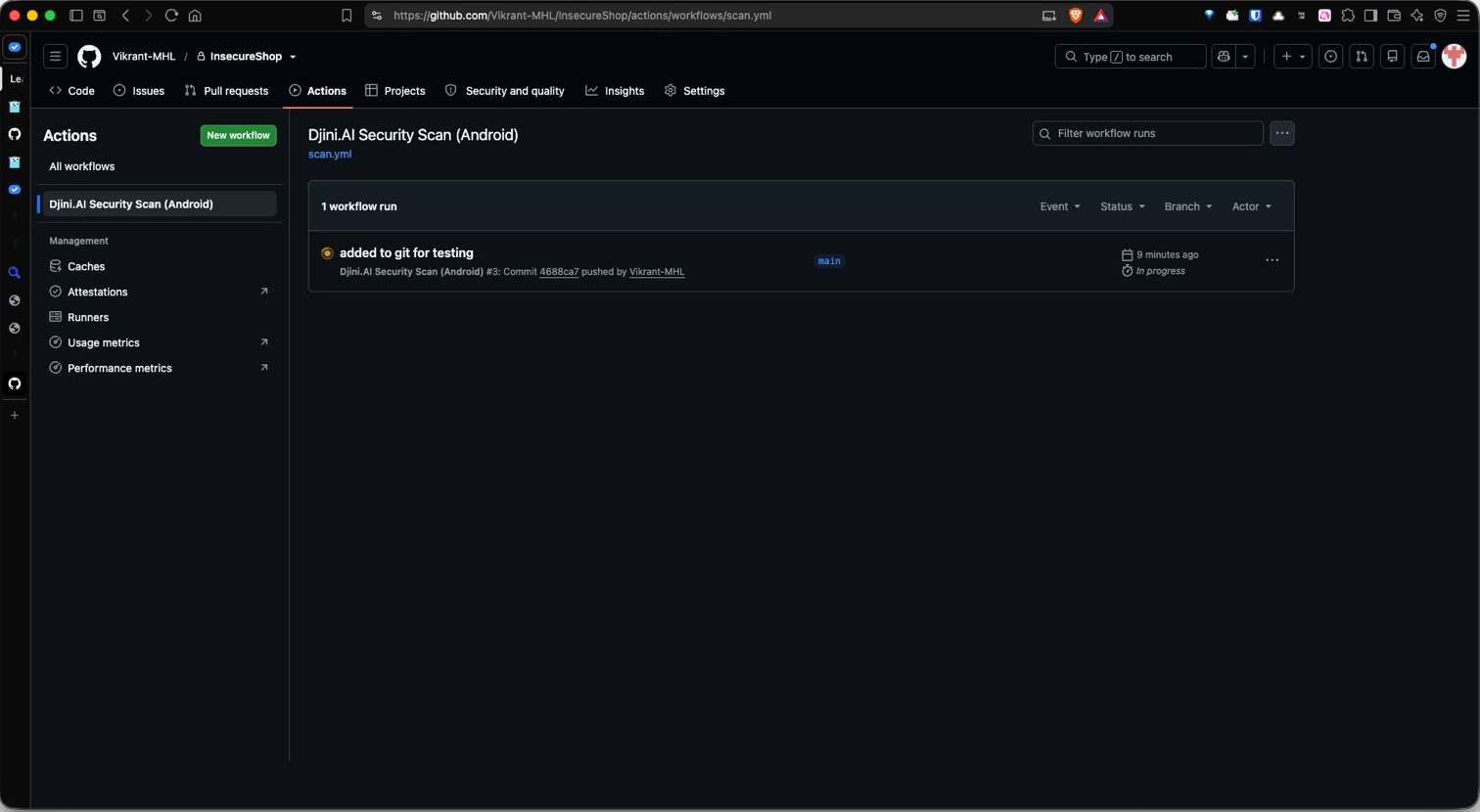
Commit that, and the workflow shows up under Actions, ready to run on every push and pull request:
Point –source at the repo root, not the code directory
It’s tempting to narrow this to app/src/main. Don’t. Your build files live outside it — and that’s where the dependency findings come from. In our Android scan, the Gson CVE-2022-25647 and the minSdkVersion issue were both found in build.gradle, which sits at app/build.gradle. Narrow the path and those disappear silently — no error, just a shorter report.
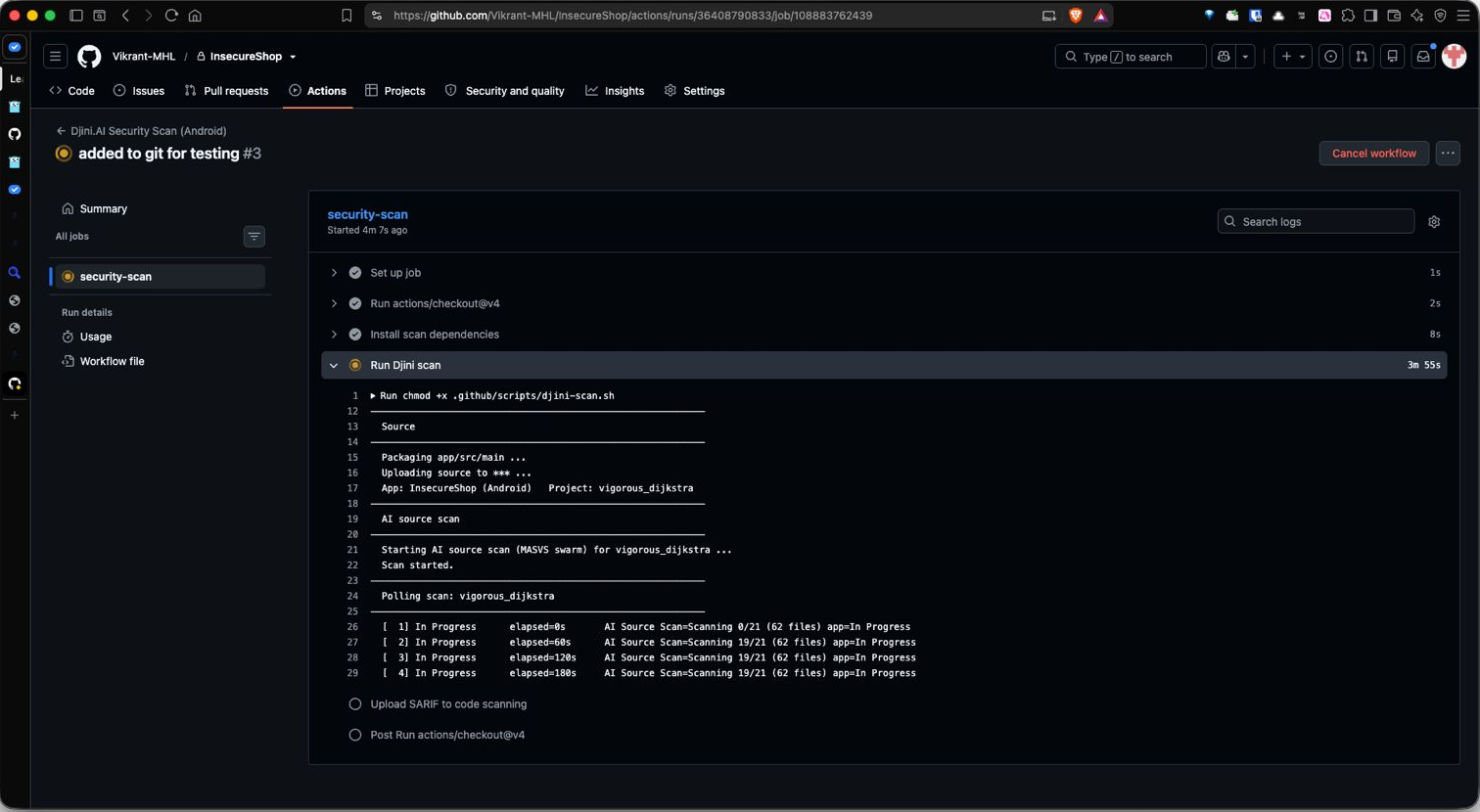
The poll loop is worth noticing; it prints progress and elapsed time on every tick, so a scan that stalls shows up in the log instead of as a silent timeout. Thirteen minutes later, the run does exactly what you want it to:
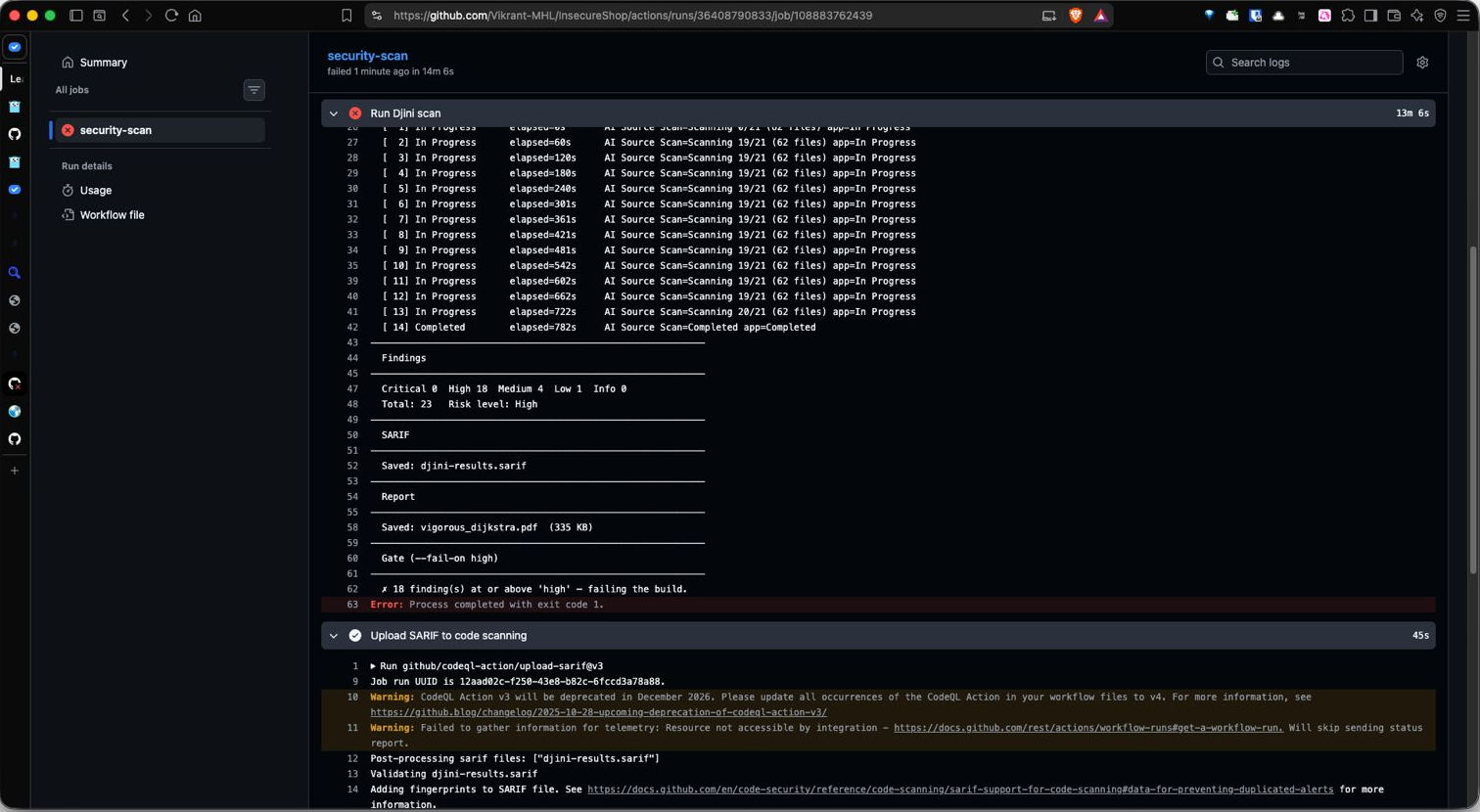
Three things happened in that screenshot that matter:
• The build failed on purpose. — 18 finding(s) at or above ‘high’ failing the build. Error: Process completed with exit code 1. That’s the merge blocked.
• The evidence survived the failure. SARIF and a 335 KB PDF were still written, because the artifact and upload steps are guarded with if: always(). Skip that and a failing gate throws away the very report you need to fix it.
• Code Scanning accepted it. The Upload SARIF step ran after the failure and finished in 45s, validating the file and adding fingerprints so GitHub can de-duplicate alerts across runs.
Two log warnings you’ll see
CodeQL Action v3 deprecates in December 2026 — the workflow above already pins upload-sarif@v4; if you copied an older example, bump it. And “Failed to gather information for telemetry: Resource not accessible by integration” is harmless, but it goes away if you add actions: read to the job’s permissions block.
Here’s the same runner locally against the bundled iOS lab app, through to the gate:
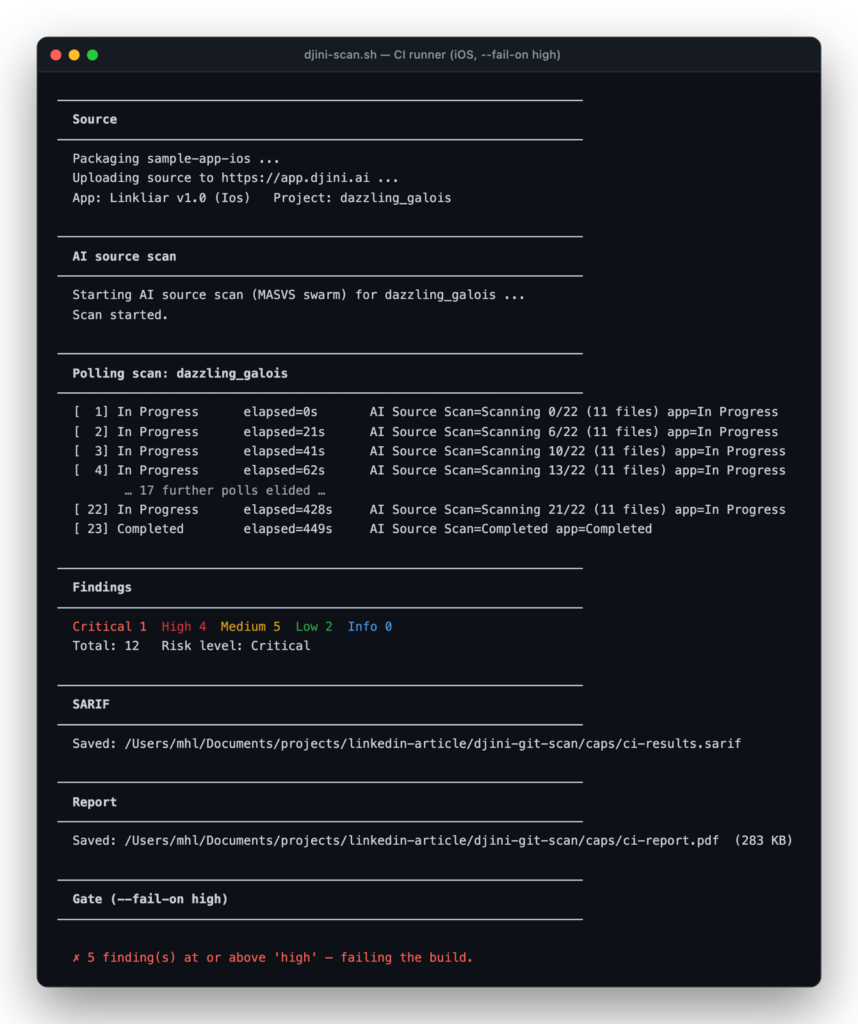
That last line is the whole value proposition: — 5 finding(s) at or above ‘high’ – failing the build. Exit code 1. The merge stops.
The run also keeps its evidence. Alongside the SARIF and the findings JSON, it attaches a paginated PDF report to the build, the thing you hand an auditor, or attach to a release ticket:
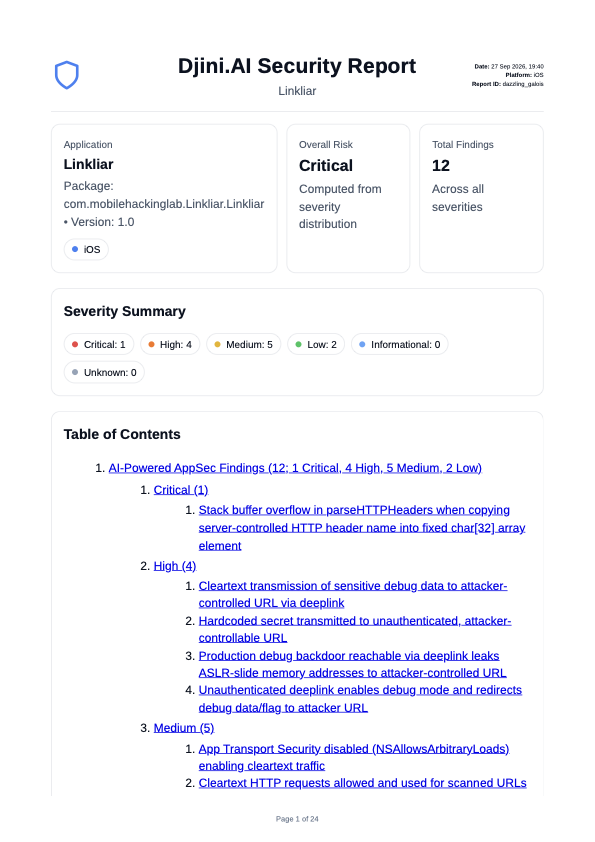
Note the table of contents, the Critical entry is the parseHTTPHeaders buffer overflow from Step 04, carried through to a document you can circulate without anyone needing API access.
⚠ Detection is stable. Severity is not. Gate accordingly.
We scanned InsecureShop four times — same commit, same model, no changes. Every run found the same underlying vulnerabilities. Every run scored them differently:
| Run | Total | Critical | High | --fail-on high | --fail-on critical |
|---|---|---|---|---|---|
| 1 | 22 | 2 | 11 | fails | fails |
| 2 | 23 | 0 | 15 | fails | passes |
| 3 | 23 | 0 | 18 | fails | passes |
| 4 | 25 | 1 | 15 | fails | fails |
Nothing was missed. The exported-ContentProvider leak and the WebView intent redirection were found in every run — rated Critical in some and High in others.
Look at the last column. --fail-on critical let two of the four runs through on an app that is famously riddled with holes. --fail-on high failed all four. The intuition that a stricter gate is a safer gate is backwards here: severity is the unstable axis, so gating on the narrowest band is gating on the noisiest signal. high is wide enough to catch a Critical even when it gets scored one notch lower.
Use --fail-on high. And don’t read a passing gate as proof that a specific finding is gone — compare the SARIF, not the headline number.
Tuning the gate
| --fail-on | Build fails on |
|---|---|
| critical | Critical only — fragile, see above |
| high (default, recommended) | Critical + High |
| medium | Critical + High + Medium |
| low | anything above Informational |
| none | never — report-only |
Start with none to get a baseline without blocking anyone, then tighten. A sensible pattern: –fail-on high on pull requests, –fail-on none on main for trend data.
What developers see
Nobody reads CI logs voluntarily. So the runner writes a GitHub Step Summary – the first thing on the run page, before any log output:
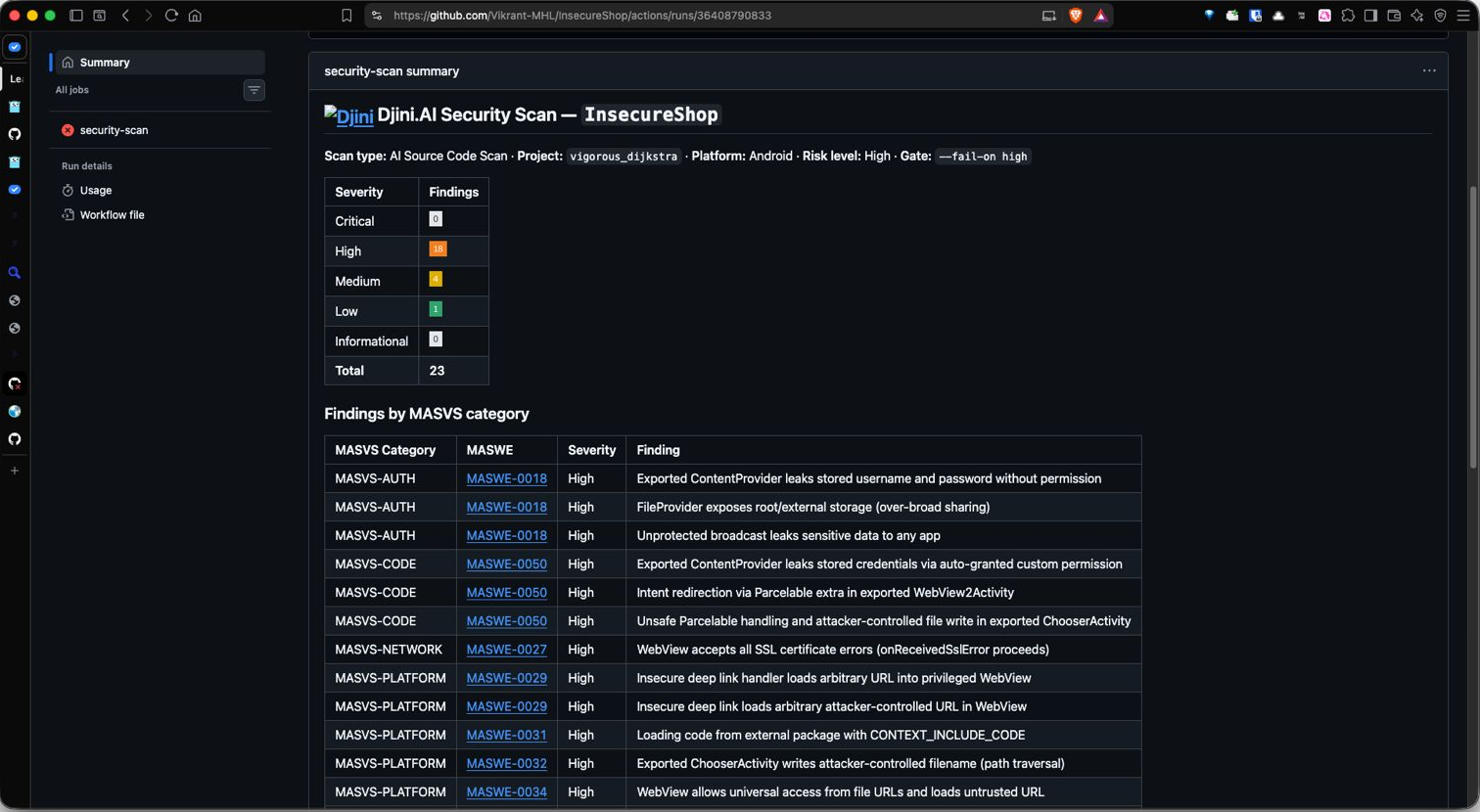
That header line is the whole triage context in one row: Scan type: AI Source Code Scan – Platform: Android – Risk level: High – Gate: –fail-on high. A developer who broke the build can see what tripped it, at what severity, in which MASVS category, without leaving the run page.
Findings also land inline on the pull request diff and under Security Code scanning, where they get history, de-duplication via those SARIF fingerprints, and a dismissal workflow for accepted risk.
⚠ Before you wire this up
Code Scanning requires GitHub Advanced Security on private repos. Without it, set create_issues: true to open one GitHub issue per finding instead — the severity gate and build artifacts work either way. SARIF upload from forked PRs is blocked by GitHub, by design.
Step 6
Shift it left again: scan from your agent
CI catches things at the pull request. But the cheapest moment to fix a hardcoded key is before you’ve even committed it while you still have the file open.
And you’ve already done the setup for this. Back in Step 01 you generated an API key and pointed Djini at your own model:
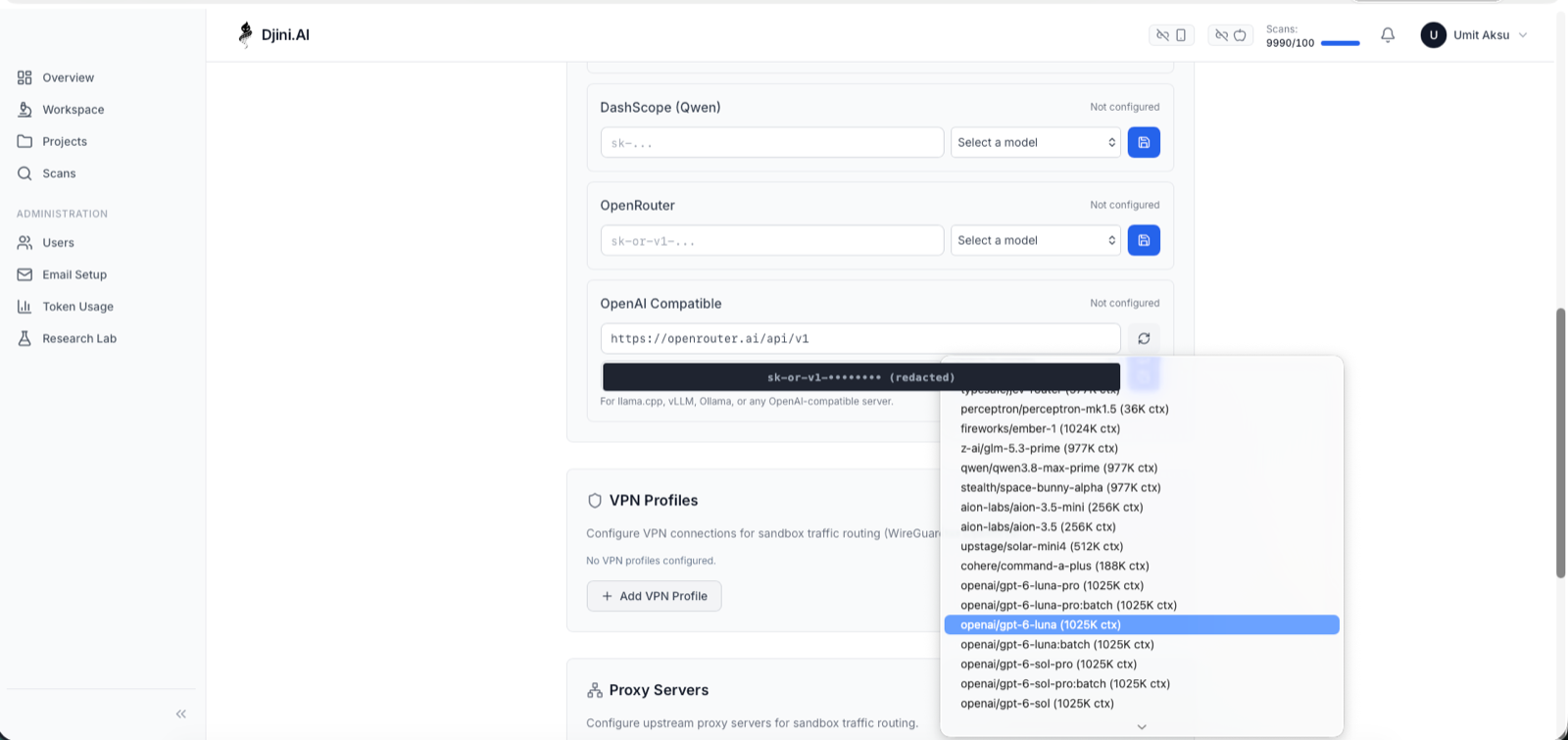
That’s the same key and the same model the pipeline uses. Nothing else to configure, no second set of credentials, no per-project setup; an agent scanning from your editor and a workflow gating your merge are the same scan, billed to the same monthly allowance.
All that’s missing is teaching your agent the API. Djini ships Skills for exactly that one command installs them for Claude Code, Cline, Copilot, Amp, Kimi and about twenty others. Keep the one matching your plan, delete the rest, and then just ask:
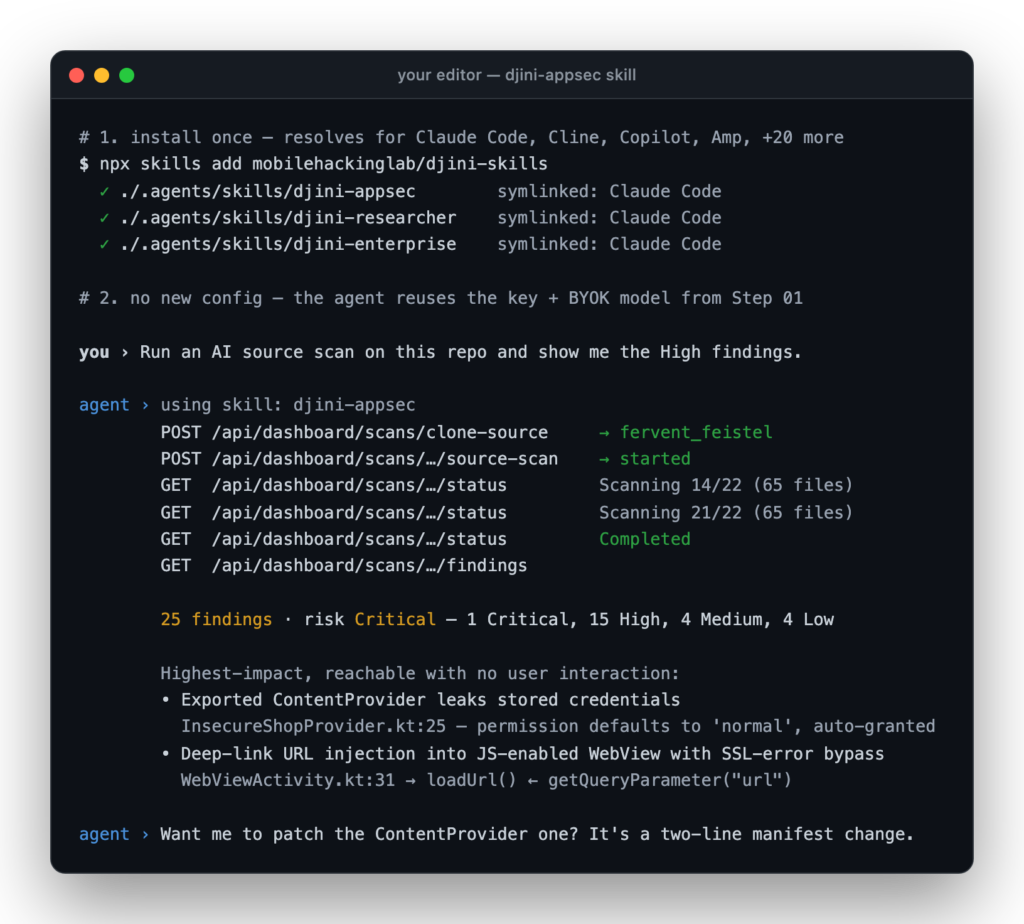
That last line is the part CI can’t do. The pipeline tells you the build is broken; the agent is already holding the evidence snippet and offering the patch, in the file you were editing anyway.
The skill’s description lists its own triggers scan source code, run SAST or static analysis, scan a repo or branch before a PR, produce SARIF for GitHub code scanning so a plain request routes to it without you naming the tool. Say “use Djiniai” if you want to be certain, but you shouldn’t have to.
This is not a hypothetical. Every scan in this article, both platforms, all four runs, was executed this way, by an agent working from djini-appsec/SKILL.md.
Which interface does what
The skills also document A2A, Djini’s hosted agent endpoint, where a server-side agent orchestrates tools for you over SSE. A2A covers the binary pipeline — uploading an APK/IPA, running and tracking device scans, provisioning Corellium research labs. Source scanning currently lives in the REST flow above, which is what your local agent calls.
Rule of thumb: source scans → the REST calls your agent makes. Binary and device scans → A2A.
So the full picture is three places the same scan runs, tightening as code moves left: your editor while writing, the pull request as a merge gate, and a nightly or release build for the deeper binary scan.
Where this fits
Be honest about what source-only AI SAST is and isn’t.
It is a fast, broad, pre-merge check with real semantic understanding the thing you run on every pull request, that catches the hardcoded key before it ships.
It isn’t a penetration test. It doesn’t exercise the app at runtime, observe live traffic, or test your backend. For that, Djini has full binary scanning with dynamic analysis on Corellium and physical device labs slower, deeper, right for releases. Run AI SAST per-PR and the full scan nightly or per-release.
Try it
Try it
- 10 AI SAST source scans every month, free — a recurring allowance, not a trial
- 1 black-box scan on registration
- Android and iOS, from a git URL or a zip
- SARIF straight into GitHub Code Scanning
- BYOK — your source is analysed by a model you control
The scan that found 22 issues in InsecureShop took 40 seconds and four curl calls. Your app is one clone-source away.
Recent Posts
- Djini AI SAST: A Free AI Scanner for Mobile App Source Code
- Hacking Optimus Prime: One Click to RCE on the TECNO Spark 30 Pro
- Pwn2Own 2025 – Part 1: Samsung Members WebView Takeover & Intent Redirection (CVE-2025-21079)
- Technical Advisory – Meta Horizon Shell — Automatic Dangerous Permission Grant via Virtual Input Injection
- Technical Advisory – Samsung Dressroom (Wallpaper & Style) – Arbitrary File Write at System UID
Recent Comments
Statar back
Great write‑up, Qt — this was a really satisfying read. The way you chained the JSInterface abuse, OTA mechanics, and…
Great write‑up, Qt — this was a really satisfying read. The way you chained the JSInterface abuse, OTA mechanics, and…
Well done Lyes, i liked the last graph it sums it up pretty well. You demonstrated how crucial it is…