Very interesting bug chain, especially the escalation process by using AppLink as a bridge between the browser and the app…
Blog
Unlimited Mobile
Security Testing, Directly From Your AI Agent
Any AI agent that supports A2A can now discover
Djini, connect to it, and run mobile security
Unlimited Mobile Security Testing, Directly From Your AI Agent
Your AI agent can now connect directly to the Djini AI Agent and run mobile security tests and tasks in parallel, with no user interaction and no need to open the Djini UI.
Djini publishes an Agent-To-Agent (A2A) compatible endpoint, so any agent that supports the protocol, Claude Code, OpenCode, and others, can connect to Djini – delegate tasks, and receive results automatically.
We are also publishing Djini Skills, an open-source skill pack that makes setup a single command for developers and security tems.
Unlimited parallel scans. Long-running assessments. Full access to virtual devices, static and dynamic analysis, and native code analysis – all running in Djini’s environment while you stay in your agent.
Ready to offload security testing to Djini’s infrastructure?
Connect your AI agent in under two minutes.
Run Unlimited, Long-Running Tests in Djini's Environment
The biggest constraint in mobile security research isn’t expertise — it’s compute. Provisioning virtual devices costs time and money. Running a full static + dynamic + native analysis pass on a single app can take hours. Doing it across a portfolio of apps in parallel has traditionally meant significant infrastructure investment.
When your agent delegates to Djini through A2A, that constraint moves to Djini’s side. Your agent kicks off a scan on Google Photos, a banking app, and an enterprise VPN client simultaneously.
Djini provisions the virtual devices, runs the analysis in parallel across its infrastructure, and streams results back. Your local machine does nothing heavy. Your agent can start new tasks while previous ones are still running.
For security researchers, this means you can run large-scale assessments that simply weren’t practical before, hundreds of apps, deep native analysis, long-running dynamic sessions, all orchestrated through natural language from your existing AI coding environment.
Integrate Djini Into Your Own Tools and Pipelines
Security testing shouldn’t be locked inside a web UI.
Developers and security teams who want to automate and integrate can now access all of Djini’s capabilities — scanning, dynamic analysis, vulnerability correlation, exploit research — directly from their own code, CI/CD pipelines, or custom tooling.
There are two ways to integrate:
• Djini Skills — install a skill file that teaches Claude Code or OpenCode how to talk to Djini. Your agent handles the API calls. You just describe what you want.
• A2A direct integration — any tool or agent that supports the A2A protocol can discover Djini automatically via the Agent Card at /.well-known/agent.json and connect without any custom SDK or API wrapper.
Both approaches give you full access to every Djini feature: app upload, scan management, sandbox interaction, native analysis, findings retrieval, and exploit PoC development. The same capabilities available in the Djini UI, now available programmatically from anywhere.
Build Your Own Security Automation
Security teams can now use Djini Skills to build recurring, automated workflows without writing custom API integrations.
Some examples of what this unlocks:
• Automatically scan every new app release as part of your CI/CD pipeline – your agent monitors for new builds and kicks off a full Djini scan on each one
• Run overnight deep-scan sessions across your entire app portfolio, with findings ready in your agent’s context when you start work in the morning
• Trigger exploit PoC development automatically when a critical finding is confirmed, so your team receives a full report, not just a vulnerability list
• Integrate Djini findings directly into your existing issue tracker, SIEM, or reporting workflow through your agent
Because the integration goes through your AI agent, the automation is written in natural language instructions — not code. Your agent knows how to talk to Djini; you tell it what to do and when.
Getting Started
Step 1 — Install Djini Skills
One command adds Djini to Claude Code or OpenCode:
npx skills add mobilehackinglab/djini-skills
The installer pulls from GitHub and lets you select the skill matching your Djini plan — AppSec, Researcher, or Enterprise.
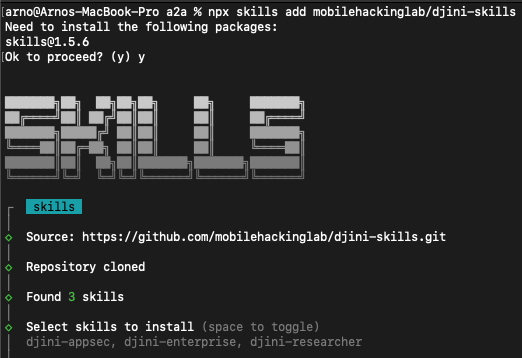
The skills CLI clones the repo, finds 3 available skills, and prompts you to select which to install.
Step 2 — Set your environment variables
DJINI_CONSOLE_URL=https://app.djini.ai
DJINI_API_KEY=your_api_key
Generate your API key under Settings → API Key → Generate. That’s all the configuration needed.
Step 3 — Start delegating
Open Claude Code and start in natural language. Here’s what a real session looks like:
“Discover what Djini can do by fetching $DJINI_CONSOLE_URL/.well-known/agent.json”
Your agent reads Djini’s Agent Card and learns every available skill and endpoint automatically.
“Ask Djini to list my scans”
Djini returns your existing projects and scan results, streamed directly to your agent.
“Can you start a new scan on Google Photos for Android using a Corellium device and enable deep scan?”
Djini provisions the virtual device and starts parallel analysis. You stay in your agent. No UI required.

Running a full deep scan on Google Photos by using the Djini Agent in Claude Code — all through natural language.
Want to see large-scale testing in action?
We’ll walk you through a live parallel assessment with your own apps.
What's Coming Next
The current release lets one agent session orchestrate multiple parallel Djini tasks.
What’s coming next takes this further: multi-agent orchestration, where multiple specialized Djini agents coordinate with each other to cover an entire security assessment simultaneously.
Instead of one agent handling tasks sequentially, multiple specialized Djini agents will run simultaneously on the same target, or mutipiple targets within your scope at once.
If you’re building agent-based security workflows and want to be involved early, open an issue on the djini-skills repo.
Ready to scale your mobile security testing?
Connect your AI agent to Djini’s infrastructure and start testing at scale.
Recent Posts
- OAuth in Mobile Apps: How Custom Schemes can leak Your Tokens
- Detecting and Exploiting Insecure Deserialization with Djini.AI
- Intro to Intent redirections…and how to exploit them
- Unlimited Mobile Security Testing, Directly From Your AI Agent
- 1-Click ATO: A studycase of common Android apps misconfigurations.
Recent Comments
Statar back
Great write‑up, Qt — this was a really satisfying read. The way you chained the JSInterface abuse, OTA mechanics, and…
Well done Lyes, i liked the last graph it sums it up pretty well. You demonstrated how crucial it is…