OAuth 2.0: The Protocol
OAuth 2.0 solves a delegation problem: how can a third-party application access resources on your behalf without ever learning your password? The answer is a framework (defined in
RFC 6749) that issues scoped, time-limited tokens in place of credentials. It is an
authorization protocol — it says what an application is allowed to do, not who the user is. Identity (authentication) is a separate concern layered on top via OpenID Connect (OIDC).
Find broken OAuth implementations automatically
Upload your APK. Get a full security audit — including OAuth misconfigurations.
Book a Demo
The Four Roles
– Resource Owner: the user who controls access to the protected data.
– Client: the application requesting access on the user’s behalf.
– Authorization Server (AS): authenticates the user, obtains consent, and issues tokens.
– Resource Server (RS): hosts the protected resources; validates tokens on each request.
Grant Types
RFC 6749 defines four grant types for different client architectures. For any modern application, only Authorization Code matters — the others are either deprecated (Implicit), legacy-only (ROPC), or user-free machine-to-machine flows (Client Credentials).
Authorization Code Flow
This is the baseline secure flow. Every other concept in this article builds on it.
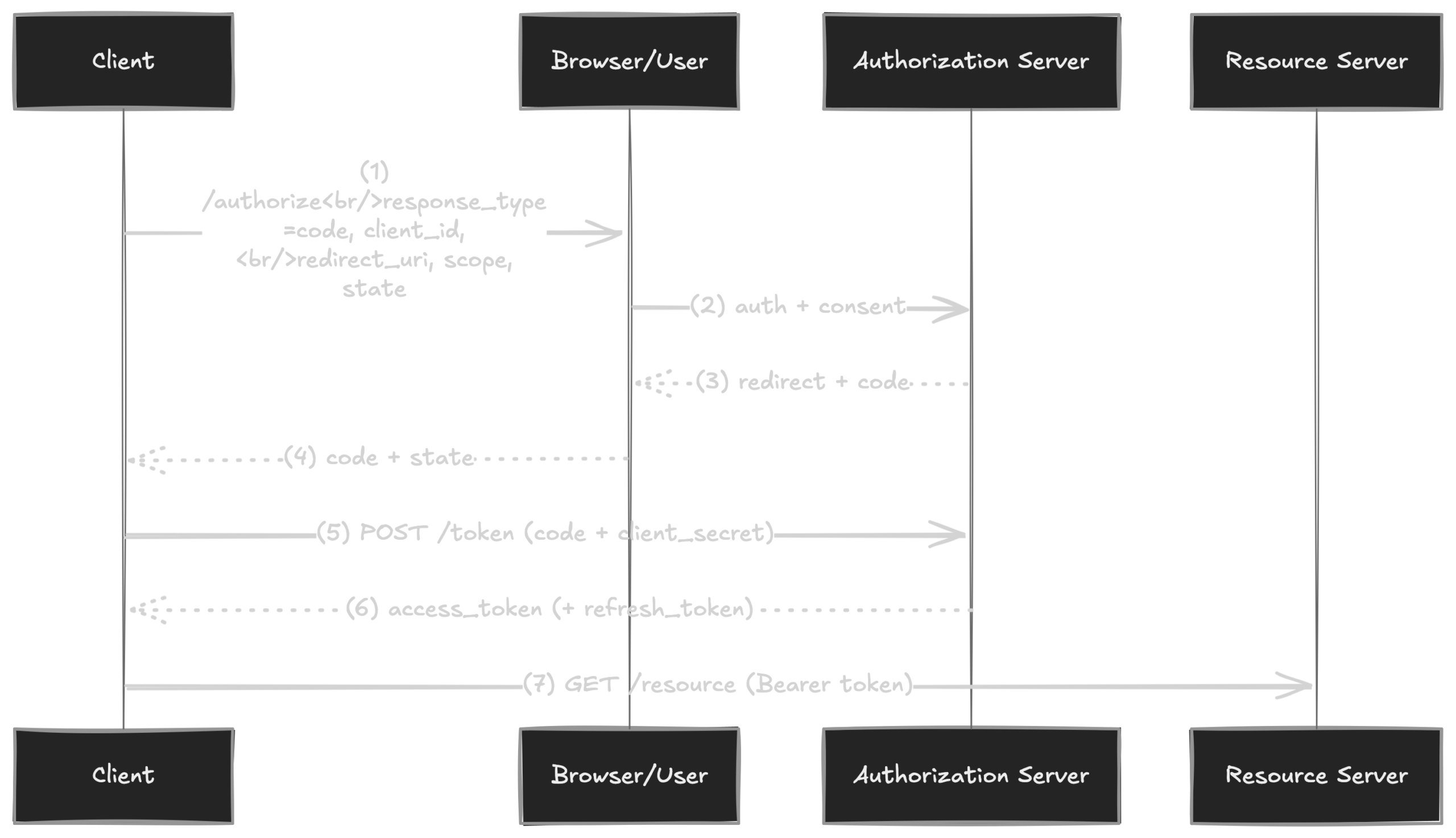
Authorization Code Flow — the client exchanges a short-lived code for tokens via a secure back-channel POST.
Step by step:
1. The client redirects the user’s browser to the AS /authorize endpoint.
2. The AS authenticates the user and displays a consent screen.
3. On approval, the AS redirects to redirect_uri with a short-lived code and the original state.
4. The client receives the code via the redirect.
5. The client’s backend POSTs the code along with its client_secret to /token.
6. The AS responds with an access_token and, optionally, a refresh_token.
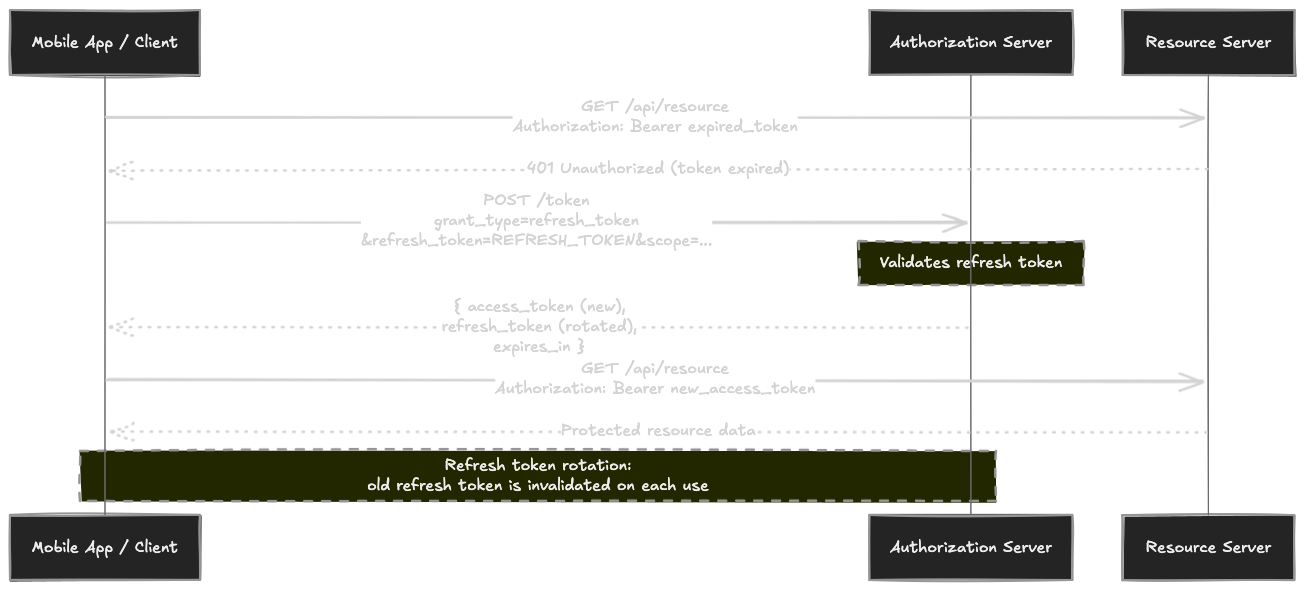
Refresh Token Flow — when the access token expires, the client uses the refresh token to get a new pair. Rotation limits blast radius of stolen tokens.
7. The client uses Authorization: Bearer <access_token> to call the Resource Server.
Key Parameters
state (RFC 6749 §4.1.1 — RECOMMENDED): an opaque, high-entropy random value generated by the client. Returned verbatim in the redirect. Protects against CSRF by binding the authorization response to the originating session.
scope: space-delimited strings that define the permissions requested (read:contacts, write:photos). The AS may grant a subset of what was requested — the client must check the granted scopes in the response.
redirect_uri: OPTIONAL in the RFC, but required in practice for security. Must be pre-registered with the AS. Determines where the code lands after the user consents.
prompt (OIDC Core 1.0 §3.1.2.1 — not in base OAuth 2.0): controls whether the AS shows authentication or consent UI. Values:
– none: no UI; error if user isn’t already authenticated or consent isn’t pre-granted. Used for silent token refresh.
– login: force re-authentication even if an active session exists.
– consent: force the consent screen even if the user previously approved.
– select_account: show an account picker for users with multiple sessions.
OAuth 2.0 in Mobile Apps (RFC 8252)
Native apps are classified as
public clients by RFC 8252
§8.4 — there is no on-device secure storage that survives a determined user inspecting their own copy of the binary. RFC 8252 (
OAuth 2.0 for Native Apps) adapts the standard Authorization Code flow for this environment. The two adaptations that matter most get their own subsections below; a few smaller rules from the same RFC are worth knowing up front:
–
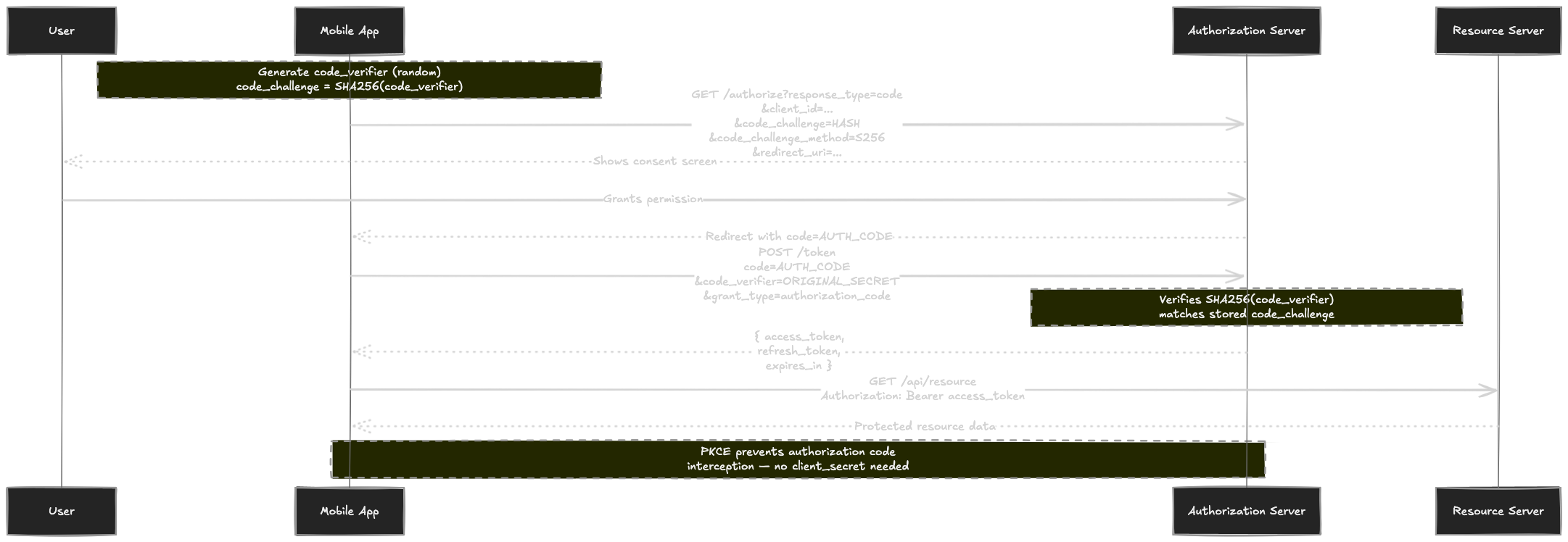
PKCE is mandatory (
§6, defined by
RFC 7636) — it mitigates the code-interception attack (
§8.1) where another app on the same device registers the same URI scheme. The client sends
SHA256(code_verifier) (base64url-encoded) at
/authorize and the raw verifier at
/token; only the app that initiated the request can redeem the code.
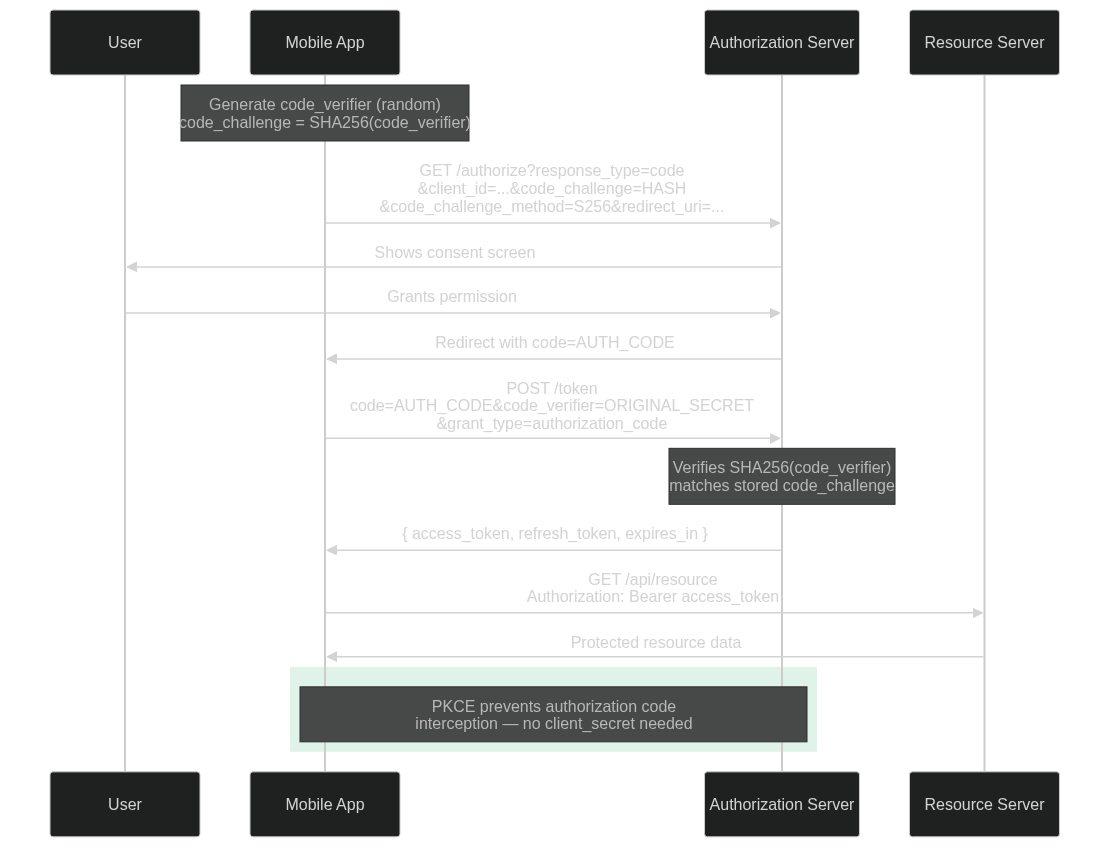
Authorization Code + PKCE — the mobile app generates a one-time code_verifier/code_challenge pair to prevent authorization code interception.
–
Implicit Grant is NOT RECOMMENDED for native apps (
§8.2).
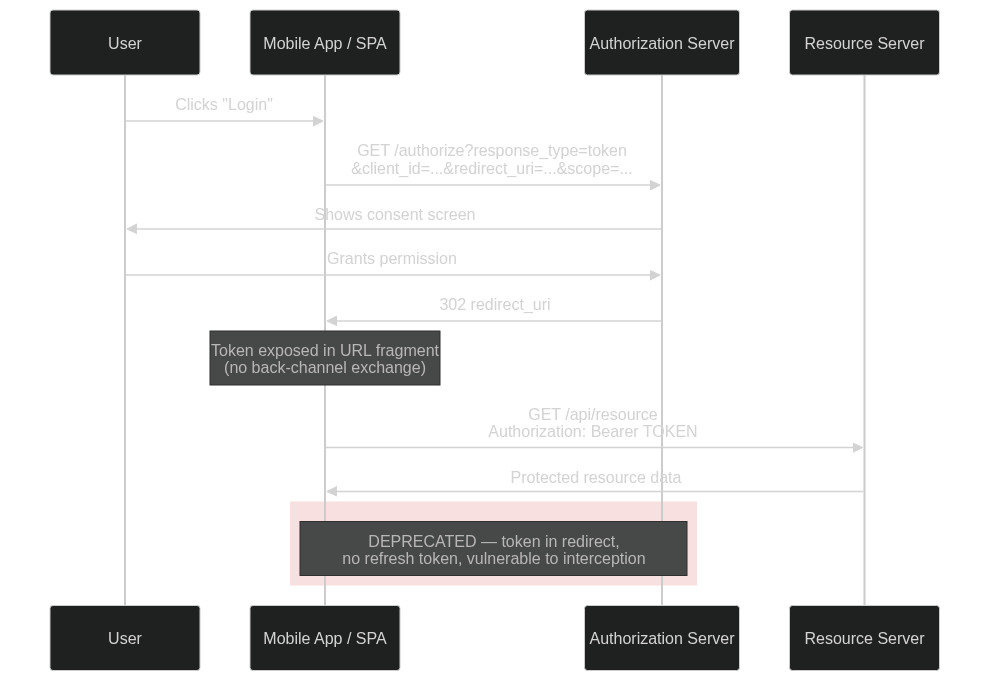
Implicit Flow (deprecated) — the access token is returned directly in the URL fragment. No refresh token, vulnerable to interception.
–
localhost as a hostname in redirect URIs is NOT RECOMMENDED (
§8.3).
Mandatory: System Browser, Not Embedded WebViews
RFC 8252 makes the requirement bidirectional. From
§5:
“native apps MUST use an external user-agent to perform OAuth authorization requests.”
“native apps MUST NOT use embedded user-agents to perform authorization requests”
The reason (
§8.12): an embedded WebView runs inside the host app’s process, giving it full access to keystrokes, form submission, and session cookies, while hiding the address bar and certificate UI users rely on to verify the origin.
For usability,
§6 recommends
in-app browser tabs — separate processes that visually stay inside the app. In practice that means
ASWebAuthenticationSession on iOS (formerly
SFAuthenticationSession /
SFSafariViewController) and
Chrome Custom Tabs on Android.
Redirect URI Options
RFC 8252 defines three redirect URI mechanisms — claimed HTTPS (
§7.2), private-use URI schemes (
§7.1), and loopback (
§7.3, desktop-only). For mobile, only the first two apply.
Claimed HTTPS (App Links on Android, Universal Links on iOS) is the preferred option per
§7.2: the OS verifies app-to-domain ownership before routing the redirect, so only the verified app receives the authorization code. (The verification files —
.well-known/assetlinks.json on Android,
apple-app-site-association on iOS — are platform implementation details, not part of RFC 8252.)
Private-use URI schemes are the fallback.
§7.1 constrains the format:
“apps MUST use a URI scheme based on a domain name under their control, expressed in reverse order”
Example: com.example.myapp:/oauth2redirect. The OS does not enforce uniqueness — any app can register the same scheme — so PKCE (see intro above) is the mitigation that prevents code theft.
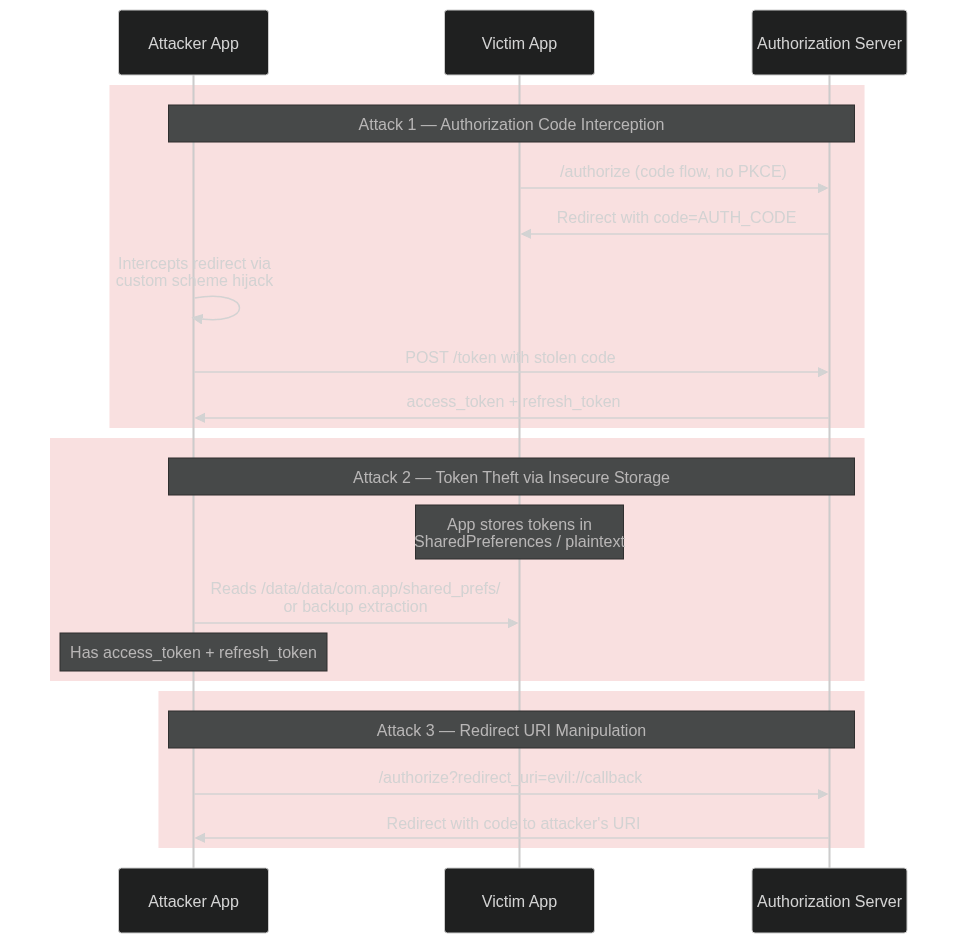
Three common OAuth attack vectors on mobile: (1) authorization code interception via custom-scheme hijack, (2) token theft from plaintext storage, (3) redirect URI manipulation.
Silent Cross-Client Hijack via prompt=none
Here is a fun one. The user installed your shiny new app from the Play Store last week and signed in through Chrome Custom Tabs, exactly as RFC 8252 §2.1 prescribes. Sitting on the same device, downloaded from some sideload forum, is a free wallpaper pack — or a clipboard tool, or a fake coupon app, doesn’t matter what. While the user is mid-scroll somewhere else, the wallpaper pack fires a single authorization URL into Custom Tabs. Three render frames later it walks away with an access token for the user’s account on your backend. No login screen, no consent dialog, no fingerprint prompt. The reference OAuth flow ran end-to-end exactly as the spec describes — and that turns out to be the problem.
Preconditions
Nothing on this list is a bug. Every item is what you would expect to see in a well-engineered, RFC-compliant mobile OAuth deployment:
– Separate client_ids per platform. Standard practice — each app store gets its own bundle/package ID, its own signing identity, its own feature flags, often its own analytics. Each native client is registered independently with the authorization server and brings its own redirect URI.
–
Private-use URI scheme as the redirect. Something like
com.product.ios:/oauth/cb for the iOS client and
com.product.android:/oauth/cb for the Android one. RFC 8252
§7.1-compliant, and the natural fallback when Claimed HTTPS hasn’t been wired up.
– An active SSO cookie at the AS in the system browser. This is the entire point of routing OAuth through Custom Tabs: the cookie lives in the browser’s jar, and every Custom Tabs call — from any installed app — picks it up.
None of these is exploitable in isolation. The gap opens when prompt=none enters the picture.
OIDC’s prompt=none tells the AS to issue a code silently — no login UI, no consent UI — provided the request is otherwise valid and a session cookie is attached. The AS validates by checking that the client_id is registered and that the redirect_uri matches that client’s registration. What the AS cannot check is which app on the device is actually going to consume the redirect — it only sees an HTTP request from the browser, and the browser doesn’t tell it. On the device, that decision belongs entirely to Android’s intent resolver, which matches schemes and nothing else. Android has no concept of a scheme being “iOS-only”, so an attacker doesn’t have to be the iOS app — they just have to claim its scheme on Android, where the legitimate iOS app structurally cannot exist.
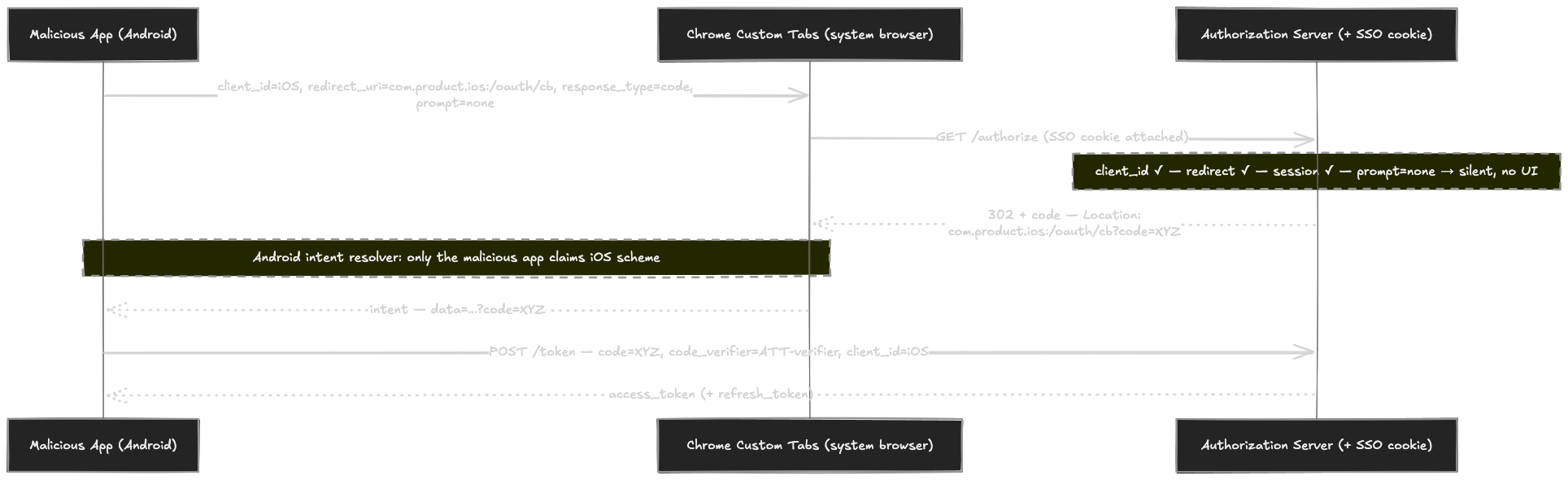
Concretely:
Step by step:
1. Recon. Pull the iOS app’s client_id and registered redirect-URI scheme out of its publicly distributed binary — or, if the provider exposes one, off its OAuth discovery document.
2. Manifest. The malicious Android app declares <intent-filter android:scheme=”com.product.ios”/> so the OS routes the iOS-shaped redirect to it.
3. Launch. It opens Chrome Custom Tabs pointed at …/authorize?client_id=<iOS>&redirect_uri=com.product.ios:/oauth/cb&response_type=code&prompt=none&code_challenge=<attacker>&state=<attacker>.
4. Silent issue. The AS finds a valid client_id, a redirect_uri matching that client’s registration, and an active SSO cookie attached to the request. With prompt=none, it skips all UI and 302s back with a fresh authorization code.
5. Redirect resolution. Chrome hands the redirect to Android’s intent resolver. Only the malicious app claims com.product.ios; the legitimate iOS app isn’t installed (and structurally cannot be). The intent — and the code — lands in the attacker’s process.
6. Token exchange. The malicious app POSTs the code to /token with its own code_verifier and client_id=<iOS>. PKCE checks out, the AS returns an access token (and, depending on policy, a refresh token) scoped to the iOS client — i.e., the full set of permissions the legitimate iOS app would have on the victim’s account.
None of the usual defenses engage. PKCE binds the code to the requester — who is the attacker;
§7.1‘s reverse-domain rule only governs intra-platform collisions; and Claimed HTTPS, which would have refused the redirect to an unverified app, wasn’t configured for the iOS client.
prompt=none suppresses the only user-visible cue.
Mitigations, both AS-side and client-side, are covered in a later section.
Case Studies from Real Findings
Three patterns from real bug-bounty findings, anonymized. Each one lands one of the failure modes above into a concrete shape: a flawed redirect_uri check, a flawed binding between client and platform, and a flawed choice of browser surface.
Prefix-only redirect_uri Validation
The Android client registered exactly one redirect URI with its authorization server:
com.example.app1://callback/com.example.app1
The AS validates incoming redirect_uri values not by exact match but by prefix — anything starting with com.example.app1://callback/ is accepted. So the attacker only needs to pick a different suffix:
com.example.app1://callback/com.attacker.app
Both URIs share a scheme, and on Android the scheme is the only thing the intent resolver cares about by default. The path is what decides which of the apps claiming that scheme actually receives the intent — and the rogue app is going to register a filter whose path is the more specific match for the attacker’s URI.
The 0-click trigger is a separate gadget. The host app exposes an in-app WebView reachable via a deeplink whose target URL comes from a query parameter, and input-validation flaws in both the deeplink and the WebView’s shouldOverrideUrlLoading let an attacker load arbitrary URLs inside that WebView. None of that is an OAuth issue on its own — it’s just the vehicle that gets the authorize URL into a place where the user’s cookies will be attached.
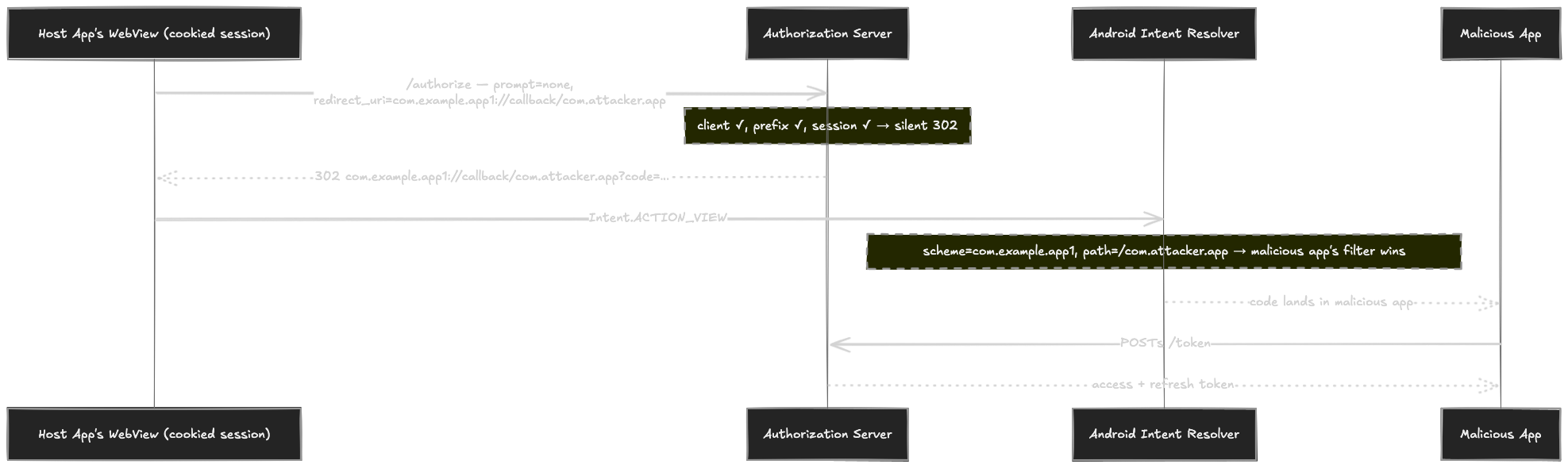
The URL the attacker arranges the WebView to load:
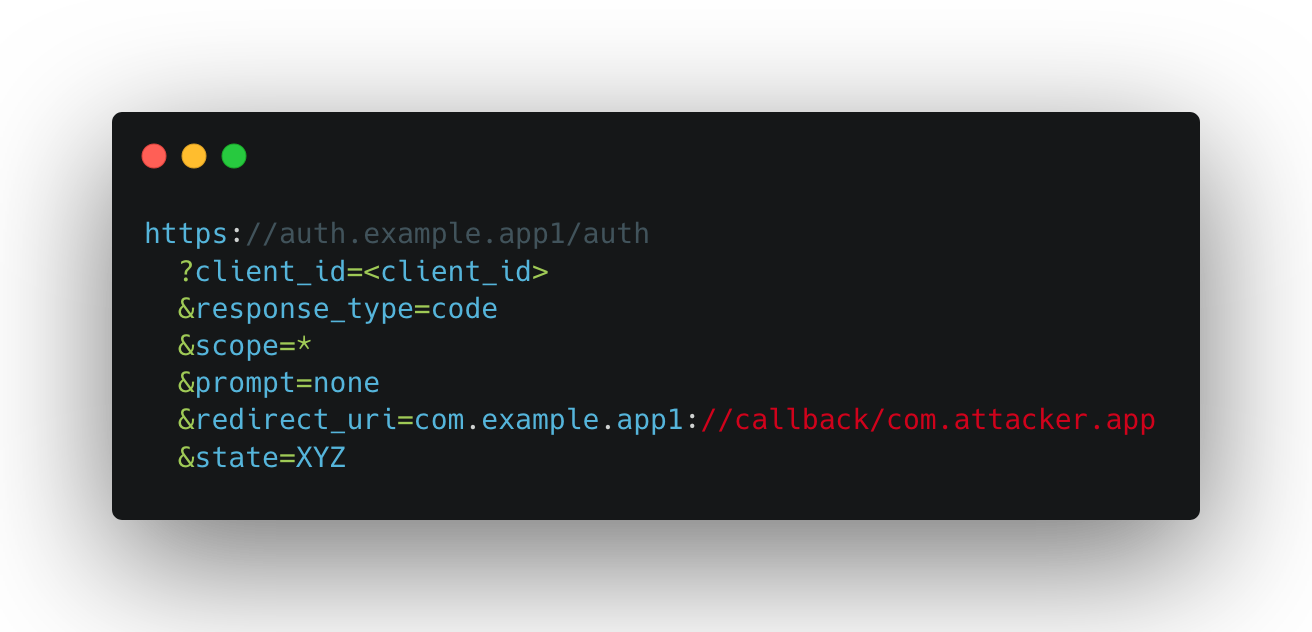
prompt=none tells the AS to issue silently if the session cookie is valid. It is — the request is going out of the host app’s own authenticated WebView. The AS runs its checks: registered client ✓, redirect URI matches the prefix ✓, session ✓. It 302s back with the authorization code.
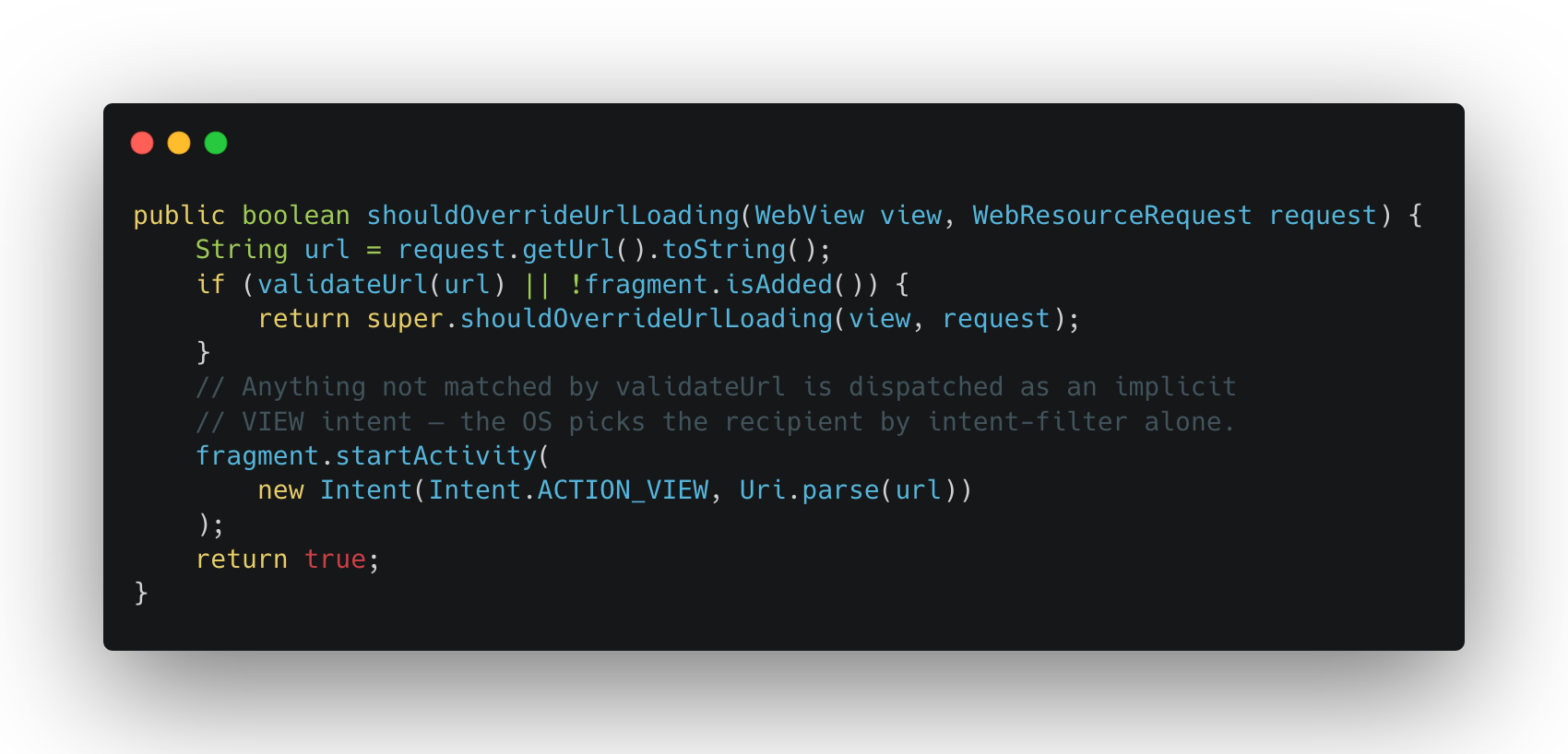
Now the redirect sits in the WebView. The WebView decides what to do with it:
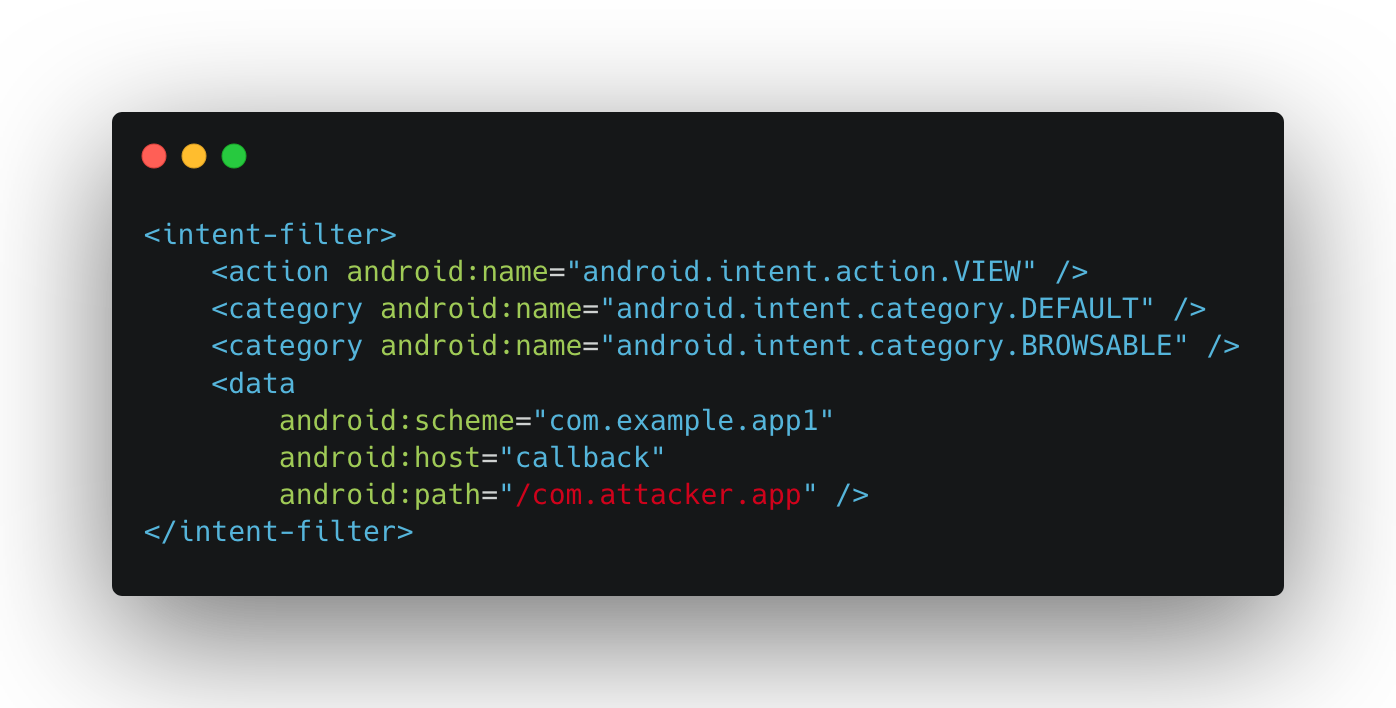
The redirect URI doesn’t match the host app’s own URL allow-list, so it falls through to the startActivity(…) branch. An implicit VIEW intent goes out to the OS, scheme-resolution kicks in, and whichever app’s intent-filter is the more specific match for com.example.app1://callback/com.attacker.app wins. The rogue app’s manifest:
Path-specific filter, no chooser dialog: the code is now in the rogue app’s process. One POST to /token later and the attacker has an access token (and refresh token) scoped to the legitimate Android client.
End-to-end:
Cross-Platform client_id / Scheme Acceptance
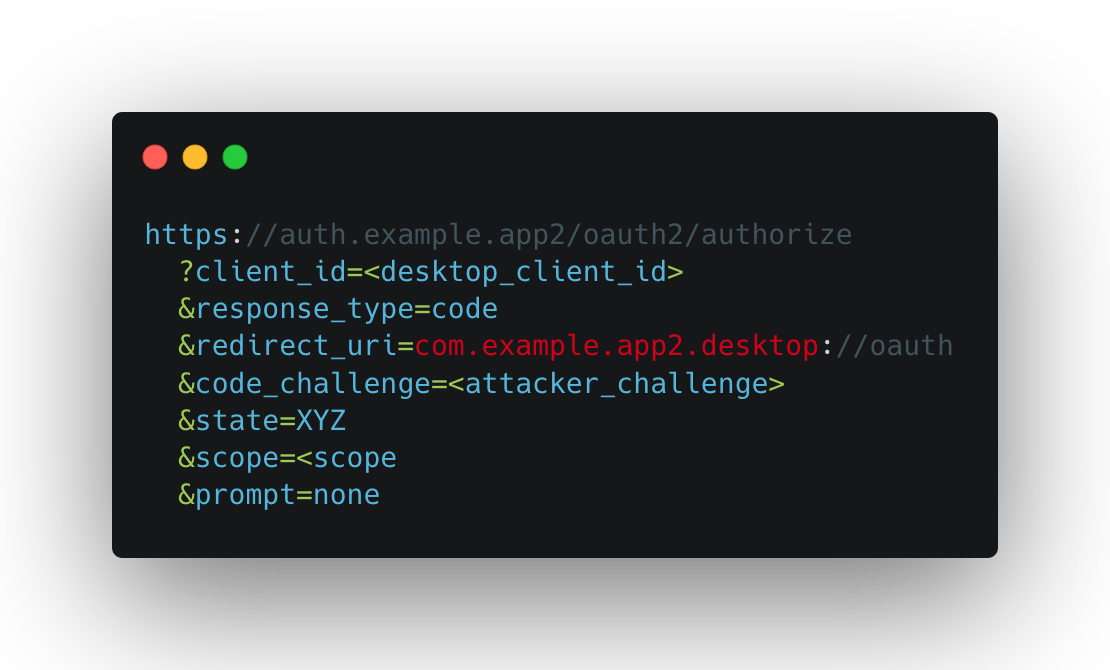
The vendor ships per-platform clients — Android, iOS, and at least one desktop OS — each registered with its own client_id and its own private-use redirect-URI scheme. The Android client is configured fine. The authorization server, on the other hand, doesn’t care which client requests it: it’ll issue a code for any of those client_ids as long as the request’s redirect_uri matches what that client registered, regardless of which device the request originated from. No User-Agent check, no client-to-platform binding.
The attacker’s idea is to target the desktop client from Android. The legitimate Android app doesn’t register an intent-filter for the desktop scheme (why would it?), so the rogue app can claim it uncontested — and Android, faced with exactly one handler for a custom scheme, delivers without a chooser.
The URL the rogue app opens in the default browser (or through Chrome Custom Tabs):
And the intent-filter the rogue app declares to catch the redirect — the same desktop-only scheme, claimed uncontested on this device:
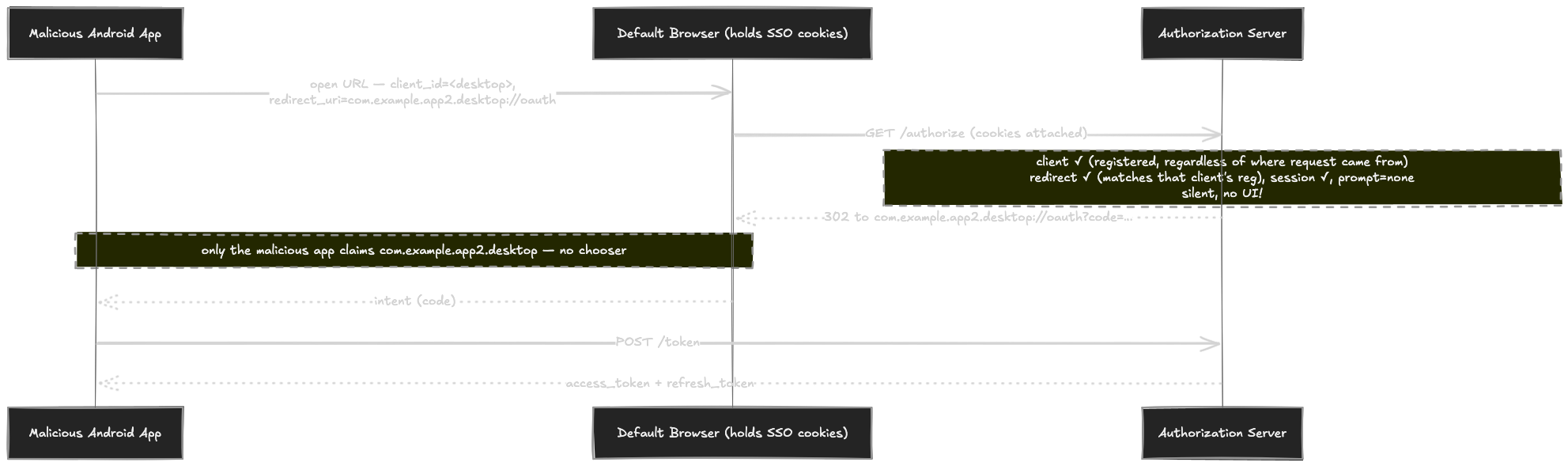
When the browser hits /authorize, the victim’s SSO cookie comes along — it was deposited during the legitimate Android sign-in, which lives in the very same default-browser jar. prompt=none tells the AS to skip every piece of UI: no login screen, no consent dialog, not even a “Continue” button. The AS validates (client ✓, redirect ✓, session ✓) and 302s straight to com.example.app2.desktop://oauth?code=…. The OS resolves the scheme, the only claimant is the rogue app, and the code lands in its process before the user notices a tab opened.
End-to-end:
Custom Tabs as the Shared-Cookie Surface
This case is a variation of the previous one with one twist — and the twist is that the Android client did the right thing where most clients get it wrong. RFC 8252
§5 requires native apps to use an external user-agent, and
§6 recommends in-app browser tabs (Chrome Custom Tabs on Android). The client here used Custom Tabs, not an embedded WebView. Good.
The catch is what Custom Tabs do by default: they share the cookie jar with the user’s default browser. So the SSO cookie deposited during the user’s original sign-in stays there for any later authorize request to pick up — including one launched by a rogue app, since any app can open Custom Tabs.
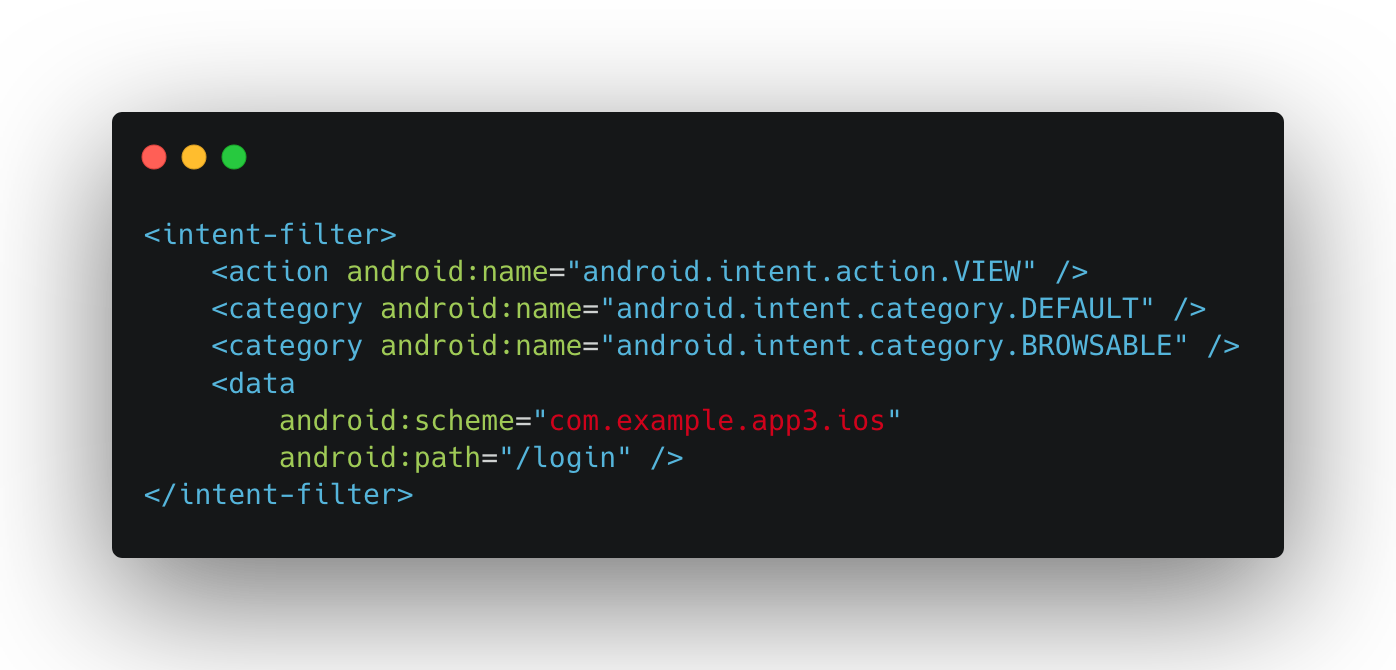
Pair that with the same AS-side flaw as the previous case — accepting redirect URIs registered for a different platform — and the loop closes without any user interaction at all. The rogue app crafts an authorize URL targeting the iOS client this time, with prompt=none to suppress every UI:
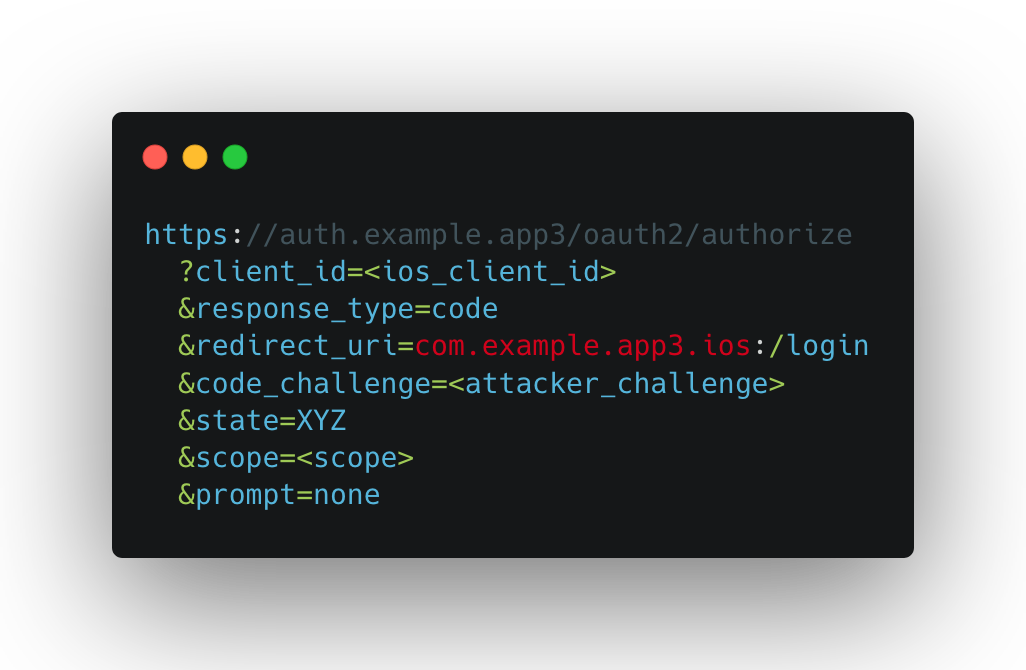
And it claims the iOS-only scheme uncontested on the device — the legitimate Android client never registered a filter for it:
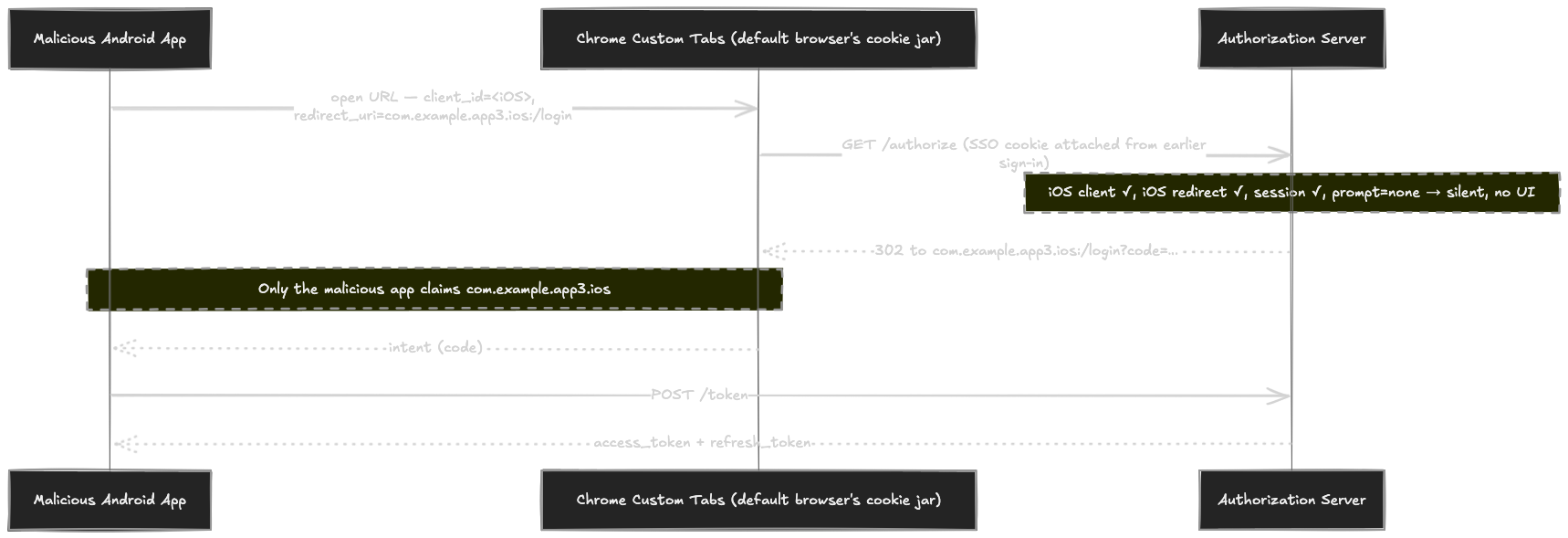
Custom Tabs opens the URL, the SSO cookie comes along, the AS validates (iOS client ✓, iOS redirect ✓, session ✓), prompt=none skips the consent dialog, and the resulting 302 to com.example.app3.ios:/login?code=… is routed by the OS to the only app on the device that claims that scheme — the rogue one. The user sees nothing more than a tab briefly flashing open.
End-to-end:
Conclusion
OAuth 2.0 on mobile is a layered contract — RFC 6749 defines the flow, RFC 8252 adapts it for public clients, and PKCE plugs the obvious code-interception gap — yet a deployment can tick every spec-compliance box and still be exploitable, because the AS validates protocol parameters while the device decides who consumes the redirect, and those two checks never meet. The prompt=none hijack is the clean illustration: registered client_id, registered redirect_uri, valid PKCE, active SSO cookie — every check the AS can perform passes, and the code still lands in the wrong process.
Secure mobile OAuth isn’t a property of the protocol but of the platform binding: Claimed HTTPS redirects (App Links / Universal Links), per-platform scheme isolation, and treating prompt=none as a privileged operation rather than a free silent-refresh primitive are what close the gap.
Broken OAuth is one of the most common mobile vulnerabilities
Djini.AI finds insecure token storage, missing PKCE, and redirect URI misconfigurations — automatically.
Book a Demo


Very interesting bug chain, especially the escalation process by using AppLink as a bridge between the browser and the app…